If you’re looking for an app to check expiration dates, the real question isn’t whether one exists — it’s whether the workflow is fast enough that you’ll actually use it after week two. NRDC research found 73% of consumers misread printed dates as a safety deadline regardless of what they say, so an accurate app has real value — but only if the input cost is low. Fango is built around the assumption that you’ll spend 30 seconds a week, not 30 seconds a product — the same low-friction approach covered in our expiry date tracker guide.
Three input methods dominate the market: barcode scanning, AI receipt scanning, and manual entry. The right one depends on how many items you’re checking and whether they came in on a receipt. Here’s how they compare for the three realistic scenarios — a single item, a weekly shop, and a full pantry sweep.
- Single item — manual entry wins, ~5 seconds
- Weekly shop (15–25 items) — AI receipt scan wins, ~30–60 seconds total
- Existing pantry sweep — manual entry with auto-complete, no method is fast
- Barcode scanning — sounds modern, usually slower and database-dependent
The Three Methods, Honestly Timed
| Method | 1 item | 20 items | Reliability | Notes |
|---|---|---|---|---|
| Manual entry | ~5 s | ~2 min | High | Auto-complete reduces typing |
| AI receipt scan | n/a | ~30–60 s | High | Needs the till receipt |
| Barcode scan | ~6–10 s | ~3–6 min | Medium | Uneven EU database coverage |
| Date-photo OCR | ~10–20 s | ~5–10 min | Low | Print quality defeats it often |
← scroll →
The big jump on row 2 is what makes receipt scanning the right default for a weekly shop. Five-second-per-item methods don’t scale to 25 items. A 30-second batch method does.
Single Item — Manual Entry Wins
You bought one thing off-list, or you’re checking what the chicken in the freezer will be by Friday. Manual entry is genuinely fastest:
-
1
Open app, tap +. The add sheet opens with a search field.
-
2
Type 2–3 letters. Auto-complete suggests the product from a list of over 400 common items per language. One tap fills the name and a default expiry.
-
3
Adjust the date if needed. The default is conservative — milk 3–4 days, raw chicken 1–2 days. Override if your printed date says different.
-
4
Save. Total: under 5 seconds.
Barcode scanning here is slower because you have to find the barcode, hold steady, and wait for recognition — and many fresh items (loose fruit, bakery, deli, butcher) don’t have one at all.
Fango uses AI receipt scanning for the weekly shop and a manual auto-complete field for one-offs. No barcode scanner — because for 20 items, the receipt method is six times faster and works on items without barcodes. No sign-up, fridge data stays on your phone by default.
Download on the App Store Get it on Google PlayFree for a month · No sign-up · iOS and Android
Weekly Shop — AI Receipt Scan Wins by a Mile
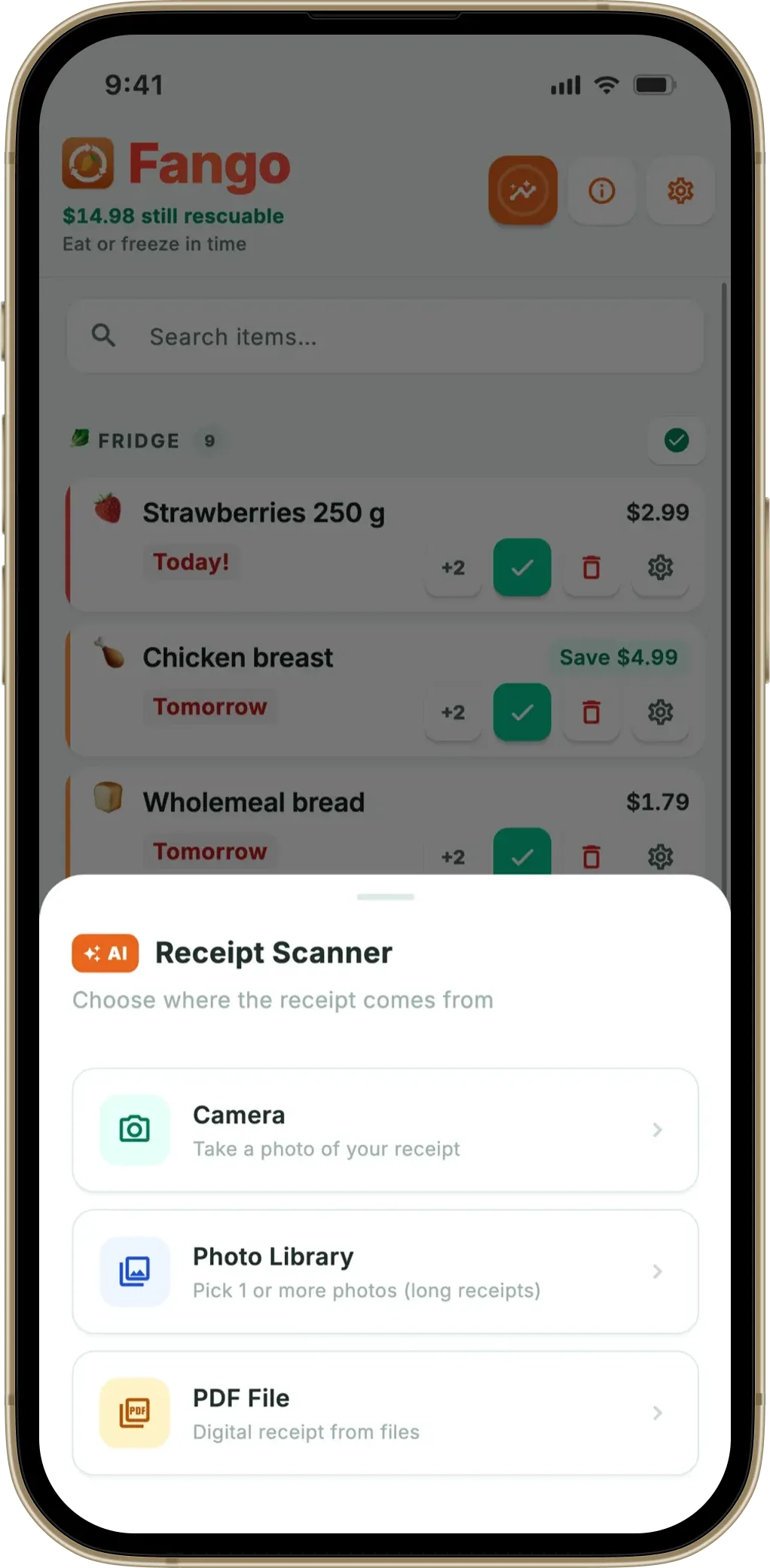
15–25 items on the till receipt, expiry dates spread across the next two weeks. This is what receipt scanning was designed for. Photograph the receipt, the AI reads every line, you accept or adjust the suggested dates, save.
The full breakdown:
- Photograph receipt — 5 seconds
- AI parses items — 3–8 seconds for the typical paper receipt
- Review screen — quick scan, override one or two dates if needed, ~15–30 seconds
- Save to fridge list — instant
Total: 30–60 seconds for a full shop. The same shop via barcode would take 3–6 minutes of standing in the kitchen scanning items one by one — assuming the barcodes are in the database.
Fango’s receipt scanner reads paper receipts, PDF receipts, and screenshots from delivery apps (Wolt, Foodora, Instacart). For more detail see grocery receipt scanner app.
Pantry Sweep — Slow However You Do It
An existing pantry that’s never been logged is the worst-case scenario for any expiry app. You have 50–80 items with printed dates you’d like to capture, no receipt available, and a one-time set-up cost in front of you. Realistic options:
-
1
Don’t try to log everything. Most pantry staples — tinned beans, dry pasta, rice, biscuits — have shelf lives of months to years. They’re not the items that get wasted. Log them when you open them, not before.
-
2
Log only what’s about to expire. Walk the fridge and pantry, pull anything with a date inside the next 14 days, log those manually. Usually 8–15 items. Takes 5 minutes total.
-
3
Start fresh from the next shop. Receipt-scan everything you bring home; gradually the list reflects reality without a one-time data-entry session.
Barcode scanning for a pantry sweep is technically possible but rarely worth it — the items most likely to be wasted (fresh produce, leftovers, bakery) often have no barcode.
Why “Photograph the Printed Date” Is the Worst Method
It sounds like the right answer — point the camera at the small printed date, OCR reads it, done. Three things kill it in practice:
- Print quality — many dates are dot-matrix or thermal, low contrast, faded after a few days in the fridge
- Curved packaging — a date printed on a bottle, tin or pouch curves away from the camera; OCR is built for flat documents
- Ambiguity — “BB 05/06” — is that May 6th or June 5th? The package usually tells you in a tiny key elsewhere, but OCR rarely reads the key
Some apps offer this as a feature; almost no one uses it twice. Reliable apps either skip it or use it as a manual fallback. Best before vs use by date covers the format question itself in more depth, and the expiry date check app looks at the same job from the checking side.
Fango sorts everything by reminder date and colour-codes the urgent items in red. The home screen widget shows what to use next without opening the app.
Download on the App Store Get it on Google PlayFree for a month · No sign-up · iOS and Android

What “Check” Actually Means in Daily Use
After the initial input, the daily check is the part people actually do, and the input method becomes irrelevant. The check is opening the app and looking at the top of the list. The fastest version of that is a home screen widget — no app open at all, just a glance.
This is where reliability matters more than input speed. The app that shows you the right answer at 6pm on a Wednesday — without making you remember to add an item that morning — wins long-term, no matter what method got the data in.
Frequently Asked Questions
Is there a free app to check expiration dates?
Fango is free to try for one month, with full AI receipt scanning and per-product reminder timing during the trial. After that it’s from $2.99/month or $22.99/year. The free month is enough to test the receipt method across several shops before deciding.
Does Fango have a barcode scanner?
No, by design. The data shows AI receipt scanning is 5–10× faster for a weekly shop and works on items without barcodes. Adding a barcode scanner would split user attention without speeding anything up. Manual entry covers single items in 5 seconds.
What about delivery apps like Wolt or HelloFresh?
Fango reads PDF receipts and email screenshots from major delivery services. The same workflow applies — scan once per order, every item lands in the fridge list with a default expiry.
Can the app handle receipts from any country?
Fango supports 34 country formats and 26 currencies for receipts. US/CA receipts are read as MM/DD/YYYY, everywhere else as DD/MM/YYYY. The country setting is in Fango’s settings screen.
What is the fastest way to check expiration dates?
It depends on the number of items. For a single item, manual entry with auto-complete is fastest — about 5 seconds. For a weekly shop of 15–25 items, AI receipt scanning wins by a wide margin: roughly 30–60 seconds for the whole shop, versus several minutes scanning barcodes one by one.
Can an app scan the printed expiry date with the camera?
Some apps offer date-photo OCR, but it is unreliable: printed dates are often low-contrast, on curved packaging, and ambiguous (is “05/06” May or June?). Fango skips it in favour of AI receipt scanning for the weekly shop and quick manual entry for one-off items, which are both faster and more accurate.
