According to WRAP, UK households throw away around 6.4 million tonnes of food every year — worth approximately £17 billion. One of the biggest contributing factors is straightforward: food is bought, pushed to the back of the fridge, and discovered too late. Fango fixes this in one step: photograph your grocery receipt, and AI reads the products and adds them to your fridge with estimated expiry dates — automatically.
Fango recognises products and reminder dates from your grocery receipt automatically. You get a push notification in time in time. No sign-up, your fridge data stays on your device by default.
Download on the App Store Get it on Google PlayFree for a month · No sign-up · iOS and Android
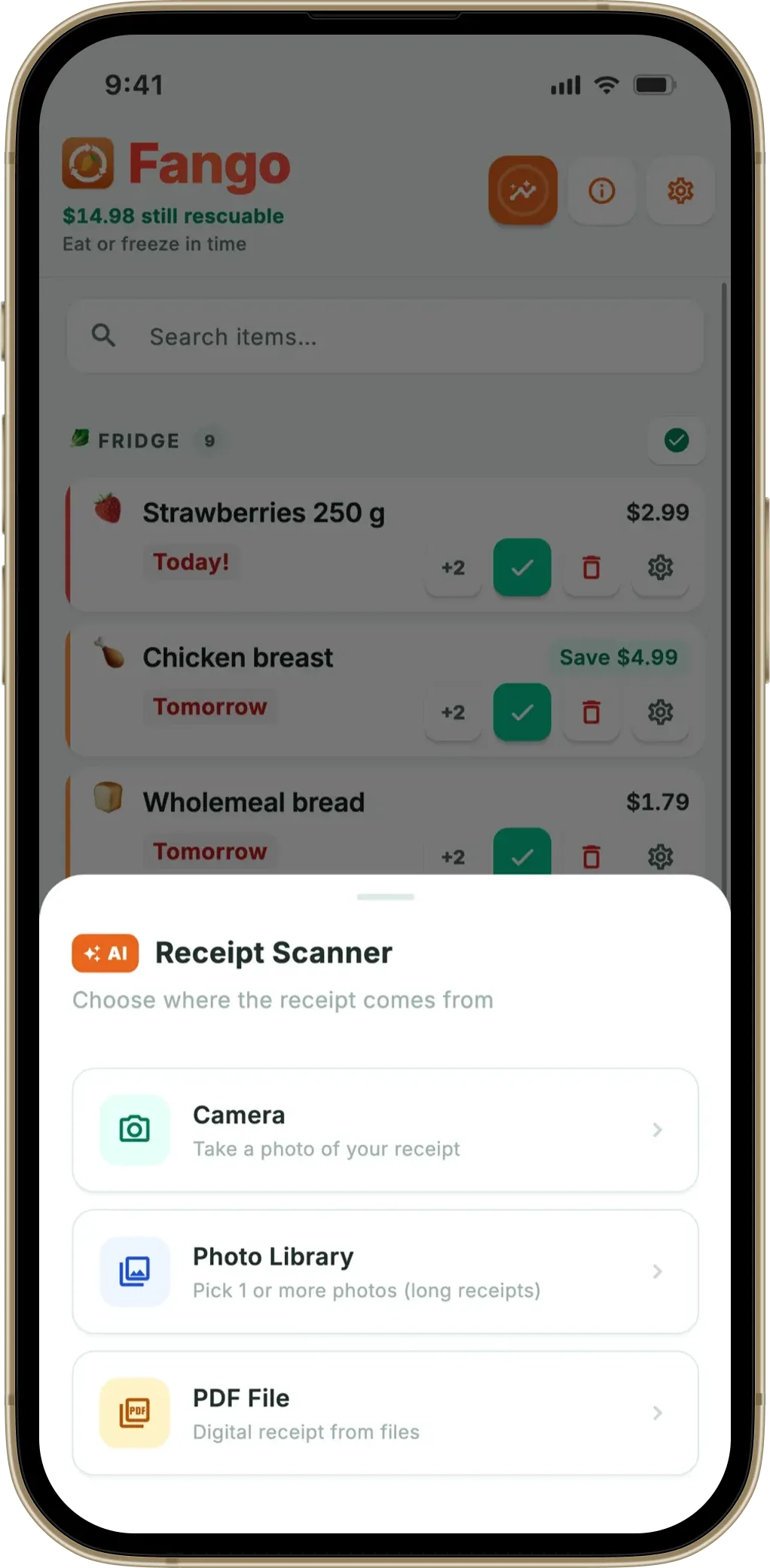
Adding items manually is time-consuming and discouraging — logging twenty purchases one by one takes minutes and quickly loses its appeal. Receipt scanning does it for you in under thirty seconds, and unlike barcode apps it captures loose produce and deli items too — we cover that trade-off in receipt scan vs barcode scan. This article explains how it works and why it’s the most practical way to keep food waste in check. For the bigger picture, see: food waste app overview and fridge tracker app guide.
- Scan your receipt with your phone camera — AI identifies all products automatically
- Expiry dates estimated automatically — no manual entry needed
- Push reminder 1–14 days before expiry — you choose how far ahead
- Your fridge data stays on your device by default — no sign-up, no user account
What is AI receipt scanning?
AI receipt scanning means the app photographs your grocery receipt and analyses it using artificial intelligence. The AI reads the product names, identifies what food you’ve bought, and automatically estimates typical expiry dates based on the product type.
The feature that matters most in any of these apps is the reminder — see what a good expiry date tracker app does differently.
Traditional food-tracking apps require adding every item manually: you type the name, select a category, enter a date. With receipt scanning, an entire shopping trip is added in one go. In practice, scanning a full receipt takes under a minute — and from that point on, Fango tracks everything for you.
How Fango’s grocery receipt scanner works — step by step
-
1
Open Fango and tap “Scan receipt”. You’ll find the scan button on the app’s home screen or in the add menu.
-
2
Take a photo of your grocery receipt. Place the receipt on a flat surface in good lighting. The full receipt doesn’t need to fit in one photo — you can scan it in multiple images if needed.
-
3
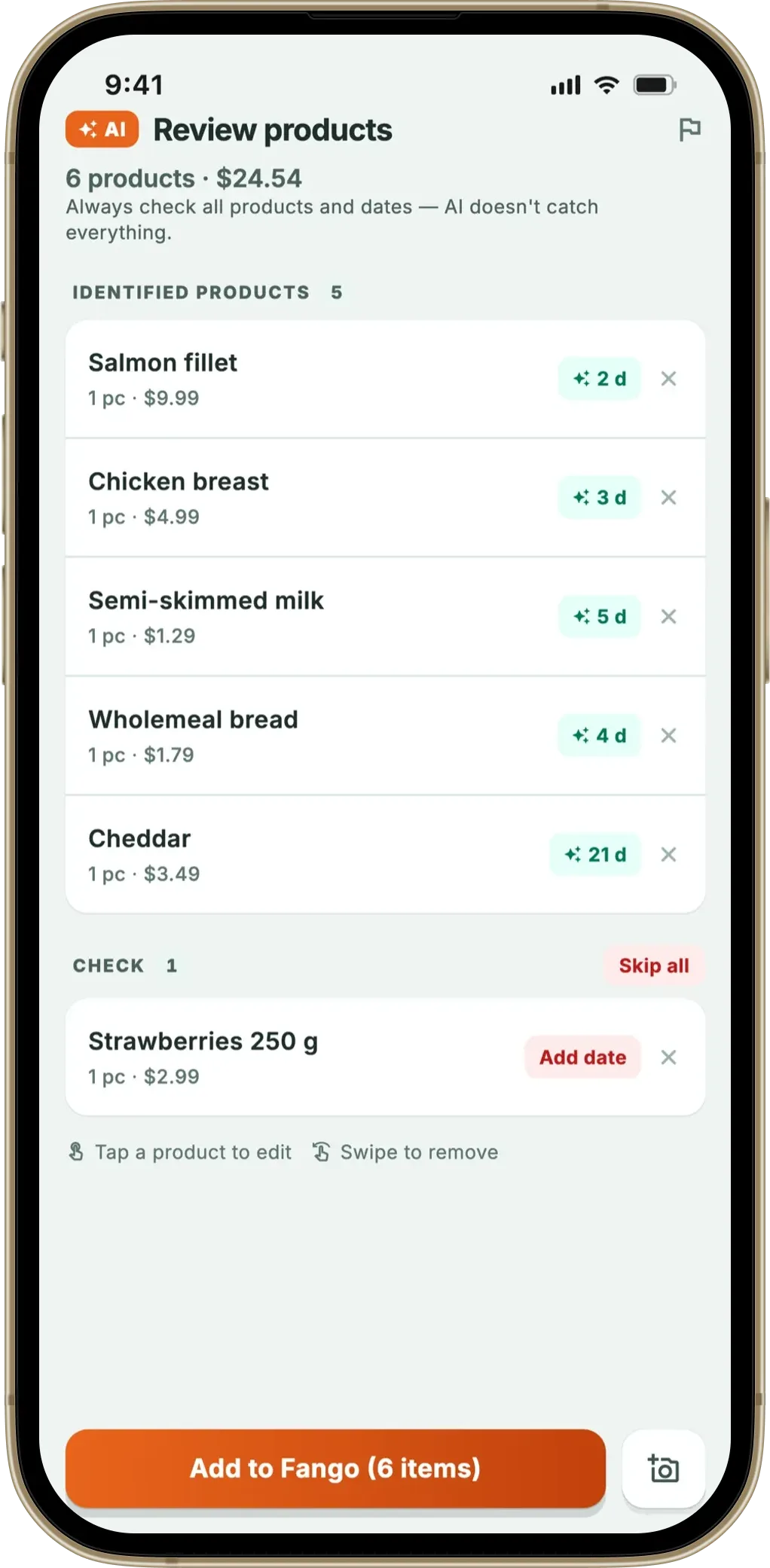
AI analyses the receipt automatically. Within a few seconds, Fango identifies the products and estimates reminder dates based on product type.
-
4
Review and confirm. You see a list of recognised products before saving. You can adjust dates or remove items you don’t want to track.
-
5
Save — everything is added to your fridge at once. You’ll receive a push notification 1–14 days before each product expires — you decide how much advance warning you want.
What does AI recognise on a grocery receipt?
The AI analyses the text on the receipt and matches product names against a database covering thousands of food items and their typical shelf lives. Recognition works best when:
- The receipt is clear and well-lit
- Product names are legible — not folded or heavily crumpled
- The photo is sharp, not blurry
Fango works with receipts from major supermarkets. If a product isn’t recognised, it can be added manually after scanning. The 3-tier review screen makes this easy: confirmed items show as ready, items needing a date check appear separately, and non-food items (cleaning products, toiletries) are filtered out automatically so you don’t have to dismiss them one by one.
For the specifics, see how the AI estimates each expiry date, which stores and receipt formats are supported, and how multiple currencies are detected automatically. You can also scan a PDF receipt from an online order, and the whole scan takes only seconds. Wondering about the privacy side? See is it safe to scan your receipts with an app.
Receipt scanning vs. manual entry
Why is receipt scanning better than adding products by hand? The practical difference is significant:
| Function | Receipt scanning | Manual entry |
|---|---|---|
| Time for 20 items | ~30 seconds | 10–15 minutes |
| Expiry dates | Estimated automatically | Must be entered for each item |
| Waste from missed items | Low | Increases with fatigue |
| Barrier to use | Low — quick post-shopping habit | High — easy to skip or forget |
← scroll →
Tips for better receipt scanning
You’ll get the best results with a few simple habits:
- Scan right after you get home from the shop — the receipt is to hand and you remember what you bought
- Good lighting matters — photograph in natural light or under a lamp, not in shadow
- Keep the receipt flat — smooth out any folds before scanning
- Review the results — adjust dates for items with a specific use-by date printed on the packaging
Why receipt scanning reduces food waste
The most common cause of food waste is simple: we don’t know what’s in the fridge or when it expires. According to WRAP, the average UK household wastes around £1,000 worth of food every year — and UK households collectively throw away £17 billion worth of food annually. Most of it is perfectly edible.
Receipt scanning solves the visibility problem. When all your purchases are in the app with estimated expiry dates, and you receive a push notification before anything is about to expire, the chances of finding forgotten food at the back of the fridge drop significantly. Scan when you get home from shopping — Fango handles the tracking from there. Globally, UNEP reports about a fifth of the food available to consumers is wasted; storing food at the right temperature (the UK Food Standards Agency recommends 0–5°C for fridges) combined with active expiry tracking gives you the longest possible safe window.
The scanned receipts leave something behind: a purchase history that the shopping list uses. It recognises your buying cadence and suggests an item around the point the last one runs out — and old receipts open as cards you can pull individual lines from onto the list instead of typing them again.
Fango recognises products and reminder dates from your grocery receipt automatically. You get a push notification in time in time. No sign-up, your fridge data stays on your device by default.
Download on the App Store Get it on Google PlayFree for a month · No sign-up · iOS and Android
Frequently Asked Questions
How does a grocery receipt scanner app work?
A grocery receipt scanner app photographs your receipt and analyses it using AI. The AI reads the product names, identifies what food you bought, and estimates typical expiry dates based on the product type. In Fango, the receipt is scanned directly through the app’s camera — results are ready within seconds.
Which supermarkets does the receipt scanner support?
Fango works with receipts from major supermarkets. The AI reads product names from the receipt text and matches them against a database of thousands of food items. If a product isn’t recognised automatically, it can be added manually after scanning.
Is my receipt data stored in the cloud?
Fango sends the receipt image (or PDF text) to an AI service (Anthropic Claude, via a Supabase proxy) for product recognition. The image is processed momentarily and not stored on any server. Anthropic does not train on the data. The resulting fridge list is saved locally on your device only — no Fango account, no cloud sync by default.
What app scans grocery receipts and tracks food expiry dates?
Fango is a food waste app that identifies products and reminder dates directly from your grocery receipt. No sign-up required — download from the App Store for iOS. Android.
Is Fango’s receipt scanning free?
Fango is free to download and free to try for one month. After the trial it’s from $2.99/month or $22.99/year.
