Picking the best app for pantry inventory comes down to one question: which one will you still be using in three months? The single biggest predictor isn’t price, design, or features — it’s how long it takes to add a weekly shop. Apps that take five minutes are abandoned. Apps that take 30 seconds become habits. Fango is built around AI receipt scanning specifically because that’s the only input method that survives daily use — the same reason a pantry tracker app lives or dies on how fast it is to update.
Install Fango, open the app, scan a receipt. If it doesn’t add your shop in under a minute, you’ve learned something useful and uninstalled costs nothing. No sign-up, no card details, no demo to dismiss.
Download on the App Store Get it on Google PlayFree for a month · No sign-up · iOS and Android
This guide focuses on what to look for, what to avoid, and how to test an app before committing — rather than ranking specific products. (For a side-by-side comparison of named apps, see best pantry inventory app 2026.)
- Speed of input matters more than anything else — receipt scanning beats barcode beats manual
- Avoid apps that require accounts unless you specifically want family sharing
- Push notifications are the entire point — test them in the first day
- Free tiers exist but check the limits match a real weekly shop
The Five Features That Actually Matter
-
1
Input method. Receipt scanning (a photo of the till receipt → AI adds everything) is the fastest. Barcode scanning is reliable but slow at 25 items. Manual typing is the worst — most apps that rely on it lose users by week two. The single feature most likely to make or break the habit.
-
2
Per-product expiry alerts. A “remind me 3 days before everything expires” rule doesn’t fit reality. Chicken needs 1 day notice. Tinned tomatoes need 14 days. The app should let you set the lead time per product. If it only offers a single global setting, you’ll either ignore everything or be alerted constantly.
-
3
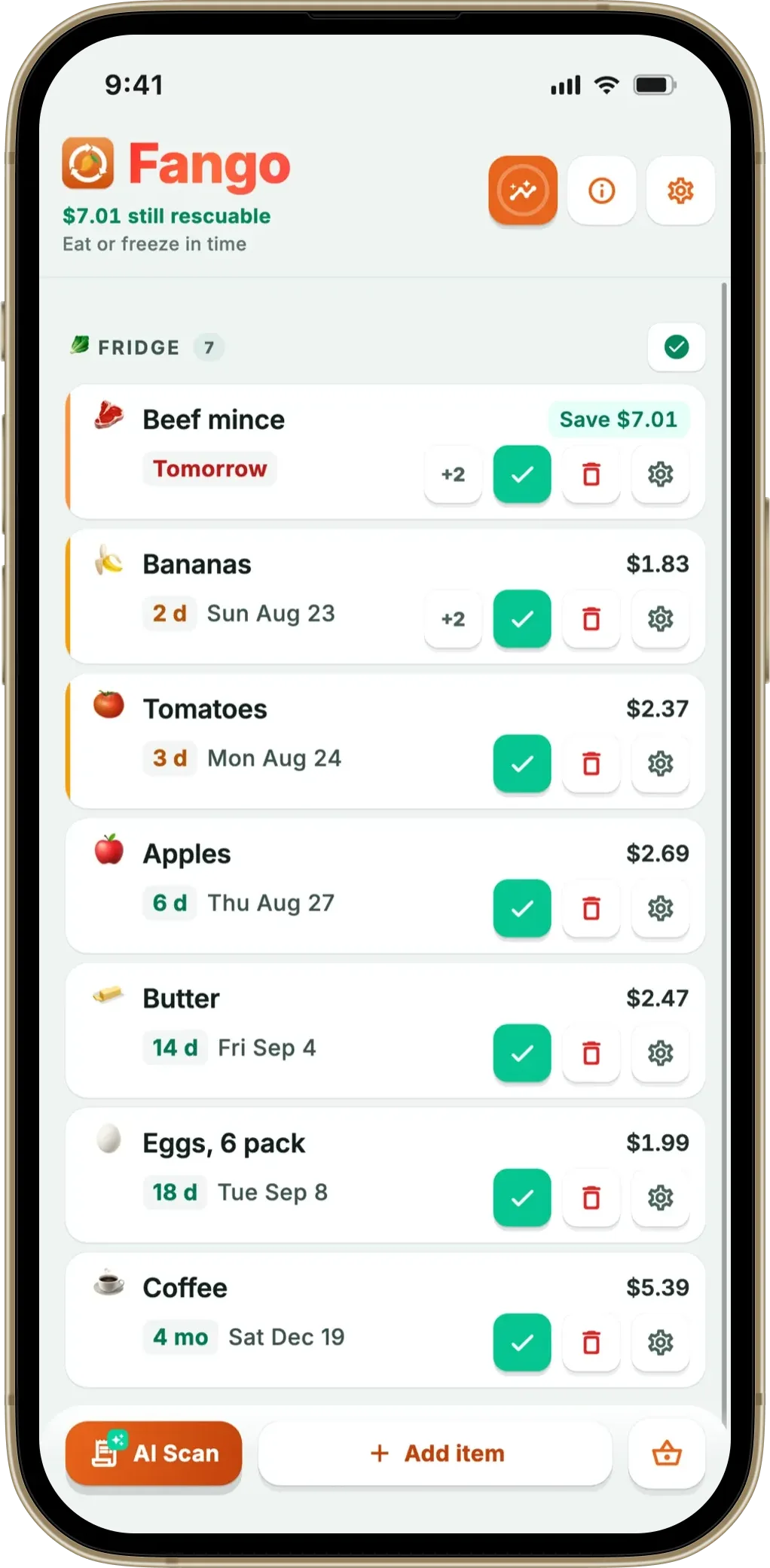
Single list across fridge, freezer, and pantry. Apps that force you to choose a section before adding an item add friction every single time. The most useful layout is one list sorted by what needs using first — frozen items, chilled items, and dry goods all visible at a glance.
-
4
No required account. Account-required apps store your data in a cloud database. They can be hacked, sold, or deprecated. They also make you fill out an onboarding flow before you’ve even tested the core feature. Local-only apps work the moment you install them.
-
5
Offline-capable. You’ll often check the inventory mid-shop in a basement-level supermarket. The list and notifications must work without a signal — only AI receipt scanning typically needs a connection.
Free vs Paid — How to Read the Tier
Most pantry apps follow one of three pricing models. Each has trade-offs:
| Model | What you get free | Trade-off |
|---|---|---|
| Freemium with item cap | Basic features for a small inventory | Caps force a paid upgrade for typical households |
| Freemium with feature cap | Unlimited items but no notifications or no scanning | Free tier is missing the actual reason to use the app |
| Free + ads / data resale | Everything, but with ads or data shared with third parties | Pantry data is sensitive — you’re paying with privacy |
← scroll →
For a small household with a few staples, a free tier with item caps usually works. For a typical 4-person household, paid tiers in the £2.99–£2.99/month range are realistic, and the food savings cover the cost many times over — WRAP estimates the average UK family of four wastes £1,000 of food per year, so even a 10% reduction is £100.
How to Test an App in Five Minutes
-
1
Add five items the way the app wants you to add them. If it took more than 90 seconds, the daily-use experience will feel painful. If you got annoyed, that’s data — uninstall.
-
2
Set one of those items to expire tomorrow. Wait. Did the notification fire on time? Did it look useful or was it buried in a bundle?
-
3
Mark one item as used. How many taps did it take? An app that takes more than two taps for “used” or “wasted” creates friction at exactly the wrong moment.
-
4
Open the app on the home screen widget if it has one. The fastest check (“do I need to use anything tonight?”) is the widget — no app launch required. Apps without a widget rely on you remembering to open them.
-
5
Check what data the app stores in the cloud. Privacy policy → look for “we collect” lists. The shorter the better. Local-only apps don’t have this concern.
Common Pitfalls When Choosing
- Picking based on screenshots — pretty UI doesn’t compensate for slow input
- Choosing a “free” app that requires a cloud account — you’re paying with data
- Picking an app with no expiry notifications — without these, you’re just typing into a list nobody reads
- Going for “all features” — apps with too many options usually compromise on the important ones
- Locking yourself in by typing 50 items into an app you haven’t tested for a week
Install Fango, open the app, scan a receipt. If it doesn’t add your shop in under a minute, you’ve learned something useful and uninstalled costs nothing. No sign-up, no card details, no demo to dismiss.
Download on the App Store Get it on Google PlayFree for a month · No sign-up · iOS and Android
How Fango Approaches the Same Decisions
For full transparency, here’s how Fango handles each of the five features above:
-
1
Input. AI receipt scanning is the primary input. Built-in suggestion list as a fallback. Manual typing supported. Barcode scanning intentionally not included — receipt scanning makes it redundant for groceries.
-
2
Alerts. Per-product timing — set 1 day for raw chicken, 14 days for tins, “no reminder” for items where you don’t want one. Defaults applied per product category.
-
3
Single list. Fridge, freezer, and pantry items all in one view, sorted by reminder date. The thing about to expire is at the top.
-
4
Account. None. Install, open, use. Data stays on the device by default.
-
5
Offline. List, notifications, manual add — all offline. Only receipt scanning needs a connection (the AI runs server-side).
If those choices match what you’d want, Fango is worth a five-minute test. If you want barcode scanning or family sharing, look at other pantry inventory apps. For broader expiry-tracking advice, see food storage tips.
An inventory is also what makes a shopping list accurate. Fango joins the two halves: the shopping list reads the pantry and offers up what is genuinely about to run out, so you stop writing the list from memory in front of an open cupboard.
Frequently Asked Questions
How much should a pantry app cost?
from £2.99–£2.99/month or £15–£25/year is the typical range for paid tiers. Anything significantly above that is usually a business inventory app being marketed at households.
Are pantry apps the same as fridge apps?
Some are scoped to one or the other. The most useful apps treat fridge, freezer, and pantry as one inventory because food moves between them — see kitchen inventory app for the broader category.
What’s the most overrated feature?
Recipe suggestions from inventory. They look good in screenshots but rarely produce meals you’d actually make. The basic functions — add fast, alert reliably, mark used — matter much more.
Will a pantry app help with food waste?
Yes, measurably — but only if you actually use it. UNEP estimates that a fifth of the food available to consumers globally is wasted, with households the largest contributor. The visibility a pantry app provides is the main mechanism for cutting that waste at home.
