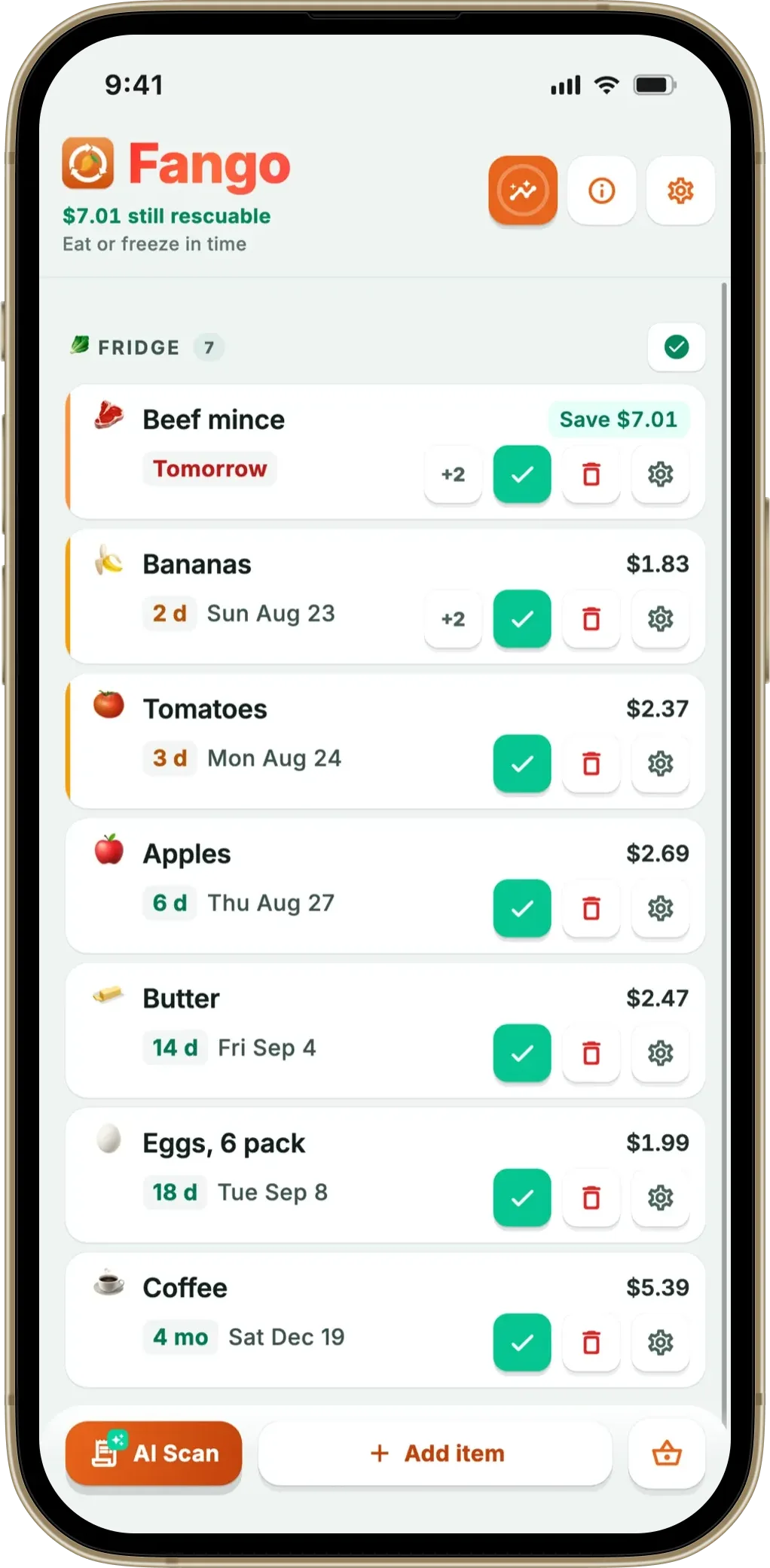
The “best pantry inventory app” depends entirely on whether you’ll actually use it after the first week. Most pantry apps fail at the same hurdle: data entry. If logging a weekly shop takes five minutes of typing, the habit dies fast. The apps that survive long-term either auto-populate from receipts (the easiest path), or pair down to such a simple flow that adding items takes seconds. Fango takes the receipt-scanning approach — AI reads your supermarket till receipt and adds every food product automatically.
Below: a four-app comparison covering input speed, notifications, privacy, and free-tier limits — and an honest “best for whom” guide at the end.
- Fango — best for receipt scanning, no-account use, fridge+freezer+pantry in one list
- Pantry Check — best for barcode-only workflow, simple UI
- Sortly — best for very visual inventories, paid focus on small businesses
- NoWaste — best free option if you don’t mind a required cloud account
The Four Apps in 30 Seconds
Tracks fridge, freezer, and pantry in a single list sorted by reminder date. AI scans your supermarket receipt and adds the whole shop in around 30 seconds. Push notifications 1–14 days before expiry, configurable per product. No account needed; data stays on the device by default.
- AI receipt scanning (34 countries supported)
- No sign-up — fully local data
- Per-product notification timing
- Home-screen widget (iOS and Android)
- Household sharing: the same view for up to four people, one subscription
- Subscription after the free trial (from $2.99/mo)
Pantry-focused inventory app built around barcode scanning. Add items by pointing the camera at each barcode in turn — fine for a few items at a time, slow for a full shop. Includes a recipe suggester based on what’s in the pantry.
- Cross-platform iOS + Android
- Recipe suggestions from inventory
- Barcode-based input is precise
- Barcode-by-barcode is slow for weekly shops
- No receipt scanning
- No EU receipt support
General-purpose inventory app — pantry is one use case, but the app is built primarily for small businesses tracking equipment. Photos for each item, custom fields, and tags. Free tier limited to ~100 items; paid tiers are designed for company use.
- Very flexible field structure
- Photo-per-item works for visual people
- Cross-platform
- Designed for businesses, not households
- No food-category expiry defaults
- Manual entry only — no receipt scanning
Free pantry and fridge tracker with cloud sync between household members. Requires account creation. Manual entry plus barcode lookup. Receipt scanning has been advertised but reviews report inconsistent results.
- Free, no paid tier
- Family-shared inventory
- Cross-platform
- Account required (cloud-stored)
- Receipt scanner reportedly unreliable
- Slower notification delivery in some reviews
Feature Comparison
| Feature | Fango | Pantry Check | Sortly | NoWaste |
|---|---|---|---|---|
| AI receipt scanning | ✓ | ✗ | ✗ | Partial |
| Barcode scanning | ✗ | ✓ | ✓ | ✓ |
| No account required | ✓ | ✓ | ✗ | ✗ |
| Local-only data | ✓ | Partial | ✗ | ✗ |
| Per-product expiry alerts | ✓ | ✓ | Limited | ✓ |
| Fridge + Freezer + Pantry in one list | ✓ | Pantry only | Generic | ✓ |
| Home screen widget | ✓ | ✗ | ✗ | ✗ |
| iOS / Android | Both | Both | Both | Both |
| Free tier | 1-month free trial | Limited items | ~100 items | Unlimited |
| Paid price | from $2.99/mo · $22.99/yr | ~£3/mo | From £24/mo | Free |
← scroll →
Fango is free to try for one month with full access to every feature. If the scan workflow doesn’t suit you, you’ll know in five minutes — most apps make you commit before you see the difference. No sign-up required.
Download on the App Store Get it on Google PlayFree for a month · No sign-up · iOS and Android
Best for Whom
What Almost Always Decides It
Three things determine whether a pantry inventory app earns a permanent spot on your phone:
-
1
Time per shop. Anything over 60 seconds to log a weekly shop dies. Receipt scanning gets you under 60 seconds. Barcode-by-barcode does not.
-
2
Notification reliability. The whole point is to be reminded in time. Apps that batch notifications, miss them, or require you to open the app to “check” defeat the purpose.
-
3
Account requirement. Apps that gate basic functionality behind sign-up have measurably lower retention. You’re more likely to use a tool that opens to a usable screen on first launch.
If you want to compare more broadly across food-tracking categories, see best food expiry tracker app iPhone 2026 or the related fridge tracker app overview. Coming from a barcode pantry app? See the best FoodShiner alternatives.
Why Most Pantry Inventory Apps Get Abandoned
The graveyard of pantry apps has one common cause of death: manual entry. An app that asks you to type in every product, pick a category, and set a date for each one is asking for several minutes of admin after every shop. People do it enthusiastically for a week, then once, then never — and an inventory that is half-updated is worse than none, because you stop trusting it. This is the single biggest factor separating an app you still use in month three from one buried in a folder.
The fix is to remove the data-entry tax entirely. A grocery receipt scanner reads the whole shop in one photo, so keeping the inventory current costs about thirty seconds a week rather than ten minutes. Pair that with realistic default dates — most staples carry a forgiving best-before date — and the list stays accurate without becoming a chore. A good pantry app is really an expiry date tracker with a reminder that nudges you before anything is wasted.
An inventory earns its keep when it changes what you buy. Fango’s shopping list reads that inventory: it suggests the items about to run out, says nothing about what is already on the shelf, and sorts itself into supermarket aisles before you leave.
Pantry Management App or Pantry Inventory App — What’s the Difference?
Search for a pantry management app and you get the same four names as for pantry inventory app, and for good reason: inventory is the list, management is what you do with it. An app that only holds the list is a spreadsheet with an icon. Management means the list changes your behaviour — it tells you what to use before it goes off, it stops you buying a third jar of cumin, and it shows you what the forgotten items cost. In practice that comes down to three functions sitting on top of the inventory: reminders that arrive before the date, a shopping list that reads the inventory, and a running total of what you saved by using things in time. Fango does all three from the same list. Of the other three, Sortly is an inventory tool first — it was built for businesses counting equipment — and Pantry Check adds recipe suggestions rather than money tracking, so if “management” is what you are after, check for those three functions before anything else.
Kitchen Inventory App: One List for Fridge, Freezer and Cupboard
A kitchen inventory app or food inventory app is what people search for when they want the whole kitchen covered, not just the dry-goods shelf. The trap here is apps that split the kitchen into separate sections you have to maintain one by one. Fango keeps a single list and lets you filter it by where things live — fridge, freezer or pantry — so a receipt is scanned once and each product lands in the right place. Frozen and dry goods automatically get a longer shelf life and earlier, more relaxed reminders (a month out, then two weeks, then one), while fresh produce is measured in days. If your main worry is the fridge specifically, the fridge tracker app guide covers that angle in more depth.
Is There a Free Pantry Inventory App?
Yes, with trade-offs. NoWaste is free with no paid tier and is the honest answer if “free forever” is the requirement — accept manual or barcode entry and an account. Pantry Check is freemium and Sortly’s free tier stops at around a hundred items. Fango is free to use for a month with everything switched on, including the receipt scan, then continues as a subscription; the reasoning is that a pantry app only pays for itself if you actually keep using it, and receipt scanning is what keeps people using it. Try the free month with your own receipts before deciding — the abandonment risk, as the next section explains, is almost entirely about entry effort.
Frequently Asked Questions
Is there a single best pantry inventory app?
No — it depends on what matters most. For receipt scanning and privacy, Fango. For family sharing on a free tier, NoWaste. For barcode-based workflows, Pantry Check. Most people gravitate to whichever one removes the most friction from data entry.
Do pantry inventory apps actually save money?
Yes — by preventing duplicate buying and reducing food expiry waste. WRAP estimates a UK family wastes £1,000 of food a year. Cutting that by 25% recovers around £250 — most pantry apps pay for themselves within a few months for any household that uses them consistently.
Can I keep using a pantry app if I move countries?
Fango supports receipts from 34 countries and 26 currencies, which makes it the most travel- and move-friendly option of the four. Other apps are typically limited to one or two regions.
What’s the simplest free pantry app to try first?
Fango — install, open, scan a receipt. No account, no setup wizard, no demo data to clear. It’s free to try for one month with full access to every feature, so you can test it properly before deciding whether to keep it.
Do I have to enter my whole pantry to start?
No — and you shouldn’t try. The fastest start is to ignore what’s already in the cupboard and scan your next receipt, letting the list build itself over a week of normal shopping. Add only the existing staples that genuinely spoil. Front-loading a full manual inventory is the main reason people abandon pantry apps in the first place.
