WRAP estimates that UK households waste £1,000 of food a year, and a large share of it is food bought twice or forgotten at the back of a cupboard. A kitchen inventory app fixes both problems by holding a single, always-up-to-date list of everything edible in your home — fridge, freezer, and pantry — sorted by what needs using first. Fango takes the friction out of building that list: scan your supermarket receipt and AI adds every product automatically.
Fridge, freezer, and pantry — sorted by reminder date so the meal you should make tonight is always on top. Scan your receipt, AI does the typing. No sign-up, fridge data stays on your device by default.
Download on the App Store Get it on Google PlayFree for a month · No sign-up · iOS and Android
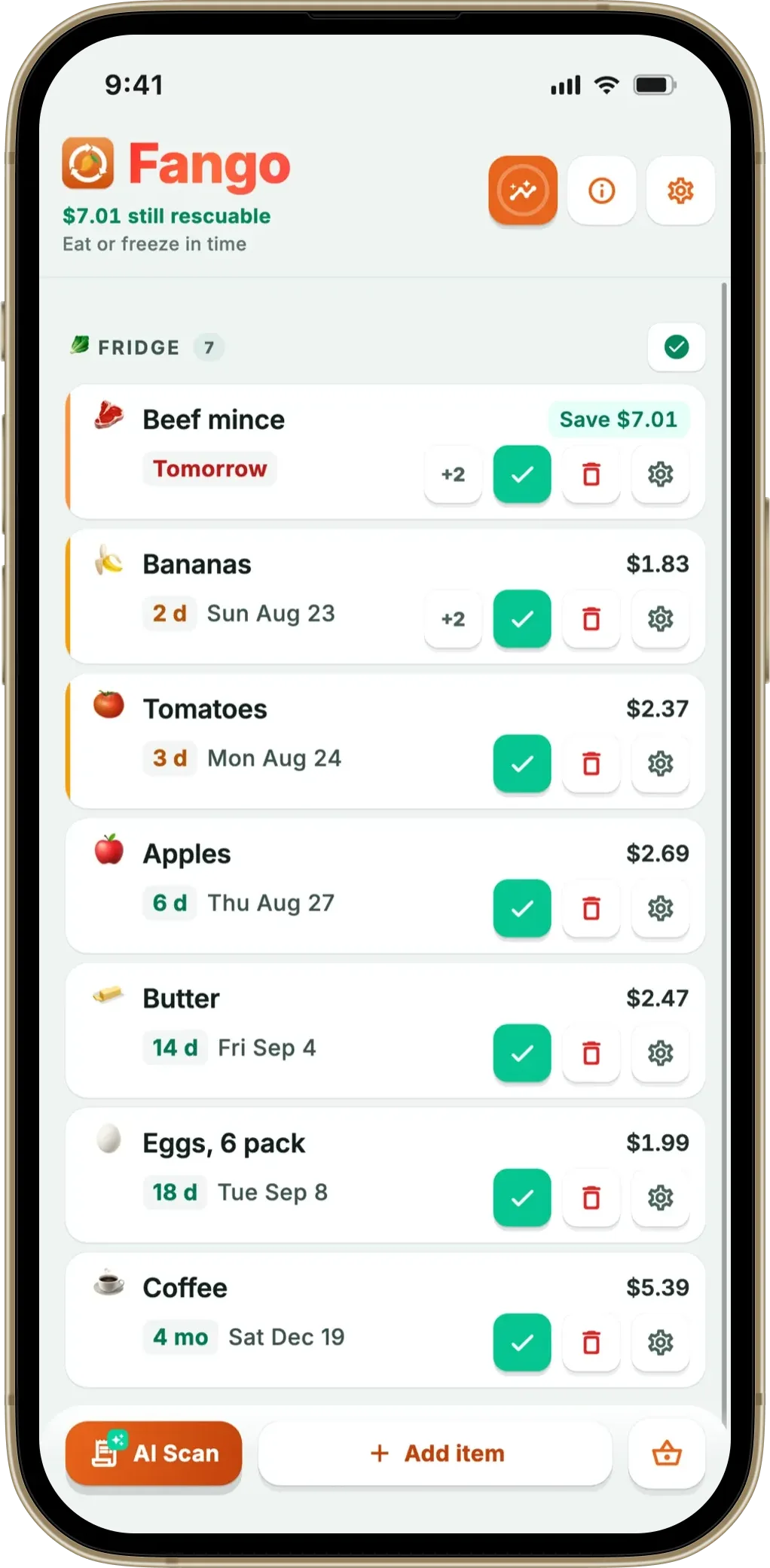
Most “fridge apps” stop at the fridge. Most “pantry apps” stop at the cupboard. A real kitchen inventory app covers all three storage areas in one view, because food doesn’t actually live in tidy categories — pasta sits in the cupboard until it becomes leftovers in the fridge, then maybe portions in the freezer.
- Covers everything edible — fridge, freezer, and pantry items in one list, sorted by reminder date
- AI receipt scanning — a weekly shop is added in around 30 seconds, no typing
- Push notifications 1–14 days before expiry — never lose food at the back of the freezer again
- No sign-up — Fango stores everything on your phone, no account required
Why a Single Kitchen List Beats Three Separate Apps
It’s tempting to use a fridge app for chilled food, a freezer app for frozen, and a pantry app for cupboards. In practice, that fragmentation defeats the purpose. When you’re standing at the supermarket trying to remember whether you need pasta, you don’t want to flip through three apps. You want one screen that answers: do I already have this?
If you want the whole cupboard tracked, not just this item, start with our comparison of the best pantry inventory app options.
A kitchen inventory app puts every edible thing you own on a single sorted list. The cooked chicken from Tuesday sits next to the frozen mince from last weekend, sits next to the half-bag of rice in the cupboard. What’s about to expire is at the top — that’s the meal you make tonight. What’s deep in the freezer is at the bottom, but still searchable. Nothing is invisible.
How Fango Builds the Inventory For You
The reason most kitchen inventory apps fail is data entry. Typing in 25 items after every shop is a job people do twice and then quietly stop. Fango removes that friction:
-
1
Photograph your receipt. After the shop, open Fango, tap the scan button, and take a photo of the till receipt. PDF receipts from online orders also work — the app supports receipts from 34 countries and 26 currencies.
-
2
AI reads, identifies, and dates every product. Claude (Anthropic’s AI model) processes the receipt server-side, identifies food items, filters out cleaning products and toiletries, and assigns a default expiry date based on category — 1–2 days for raw chicken, 3–5 weeks for eggs, months for tins.
-
3
Confirm in under a minute. Each item appears with a suggested expiry date. Accept, adjust, or remove individual products. A weekly shop is typically reviewed and saved in 30–60 seconds.
-
4
Add fridge, freezer, or pantry items manually any time. Tap a suggestion from a built-in product list (over 400 common items per language) or type a name. The same expiry-date logic applies.
-
5
Get a push notification in time. Default lead times are configurable globally and per product — 1 day for raw chicken, 5 days for canned goods, whatever fits your household.
What to Look for in a Kitchen Inventory App
-
1
All three storage areas in one list. If the app forces you to choose between “fridge view” and “pantry view”, you’re going to forget half your inventory exists. A flat list sorted by reminder date is the only layout that survives daily use.
-
2
Receipt scanning, not barcode scanning. Barcode scanning means scanning every item one at a time — a 25-item shop takes 5 minutes. Receipt scanning processes the whole shop in one photo. Look for an app that does the latter.
-
3
Per-product notification timing. Generic “remind me in 3 days” rules don’t work — chicken needs 1 day notice, jam needs 2 weeks. The app should let you adjust the lead time per item, especially for things you bulk-buy and forget.
-
4
Local-only storage, no account. Your grocery data is private. Apps that require cloud accounts ship that data to a third party. A privacy-first kitchen tracker keeps everything on your device.
-
5
Works offline. You’re often checking your inventory in a supermarket basement with poor signal. The list should load and update offline; only receipt scanning needs connectivity.
How an Inventory Changes Shopping Habits
The first month of using a kitchen inventory app is mainly informational — you discover what you actually have. Most households are surprised by the volume of forgotten food: three half-jars of pasta sauce, two bags of frozen peas, a packet of yeast from a baking phase. The second month is where the savings start, because the inventory becomes a reference you check before shopping.
Instead of writing a shopping list from memory, you open the app and see what’s running low. Instead of grabbing pasta because you “probably need it”, you check that you don’t already have three packets. The same shift applies to perishables: when you can see that the cream is about to expire, you build a recipe around it rather than ordering takeaway.
The savings compound. Cutting your grocery bill is a realistic side effect once duplicates and forgotten food stop happening — and that’s the same dial that reduces food waste at home.
Fridge, freezer, and pantry — sorted by reminder date so the meal you should make tonight is always on top. Scan your receipt, AI does the typing. No sign-up, fridge data stays on your device by default.
Download on the App Store Get it on Google PlayFree for a month · No sign-up · iOS and Android
Connecting the Inventory to Storage Knowledge
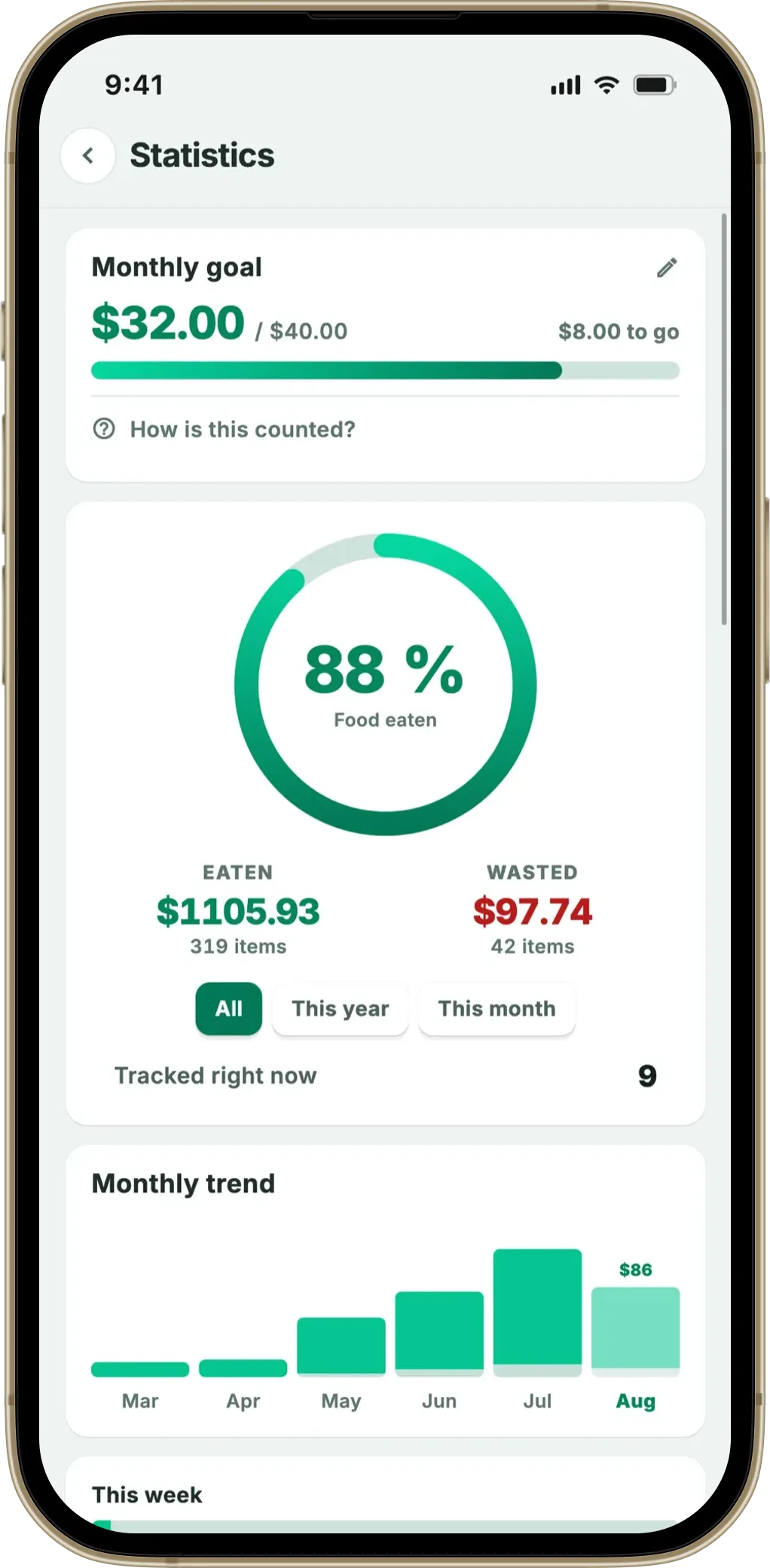
A kitchen inventory tells you what you have. It doesn’t automatically tell you how to keep it. The two work best together: the app holds the live list and dates; a few storage habits make sure those dates are realistic.
Three habits make the inventory work harder for you:
-
1
Keep the fridge between 0–5°C. UK Food Standards Agency recommends this range. A fridge that drifts above 5°C cuts the realistic shelf life of every chilled item by half — your inventory dates will be wrong.
-
2
Use FIFO in the freezer. First in, first out. Freezer items vanish into the back if you don’t actively rotate. A kitchen inventory app helps because it surfaces frozen items by date, not by visibility — but you still need to physically rotate them.
-
3
Decant cupboard staples into clear containers. Half-empty bags of flour, rice, or pasta hide behind newer ones. Glass jars or transparent bins make the inventory easier to verify visually and reduce duplicate buying.
For a deeper guide on storage, see food storage tips.
Frequently Asked Questions
What’s the difference between a kitchen inventory app and a fridge tracker?
A fridge tracker app covers chilled items only. A kitchen inventory app covers fridge, freezer, and pantry in the same list. Fango is the latter — everything edible in your home in a single view, sorted by what needs using first. A closely related concept is the food storage inventory app, which adds FIFO and restock-signal mechanics on top of the same list. If you want to focus on one zone, there are dedicated takes too — an app for freezer inventory for the freezer, and a pantry management app or the best app for pantry inventory for the cupboard.
Can I use a kitchen inventory app without entering data manually?
Yes. Fango’s AI receipt scanner reads a supermarket till receipt and adds every food product automatically — around 30 seconds for a typical weekly shop. You only enter products manually if you bought something off-receipt (a market, a swap, a gift).
Does Fango know how long different foods last?
Yes — each product gets a default expiry date based on category. Raw chicken gets 1–2 days, eggs get 3–5 weeks, dry pasta gets months. Defaults are conservative; you can adjust per item.
Is the inventory shareable with family members?
Yes. Household sharing puts the same inventory on up to four phones, and one subscription covers all of them. Joining works with an 8-character invite code, so no cloud account is needed.
