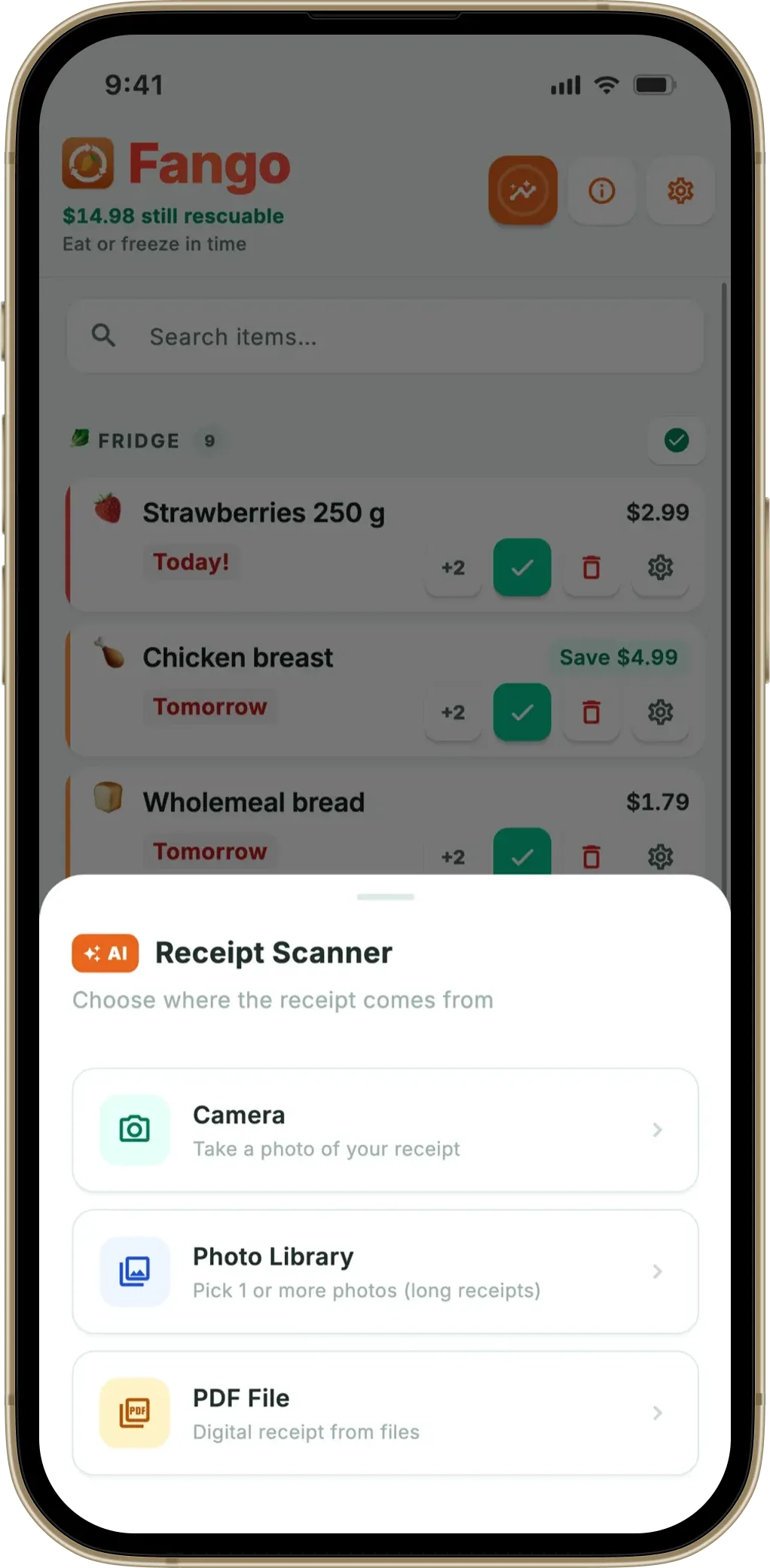
WRAP estimates that UK households throw away £1,000 worth of food every year — most of it because people forget what they have and when it expires. Globally, UNEP reports approximately a fifth of the food available to consumers is wasted. An expiration date app solves this by maintaining a list of everything in your fridge and pantry with expiry dates, and sending push notifications before anything goes bad. Fango takes this a step further: photograph your grocery receipt and AI automatically identifies every food product and adds it to your list — no manual entry needed.
Whether you call it an expiry date app, an expiration date tracker, or simply a food reminder app, the core function is the same: make the invisible visible so nothing gets forgotten. Our full guide to choosing an expiry date tracker goes through the features that decide whether you’re still using the app a month later.
- What it does — tracks food expiration dates and sends alerts in time
- AI receipt scanning — photograph your grocery receipt, AI adds all food products automatically
- Push notifications — configurable 1–14 days before expiry, per product
- No account needed — no sign-up, no cloud account by default, fridge data stays on your device by default
What Does an Expiration Date App Actually Do?
An expiration date app does three things: it stores a list of the food you own, it assigns an expiry date to each item, and it notifies you before that date arrives. That notification is the key difference between an app and a written list — a list is passive, you have to remember to check it. An app is active, it finds you.
Most food waste happens not because food was bad when bought, but because it was put in the fridge or pantry and forgotten. A push notification on your phone — “smoked salmon expires tomorrow” — is the simplest possible intervention to prevent that. Good food storage habits help too, but a notification stops the forgetting at the moment it matters.
How Fango Works as an Expiration Date Tracker
The most common reason people stop using food tracking apps is the effort required to add products. Fango reduces that to near-zero with AI receipt scanning:
-
1
Photograph your grocery receipt. After unpacking your shopping, open Fango and tap the scan button. Take a photo of the till receipt — or upload a PDF from an online grocery order. Receipts from supermarkets in 34 countries are supported.
-
2
AI reads the receipt and identifies food items. Every line is processed by Claude (Anthropic’s AI model). It identifies which items are food, ignores non-food purchases, and assigns a typical expiry date based on each product’s category. Chicken gets 2 days; hard cheese gets 3 weeks; canned tomatoes get 18 months.
-
3
Review in under a minute. Each product is displayed with its suggested expiry date. Accept, adjust, or remove individual items. A full week’s shop typically takes 30–60 seconds to review. Fango then sorts everything by reminder date — what expires soonest is at the top.
-
4
Get notified before expiry. You choose how many days’ warning you want for each product — 1 day for meat and fish, 3 days for dairy, a week for pantry staples. When the time comes, a push notification arrives on your lock screen.
Fango tracks reminder dates for everything in your fridge and pantry and sends a push notification before anything goes bad. Scan your grocery receipt and AI adds all products automatically — no typing, no sign-up, no account.
Download on the App Store Get it on Google PlayFree for a month · No sign-up · iOS and Android
What to Look For in an Expiration Date App
-
1
Automatic product entry. Manually entering every item from a weekly shop is tedious enough that most people quit within two weeks. Look for an app with AI receipt scanning or barcode scanning to reduce friction to almost zero.
-
2
Configurable notification timing. A chicken breast and a block of parmesan have very different urgency windows. The best apps let you set different reminders per product — or at least different categories — rather than a fixed “1 day before expiry” for everything.
-
3
Sorted by reminder date, not by when you added it. The display matters as much as the data. A flat alphabetical list or recent-first list buries the item that expires tomorrow. The first thing you should see when you open the app is what expires soonest.
-
4
Privacy — no account, no forced cloud. Your grocery data is private. What you buy, how often, in what quantities — this is information worth protecting. Prefer an app that stores data locally on your device rather than on a remote server.
Fango sorts everything by reminder date and colour-codes the urgent items in red. The home screen widget shows what to use next without opening the app.
Download on the App Store Get it on Google PlayFree for a month · No sign-up · iOS and Android

Expiration Date App vs. Barcode Scanner App
Some food tracking apps rely on barcode scanning to add products. You scan each item’s barcode and the app looks up the product name. This works, but has practical limits: it requires scanning each item individually, barcodes don’t contain expiry dates (those are printed separately and must be entered manually), and it doesn’t work for loose produce or items without barcodes.
AI receipt scanning — as used in Fango — is faster for a full weekly shop: one photo of the receipt adds everything at once. The AI estimates expiry dates from product categories rather than reading them from the barcode, which means you sometimes need to adjust dates for items like fresh meat where the use-by date varies. But for 90% of a standard grocery shop, the AI estimate is accurate and saves significant time compared to barcode-by-barcode scanning.
The pantry inventory app and fridge tracker app pages cover the broader tracking use case if you’re also tracking dry goods and frozen items.
Frequently Asked Questions
What is the difference between “expiration date” and “best before” date?
A best-before date is a quality indicator — food is often safe to eat after this date, though texture or flavour may have declined. An expiration date (or use-by date in the UK) is a safety deadline — food should not be eaten after this date. See our full guide to best before vs use by for the full breakdown.
Does Fango read the actual expiry date printed on packaging?
Not automatically — AI receipt scanning estimates expiry dates from product categories based on typical shelf life. For items like fresh chicken or fish where the exact date on the pack matters, you can adjust the date during the review step. Alternatively, add items manually and enter the exact date printed on the packaging.
Does Fango work without internet?
Yes — your food list and push notifications work fully offline. Internet is only needed when scanning a receipt with AI. Your fridge data is stored locally on your device.
Is Fango free to try?
Yes — new users get a 1-month free trial with full access to every feature, including unlimited AI receipt scans. After the trial it’s from $2.99/month or $22.99/year.
