An inventory app borrows a word from warehouses and supermarkets and applies it to a fridge that holds maybe 30 things at a time. The borrowed concept is useful — knowing what’s in stock, how much, and what to use first — but the warehouse-grade tooling (SKU codes, barcodes, item locations) is overkill for a household. The right tool tracks just enough to prevent the 1.3 kg of edible food per person that ends up in the bin every week, according to WRAP household figures. Fango is built on that “just enough” idea — receipt scan in, sorted list out, glance to find what’s next.
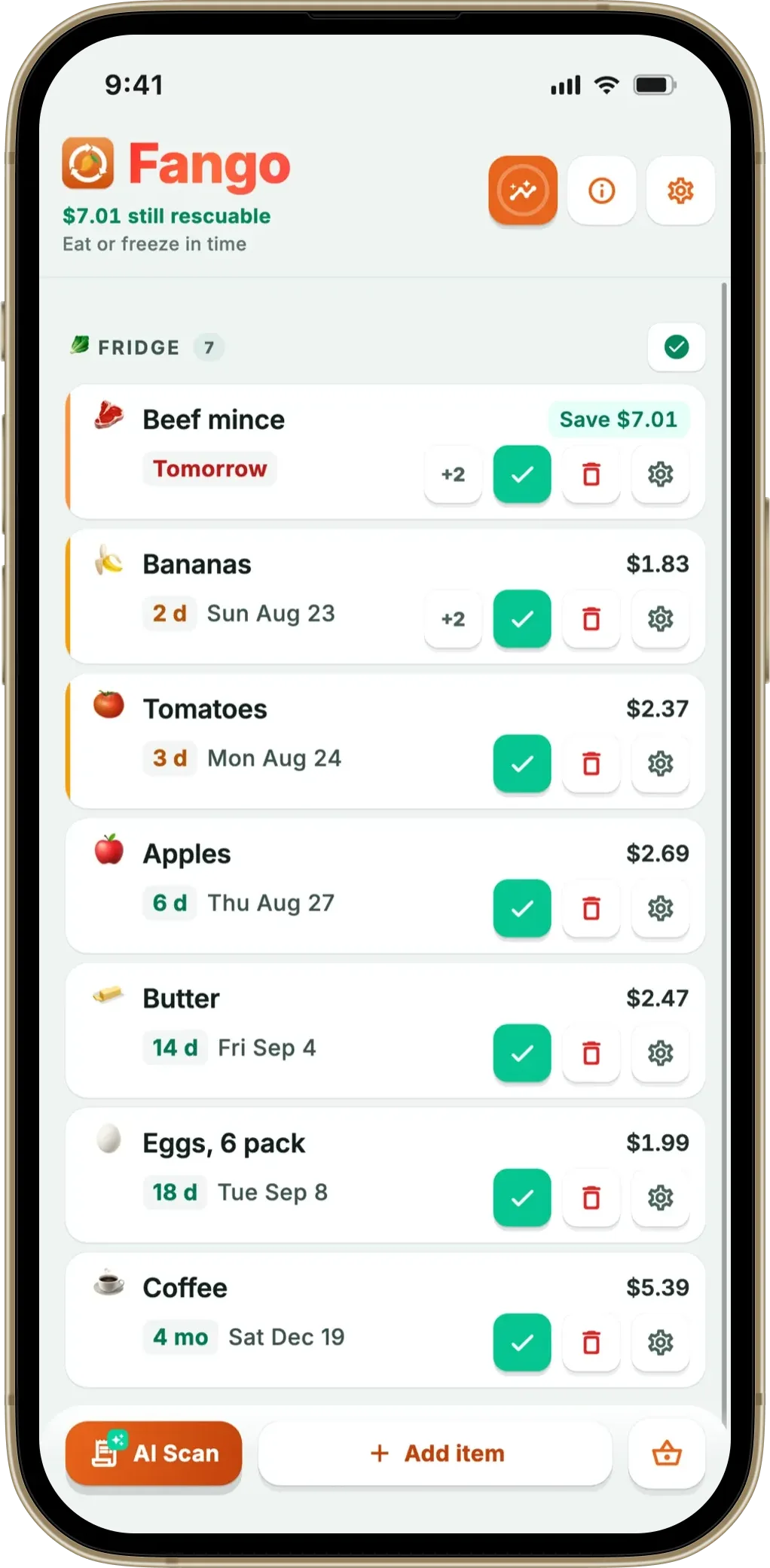
Fango captures a whole weekly shop from one receipt photo — each item lands in the list with quantity, price, and a category-default expiry. The sorted list does the FIFO logic for you. Home screen widget shows the front of the list without opening the app.
Download on the App Store Get it on Google PlayFree for a month · No sign-up · iOS and Android
This article covers what a food storage inventory app actually needs to track, what it can safely ignore, and the real workflow that keeps the inventory accurate without becoming a hobby. If your focus is mostly the chilled shelf, the fridge tracker app overview covers the same ground for the fridge specifically.
- Track count + expiry + price — those three are enough for 99% of household decisions
- Skip locations and categories — sorted-by-expiry list does the same job with less typing
- FIFO is automatic — top of the list is the next to use, no manual ordering
- Restock signal is visual: when the front of the list runs low, shop
What an Inventory Actually Needs
Warehouse software has dozens of fields per item. A household inventory really only needs four:
If you want the whole cupboard tracked, not just this item, start with our comparison of the best pantry inventory app options.
-
1
Product name. “Greek yoghurt 500g” — enough to recognise it on the list. Brand is rarely useful.
-
2
Quantity. 1 pot, 2 packs, 500g. The receipt scanner picks “2 x” or “x3” from the line automatically.
-
3
Expiry date. The thing the app uses to sort. Default from category, override from the printed date.
-
4
Price (optional). Receipt scan provides it automatically; manual items skip it unless you want stats.
Locations (fridge / freezer / pantry / cupboard A / shelf 2) are usually clutter. A sorted-by-expiry list answers “what’s next?” without anyone having to remember which shelf they used last Tuesday.
FIFO Without Thinking About It
The acronym FIFO — First In, First Out — describes the rule that the oldest stock should be used first. In a manual inventory you’d have to remember which pack of mince was opened yesterday vs which was bought today. An expiry-sorted list does the remembering: the older mince, with the closer expiry, sits above the newer one. Cook from the top.
There’s a stricter version that matters more — FEFO, First Expired, First Out. Sometimes the item bought yesterday has a use-by date earlier than the one bought a week ago (e.g., reduced-to-clear stock). The app sorts by expiry date, not purchase order, so FEFO is handled automatically.
The Bulk-Input Problem
Every inventory app has the same Achilles heel: keeping the inventory accurate without turning into a part-time job. Manual entry of 25 items after a Saturday shop is the moment most people stop using these apps. The two reliable answers:
- Receipt scan — photograph the till receipt; AI reads every line; 30–60 seconds for a full shop
- Auto-complete on manual entry — type 2 letters, tap the suggested product, default expiry pre-filled
Both reduce the input cost from minutes to seconds. Barcode scanning sounds modern but is slower at scale — see app to check expiration date for the full speed comparison.
The Real Restock Signal
People expect inventory apps to send a notification when something runs low. In practice the restock signal is visual: open the app, see the list, notice that the front is thinning out and there’s nothing 5+ days out. That’s the cue.
What it looks like in Fango:
- Top 3 items have ≤2 days expiry — use them now or freeze
- Middle of list is thin — last shop was small or used up faster than expected
- Bottom is dominated by pantry items — fresh stock is running out; time to shop
Real-time low-stock notifications mostly create noise. The shape of the list tells you enough.
Stats — Inventory Health Over Time
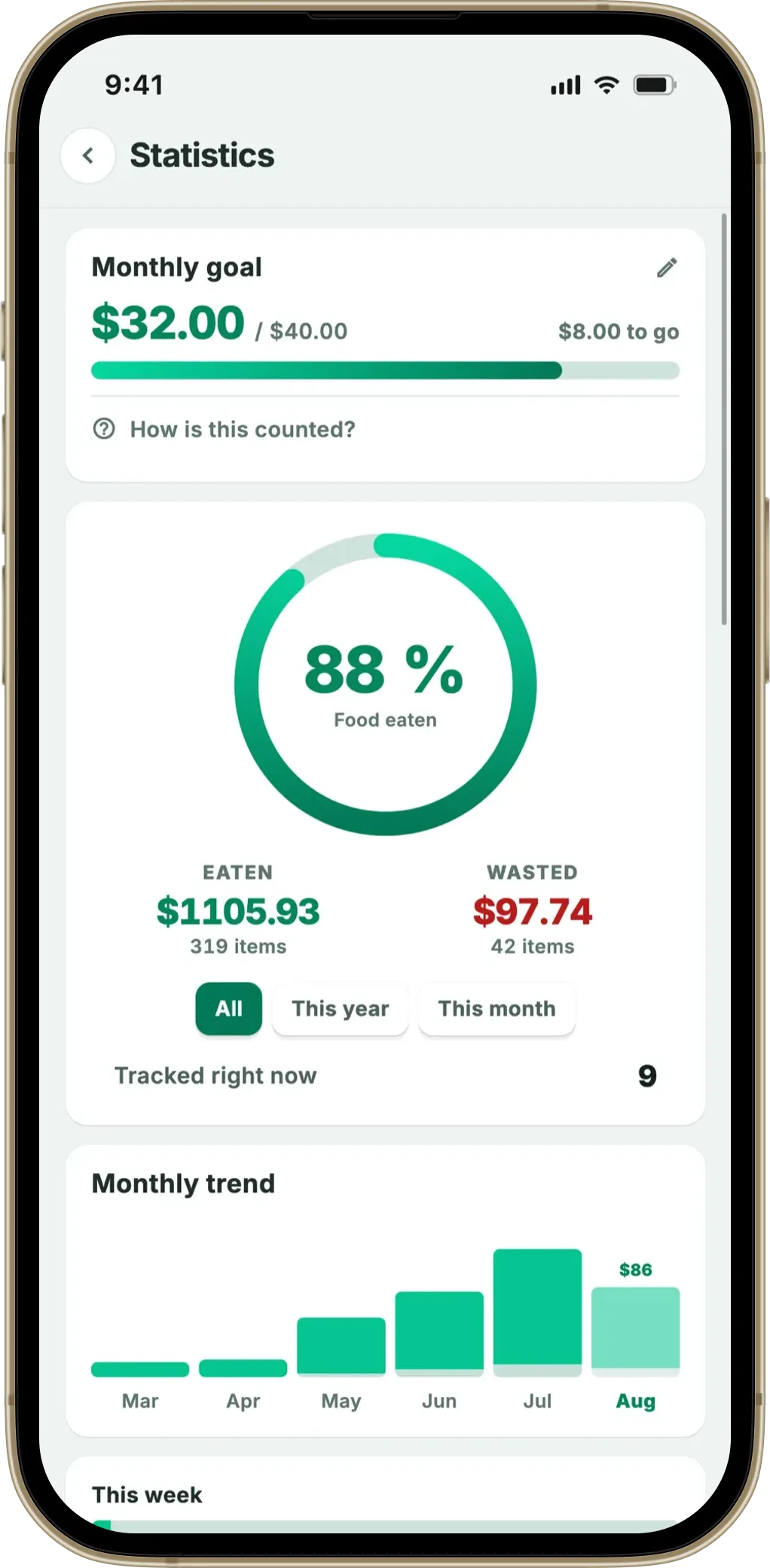
Counts at a single moment aren’t very interesting; counts over time are. Fango’s Stats screen shows the monthly totals that matter for an inventory:
- Items eaten — the good number; how much you actually used
- Items wasted — the target-zero number
- Money saved — receipt prices × items eaten
If you scan receipts and mark items as eaten/wasted consistently, the trends stabilise by month three. For more on what the numbers mean, see expiration date tracking app.
Fango captures a whole weekly shop from one receipt photo — each item lands in the list with quantity, price, and a category-default expiry. The sorted list does the FIFO logic for you. Home screen widget shows the front of the list without opening the app.
Download on the App Store Get it on Google PlayFree for a month · No sign-up · iOS and Android
What an Inventory App Doesn’t Need
Common features that sound useful and rarely earn their place:
- Detailed location tags — fridge shelf 2, freezer drawer 1. You’ll forget where you put it; sorted-by-expiry list answers the question anyway
- Per-item categories — dairy, protein, produce. Fine for analytics, useless for “what’s for dinner”
- Recipe suggestions — the chicken-and-tomatoes-on-day-3 problem is solved by glancing at the top of the list, not by a recommendation engine
- Shared family inventory — needs accounts and a cloud, which conflicts with the privacy-first design; one person handles the receipt scan, others use what’s in the list
Fango skips all of these on purpose. For the comparison with apps that do include them, see NoWaste app alternatives.
Storage and shopping are the same problem from two ends. Fango’s shopping list reads the inventory you already keep and suggests only what is genuinely running low — which is what stops the cupboard accumulating three of the same thing.
Frequently Asked Questions
Is there a free food storage inventory app?
Yes — Fango is free to try for one month, so you can run a realistic inventory on real weekly shops. After the trial it’s from $2.99/month.
Can I track items across multiple appliances?
Yes — Fango uses one sorted list across fridge, freezer and pantry. Items don’t need location tags; the sort by expiry handles the order regardless of where the food actually is.
Does the app handle bulk items (e.g., 6-pack of yoghurt)?
Yes. The receipt scanner picks up multi-packs from the line item (“6 x” or similar). For a 6-pack of yoghurt the quantity is 6; as you eat each pot, you tap to decrement. The remaining items stay on the list until quantity reaches zero.
What about items I don’t get from a supermarket?
Add them manually — type the name, accept the suggested expiry, optionally enter a price. They join the same list and feed the same stats.
