NoWaste is one of the best-known food tracking apps — but it’s not the right fit for everyone. Some people don’t want to hand over an email address just to track their fridge. Others find the receipt scanning unreliable, or simply want something that works entirely offline. Fango was built specifically for users who want no account and no cloud sync by default — but it’s one of several alternatives worth considering. If you came from a receipt-scanning app, our Kitche alternatives comparison covers that side directly.
UNEP estimates that around a fifth of the food available to consumers globally is wasted. WRAP reports UK households alone throw away around 6.4 million tonnes of food annually. A tracking app can make a real difference — but only if it suits how you actually live. Here is a clear comparison of what is available in 2026.
- No account needed → Fango (AI scanner + fridge data stays on device)
- Multi-device sync → Fango (no account) or NoWaste (requires account + subscription)
- Barcode-first approach → Fridgely or BEEP
- Best overall for most households → Fango (free to try, no sign-up, AI receipt scan)
Why people look for NoWaste alternatives
NoWaste has built a loyal user base, and for good reason — it covers the basics well. But the most common reasons people start searching for alternatives are:
If you are choosing between apps, our guide to picking an expiry date tracker lists the features that decide whether you are still using it a month later.
- Registration required. NoWaste requires you to create an account before you can use the app. For many people, handing over an email address for a fridge tracker feels like unnecessary friction — and a privacy concern.
- Cloud dependency. Your food data is stored on NoWaste’s servers. If the service shuts down or you lose access to your account, your data goes with it.
- Subscription for full features. Core functionality is free, but the full experience requires a paid plan.
- Receipt scanning reliability. NoWaste offers receipt scanning, but users frequently report it missing products or requiring significant manual correction.
- Weaker on Android. NoWaste’s Android version sits at around 3.0★ on Google Play, notably below its iOS rating, and a recurring theme in reviews is lost inventories after a sync went wrong — worth knowing if you’re relying on the cloud-sync feature that is otherwise its main strength.
None of these make NoWaste a bad app — but they are real reasons to look for something different. Below is a clear breakdown of the main alternatives.
The alternatives at a glance
| Feature | Fango | NoWaste | Fridgely | BEEP |
|---|---|---|---|---|
| No sign-up required | ✓ | ✗ | ✗ | ✗ |
| Data stays on device | ✓ | ✗ | ✗ | ✗ |
| AI receipt scanning | ✓ | Partial | ✗ | ✗ |
| Barcode scanning | ✗ | ✓ | ✓ | ✓ |
| Push notifications | ✓ | ✓ | ✓ | ✓ |
| Multi-device sync | ✓ in household sharing | ✓ | ✓ | Limited |
| iOS | ✓ | ✓ | ✓ | ✓ |
| Android | ✓ | ✓ | ✓ | ✓ |
| Free tier | ✓ 1-month free trial | Limited | Limited | ✓ |
← scroll →
Fango — best for AI receipt scanning without the typing
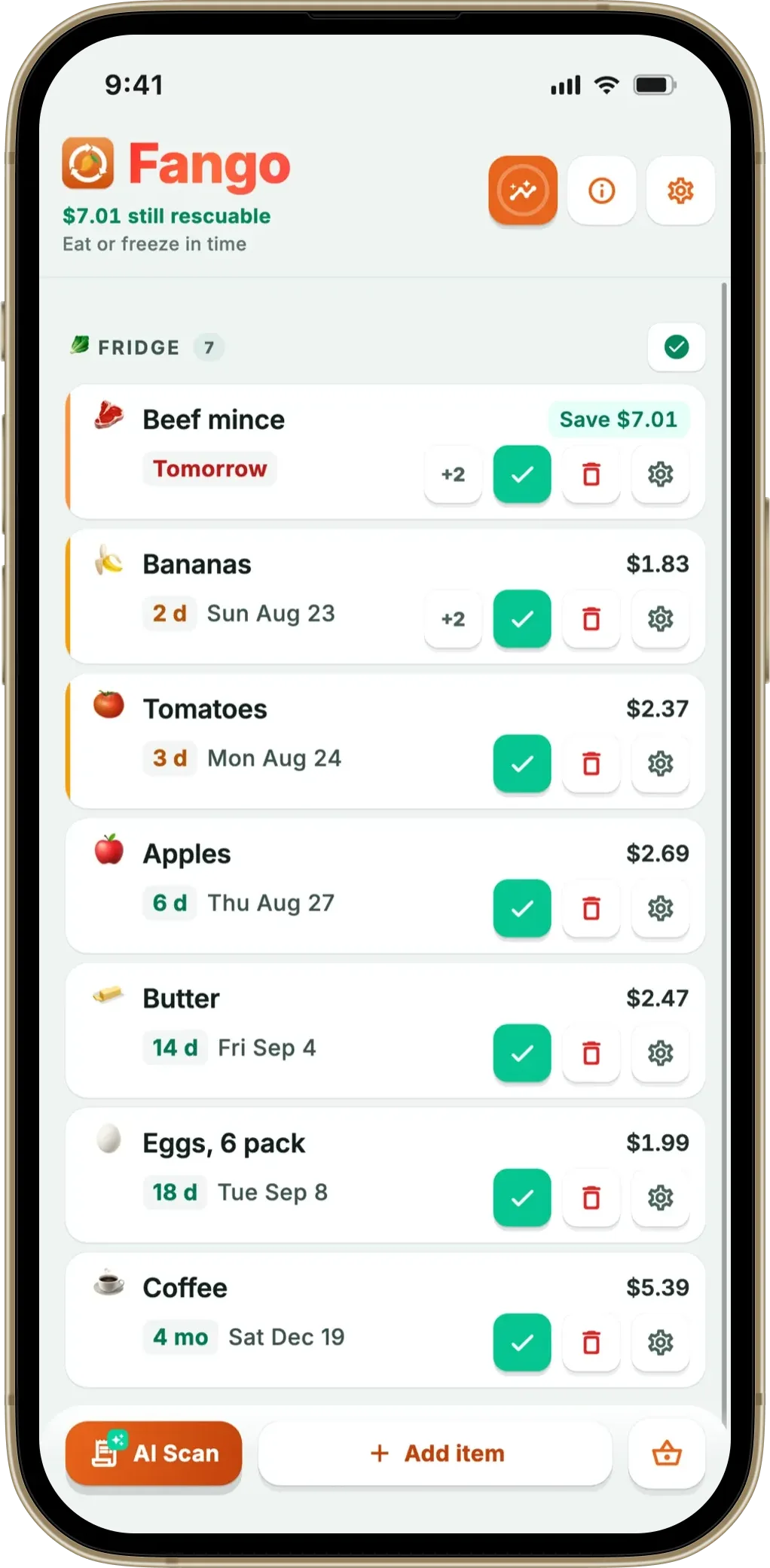
Fango was designed from the ground up for people who don’t want to create an account to track their fridge. Download the app, open it, and you’re tracking immediately — no email, no password, no verification step. Your fridge data is stored locally on your device; the only network step is the optional AI receipt scan.
The standout feature is AI receipt scanning: photograph your grocery receipt and the app reads the products automatically, estimating expiry dates based on item type. For most shopping trips, you’re done in under a minute. Fango then sends push notifications in time — one to fourteen days in advance, configurable per item.
- No account or sign-up required
- Fridge data stored locally — no Fango account or cloud sync
- AI receipt scanning works reliably
- 1-month free trial, then from $2.99/mo
- Fast to use on every shop
- Household sharing: the same view for up to four people, one subscription
- No barcode scanning
- No multi-device sync by default
Scan your receipt — AI adds everything automatically. Get a reminder in time. No account, no cloud sync by default, fridge data stays on your device by default.
Download on the App Store Get it on Google PlayFree for a month · No sign-up · iOS and Android
NoWaste — best for multi-device households
NoWaste is one of the most established apps in the food waste category. It requires an account, but that enables the main thing it does well: cloud sync across multiple devices. If you and a partner want to share the same fridge inventory from two different phones, NoWaste is one of the few apps that makes that possible out of the box.
It includes manual entry, barcode scanning and a recipe suggestion feature based on what’s about to expire. The free tier is limited; full functionality requires a paid subscription.
- Multi-device sync — shared fridge for couples/families
- Barcode scanning
- Recipe suggestions based on expiry dates
- Available on both iOS and Android
- Account required — email and password
- Data stored in the cloud
- Full features require a paid subscription
- Receipt scanning can be unreliable
Fridgely — best for barcode scanning
Fridgely is built around barcode scanning — scan the barcode on a product and the app looks up the item details automatically. It covers the basics: expiry tracking, fridge inventory, and notifications. The interface is more utilitarian and less polished than newer apps, but it works reliably for the barcode-scanning use case. If you’re weighing that against a receipt-first app, our receipt scan vs barcode scan guide explains which suits which kind of shopper.
It requires an account and stores data in the cloud. There is no AI receipt scanning, so you add items one at a time by scanning barcodes or entering manually.
- Reliable barcode scanning with product database
- Available on iOS and Android
- Straightforward fridge inventory tracking
- Account required
- No AI receipt scanning
- Older interface — less polished than alternatives
- Adding multiple items requires scanning each barcode individually
BEEP — best for minimalists
BEEP takes a stripped-back approach to food tracking. It focuses on barcode scanning and expiry reminders without the extra features that can make other apps feel cluttered. If you want a simple tool that does one thing well — reminds you in time — BEEP is worth a look.
It does not have AI receipt scanning or cloud sync for shared inventories. The feature set is intentionally minimal, which makes it fast to use but limited in capability compared to Fango or NoWaste.
- Simple, fast to use
- Available on iOS and Android
- Free
- No AI receipt scanning
- Limited feature set
- Account required
Which app is right for you?
Fango also carries a shopping list: it reads the fridge and your receipt history to suggest what is running low, and sorts itself into supermarket aisles. The difference worth naming is sharing — Fango’s list stays on one phone, because there is no account behind it.
Related reading: Best “Best Before” App Alternatives in 2026 and Best Cooklist App Alternatives in 2026.
Frequently asked questions
What is the best NoWaste alternative?
The best alternative depends on what frustrated you about NoWaste. If you want no account and a fridge list that stays on your device by default, Fango is the strongest option — it has AI receipt scanning, push notifications and full expiry tracking with no sign-up. If multi-device sync is the priority, NoWaste remains difficult to beat on that specific feature. Also see: CozZo alternatives and the full best food expiry tracker app comparison.
Is there a food waste app that does not require registration?
Yes. Fango requires no account or sign-up. You download it and start tracking immediately. Your fridge data stays on your device by default. The one exception is optional AI receipt scanning, where the image is processed by Anthropic Claude momentarily and then discarded. See more in our full article on food waste apps with no sign-up.
What is NoWaste app?
NoWaste is a food inventory and expiry tracking app for iOS and Android. It requires an account and stores data in the cloud, which enables multi-device sync. It offers barcode scanning, manual entry and recipe suggestions. It uses a freemium model with a paid tier for full features.
Does NoWaste have a free version?
NoWaste has a free tier with limited functionality. The full experience requires a paid subscription. Fango is free to try for one month with no account, then from $2.99/month or $22.99/year.
