“Grocery list app from receipt” is a search that hides two different intents. Some people want a tool that builds a fridge inventory from a receipt — “what I just bought.” Others want a tool that turns past receipts into a shopping list — “what I usually buy, so I don’t have to write it down again.”
Photograph a receipt and AI builds the digital list — products, prices, expiry estimates. Free to try for one month, no sign-up, then a monthly or yearly subscription, with the price for your country shown in the app.
Download on the App Store Get it on Google PlayFree for a month · No sign-up · iOS and Android
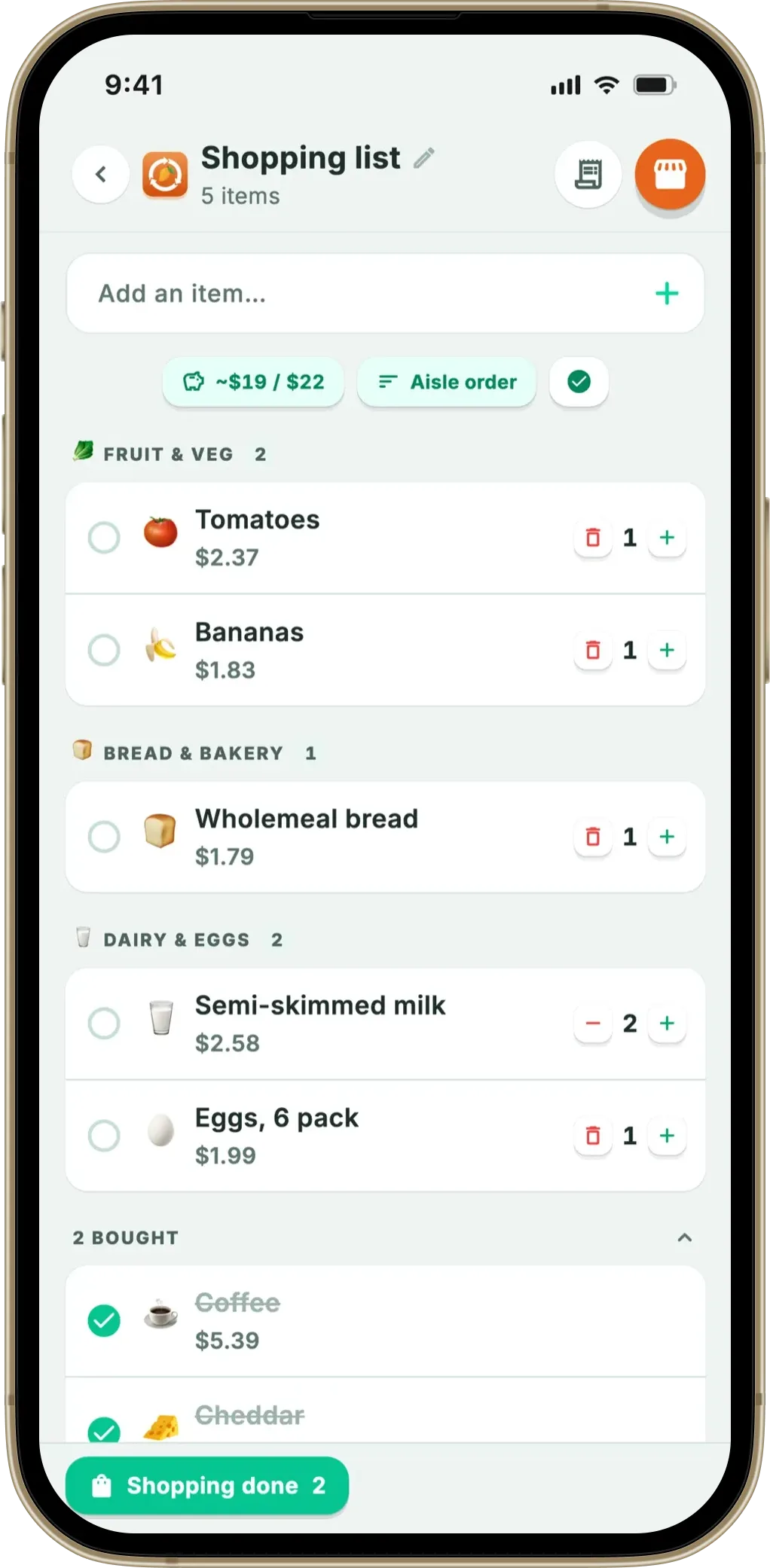
Both exist, and they’re not the same product. This article explains the split, walks through how receipt-to-list apps actually work, and points you to the right one for the intent you actually have. Fango is one example throughout, since it covers the fridge-inventory side of this category cleanly.
- Two intents — fridge list (what you just bought) vs shopping list (what to buy next)
- Receipt-to-fridge apps — Fango and NoWaste (receipt scanning on iOS); Fridgely and Kitche are no longer in the app stores
- Shopping list generation from history — rare; Fango does it from your own scanned receipts
- Worth it when — you want expiry tracking on top of the list, not just the list itself
Two intents, one search query
It’s worth being precise about what people mean:
If the same problem shows up on the shopping side — buying what you already have — our best shopping list app comparison covers apps that read your inventory.
What you just bought, extracted from the receipt. The list feeds a fridge inventory and expiry tracking.
What you plan to buy. Sometimes generated from past purchase history.
Receipt-scan apps almost always do the backward-looking list well; only a few also generate the forward-looking list. If you want both, you’ll likely need an app that explicitly does both — Fango is one that does: the receipt fills the fridge list, and a shopping list that you can share with your household sits right next to it.
How a receipt becomes a digital list
The mechanics are similar across modern AI receipt scanners. Using Fango as the worked example:
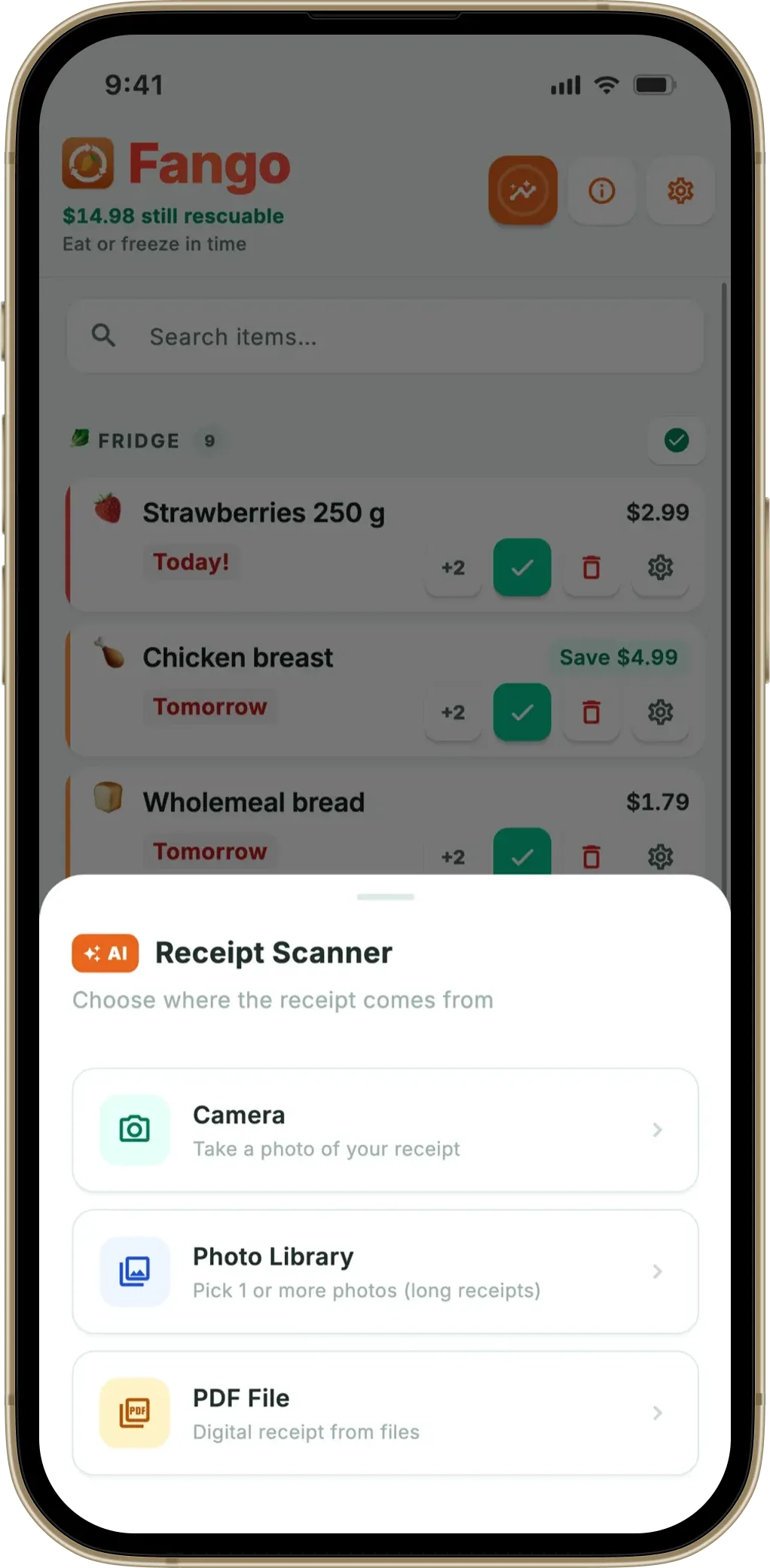
- Capture. Camera, photo library or PDF. Online grocery delivery PDFs (Wolt, Foodora, Tesco, Ocado, K-Ruoka.fi) work the same as paper receipts.
- Text extraction. On iOS, the phone uses on-device text recognition (Google ML Kit) and sends only the extracted text. On Android, the receipt image is sent to Anthropic Claude as a base64 image — Android’s manufacturer ML stacks aren’t consistent enough to rely on.
- AI identification. Claude returns a structured list — product name, price, currency, quantity, category — using country-specific rules (Fango supports more than 60 countries).
- Review. The user confirms prices and expiry dates on the review screen. Fango shows an orange banner when AI confidence is low; you can edit, remove or add items before saving.
- Save to fridge. The list lands in your digital fridge with per-item expiry dates. Notifications fire 1–14 days ahead.
The end result is a list that didn’t exist five seconds ago, complete with prices and expiry estimates. For a typical 12–20 item shop, this saves about 5–10 minutes of typing per visit.
What’s actually in the list
Each item in a receipt-derived list typically carries:
- Name — the product as it appeared on the receipt (sometimes abbreviated, e.g. “BROILER 700g” instead of “Chicken breast 700g”)
- Price — in the original currency of the receipt
- Quantity — number of units
- Expiry estimate — based on product category (raw chicken 1–2 days, hard cheese 2–4 weeks, eggs 3–5 weeks, etc.) per UK FSA guidance
- Shop date — extracted from the receipt where available, so the expiry counts from the shop date, not from “today”
Discount lines (S-Bonus, Clubcard, Nectar) are recognised and not double-counted — the price on the product line is already the discounted price. Non-food items like cleaning products or toiletries appear in a separate “Non-perishable” section so they don’t trigger expiry reminders.
How the main apps differ
| App | List source | Type of list | Notes |
|---|---|---|---|
| Fango | AI receipt scan (camera / PDF) | Fridge list + shopping list | No account; household sharing for up to four phones; more than 60 countries; iOS and Android |
| NoWaste | Receipt (iOS) + barcode | Fridge list | Freemium (6 lists / 500 items free); syncs across devices; web app |
| Fridgely | — | — | No longer available in the App Store or Google Play |
| Kitche | Receipt scan (formerly) | — | Removed from the app stores after Remy acquired it (Feb 2025) |
| AnyList / Out of Milk | Manual typing | Shopping list only | Not receipt-based; pure to-buy lists |
← scroll →
When a receipt-based list is worth it
The honest answer: it’s worth it when you want expiry tracking on top of the list, not just the list itself. A plain notes app handles “what’s in the fridge” just fine — but it doesn’t remind you that the chicken is on day 2 of 2.
Some practical cases where receipt-to-list pays off most:
- Big weekly shops. 15–25 items in one go, typing each one is the friction that kills tracker apps in week two. A single receipt photo skips it.
- Mixed households. Items get added at irregular times — one shop on Friday, a top-up on Tuesday. Receipt scanning per-shop keeps the inventory honest.
- Travel and multiple currencies. Fango handles dozens of currencies and more than 60 countries, so a shop in Spain on holiday doesn’t break the price tracking.
- Online grocery delivery. The PDF receipt from Ocado, Tesco delivery or Wolt scans cleanly — usually faster than a paper receipt because text is already digital.
Privacy considerations
If the list syncs across devices, as NoWaste’s does, your inventory is stored with the app’s service rather than only on your phone. That’s fine for most people and useful if you use more than one device.
If you’d rather the list stays only on your phone, Fango is the only option in this comparison: no account, no cloud sync by default, receipt sent to Anthropic Claude only for the few seconds the AI needs to read it. The fridge list, the statistics and the scan history live on the device unless you share the fridge with your household.
Summary
“Grocery list app from receipt” usually means a fridge list rather than a shopping list — though Fango now does both, using your receipt history to suggest what to buy next. The receipt apps still available (Fango and NoWaste) approach it differently; Fridgely and Kitche are no longer in the app stores. For privacy, no sign-up and a list shared with your household, Fango. For an inventory that syncs across devices and a web app, NoWaste. The right app for you is whichever matches how you actually shop.
Related reading: grocery receipt scanner app overview, how AI grocery apps read receipts, food waste tracker comparison, best free food waste app.
Photograph a receipt and AI builds the digital list — products, prices, expiry estimates. Free to try for one month, no sign-up, then a monthly or yearly subscription, with the price for your country shown in the app.
Download on the App Store Get it on Google PlayFree for a month · No sign-up · iOS and Android
Frequently Asked Questions
What is a grocery list app from a receipt?
It’s an app that reads a photographed grocery receipt and turns the line items into a digital list — typically a fridge inventory list, sometimes a shopping list. Fango is an example for fridge inventory: photograph the receipt, AI extracts the products, and they appear in your digital fridge in 3–5 seconds. The list is what you just bought, not what you plan to buy.
What’s the difference between a shopping list and a grocery list from a receipt?
A shopping list is forward-looking: items you plan to buy. A grocery list from a receipt is backward-looking: items you just bought, extracted automatically from the receipt. The two solve different problems. Receipt-scan apps like Fango do the backward-looking list, which feeds a fridge inventory and expiry tracking. Shared shopping list apps (like AnyList or Out of Milk) do the forward-looking list. Some apps combine both, and Fango is now one of them: the receipt builds the fridge list, and the fridge list plus your buying history feeds the shopping list.
Can a grocery list app generate a shopping list from past receipts?
Some can, and Fango now does. Fango reads your own scanned receipts, works out which products you buy on a regular cadence, and offers them back as one-tap suggestions on its shopping list — with an estimate of how often you rebuy each one. It also offers anything in your fridge that is about to go off as a suggestion, so you can restock before it runs out, and it never suggests something already on the list. What it still will not do is plan meals or build a list from recipes.
Which apps turn a grocery receipt into a digital list?
Fango (AI receipt scanning into a fridge list, no account, iOS and Android) and NoWaste (receipt scanning on iOS plus barcode scanning, syncs across devices). Kitche also used to scan receipts, but neither Kitche nor the original Fridgely is available in the App Store or Google Play any more. The apps still available differ in how they read the receipt, from full AI vision to barcode-by-barcode entry.
Is a grocery list app worth using over a plain notes app?
Yes, if you want expiry tracking on top of the list. A notes app doesn’t remind you that the chicken is about to go off. A grocery list app from a receipt fills in expiry dates per item, sends notifications before they’re due, and keeps statistics on what you actually ate vs wasted. If you only need a one-shot grocery list with no expiry tracking, a notes app is fine.
