“Food waste app” is a vague phrase. Search the app stores for it and you get four very different categories of tool: redistribution apps that let you buy surplus food (Too Good To Go, Olio), recipe apps that turn leftovers into meals (SuperCook), smart-fridge apps from appliance makers, and — the focus of this article — tracker apps that keep an inventory of the food you already own and remind you in time.
This comparison covers the latter category only. Five apps: Fango, Kitche, NoWaste, BEEP and Fridgely. Two of them, Kitche and the original Fridgely, are no longer in the app stores in 2026; we keep them here because many older guides still recommend them. According to WRAP’s 2022 household food waste report, UK households throw away around £1,000 of edible food per year — and most of it is food bought and then forgotten. A tracker app, used consistently, is one of the simplest ways to claw back a chunk of that.
- Fango — AI receipt scanning, no account, data stays on your device by default; iOS and Android
- Kitche — no longer in the app stores after Remy acquired it in February 2025
- NoWaste — most features (barcode, receipts, recipes, shopping list); free tier plus a cheap Pro upgrade
- BEEP — barcode-first with team sharing; iOS and Android, account required
- Fridgely — the original app is no longer on the App Store or Google Play
What is a “food waste tracker app”?
The category is narrower than it sounds. A food waste tracker app does three things:
- Inventory — keeps a running list of what’s in your fridge, freezer or pantry.
- Expiry dates — stores or estimates a use-by date for each item, working as an expiry date tracker.
- Reminders — sends a notification in time so you don’t throw them out.
It is not the same as a redistribution app like Too Good To Go, which connects you to nearby shops selling surplus food, or Olio, which is for sharing food with neighbours. Both of those are about external food — what other people are selling or giving away. A tracker is about your own food, the groceries already in your kitchen. Most households benefit from a tracker more than a redistribution app, simply because most household food waste happens at home, not at the shop.
What should a food waste tracker actually measure?
The word “tracker” suggests a log of what you threw away, and some people search for exactly that: a way to see how much food, and how much money, goes in the bin each month. Measuring waste on its own rarely changes much, though. You find out on Sunday that the spinach went off on Wednesday. The useful kind of food waste tracking records both outcomes, eaten and wasted, and warns you while there is still time to change the result.
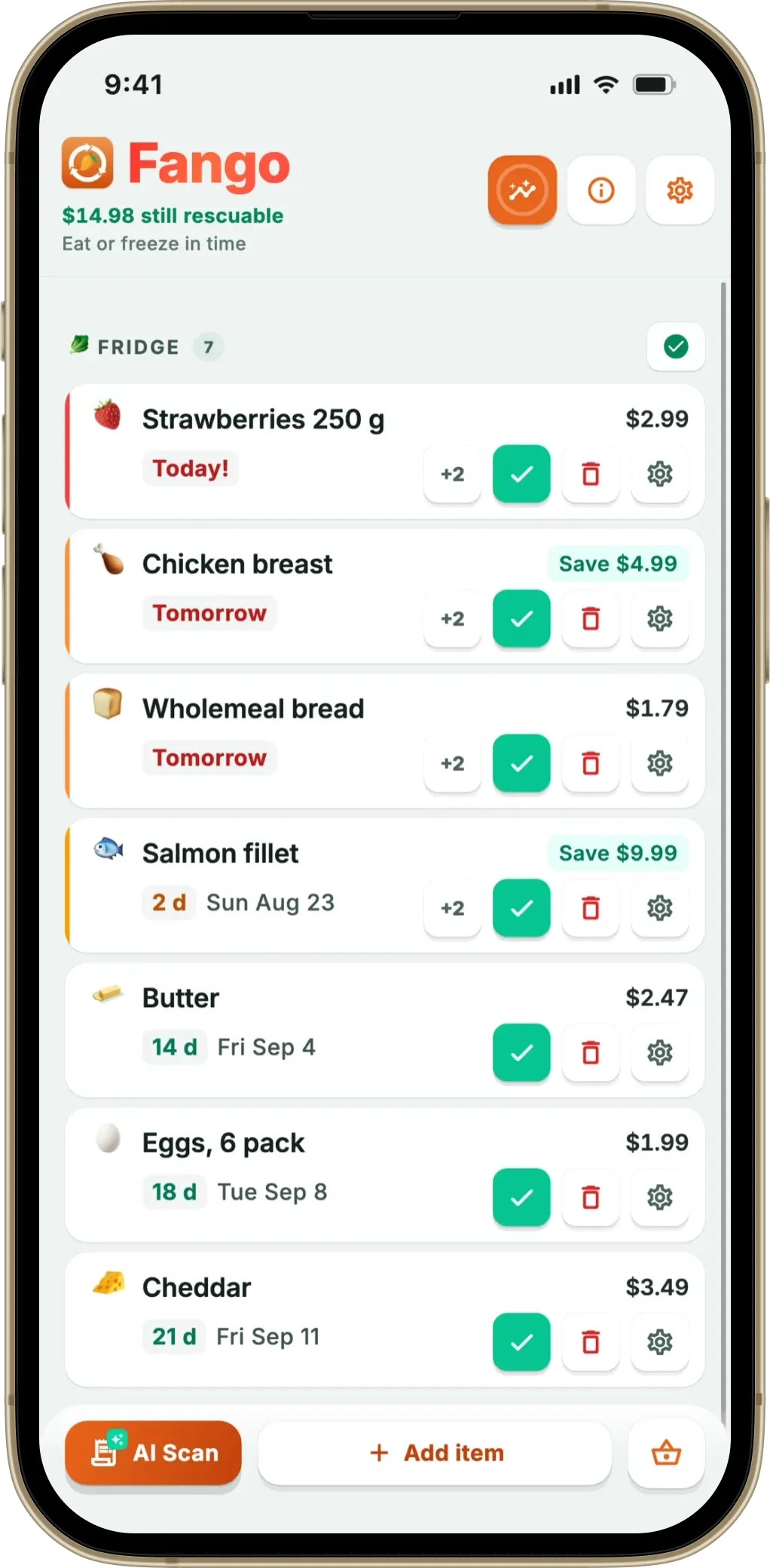
In Fango, every item leaves the list one of two ways: marked eaten or marked wasted, often straight from the reminder. Food you ate close to its date counts as rescued, and the rescued amount adds up in your own currency against a monthly savings goal. The statistics show your rescue rate, a month-by-month trend and a short weekly recap, so the number you watch is money kept rather than a guilt counter. For how that plays out in a real fridge, see how fridge tracking saves money.
Quick comparison
| Feature | Fango | Kitche* | NoWaste | BEEP | Fridgely* |
|---|---|---|---|---|---|
| AI receipt scanning | ✓ | ~ receipt scan | ~ iOS, not AI-led | — | — |
| Barcode scanning | — | ✓ | ✓ | ✓ | ✓ |
| Expiry reminders | ✓ 1–14 days | ✓ | ✓ | ✓ | ✓ |
| Notification action buttons | ✓ Eaten / Wasted / +2d | — | — | — | — |
| No sign-up required | ✓ | — | check listing | — | — |
| Data stored locally by default | ✓ | — | syncs across devices | cloud | — |
| Recipes | — | ✓ | ✓ | — | — |
| Household sharing | ✓ up to 4 people | — | device sync | ✓ team invite | — |
| Available on iOS and Android | ✓ | removed from both | ✓ + web | ✓ | removed from both |
| Free to use without paying | 1-month free trial | — | 6 lists / 500 items | limited | — |
| Price after any free period | Subscription after the free month (price in app) | No longer available | $6.99/yr or $29.99 lifetime | $7.99/mo · $59.99/yr | No longer available |
← scroll →
* Kitche and the original Fridgely are no longer in the App Store or Google Play (checked September 2026). Prices are US App Store prices.
Fango — best for AI receipt scanning with zero setup
Fango is built around a single idea: the fastest way to track food is to photograph the receipt and let AI do the typing. Scan a grocery receipt with the phone camera (or pick a PDF or image from your files), and Anthropic Claude reads the line items and adds them to your digital fridge — you only confirm the expiry dates. A typical paper receipt is parsed in 3–5 seconds; adding the review step, the whole log is under a minute.
Fango requires no account, no email and no cloud sync by default. Your fridge list, your statistics and your receipt history stay on your device by default unless you share them with your family. Otherwise the receipt image is the only thing that leaves the phone, and only for the few seconds it takes Claude to read it. There’s no Fango account database to leak.
The reminder system is unusually flexible: you choose a window of 1–14 days ahead, and notifications carry three action buttons — ✓ Eaten, 🗑 Wasted and ➕ 2 days — so you can clear or extend an item straight from the lock screen, without opening the app. Receipt scanning is supported in more than 60 countries and dozens of currencies.
What Fango doesn’t do: there’s no barcode scanner and no recipes, and no personal sync between your own devices. It’s a tracker focused on the receipt-to-fridge pipeline, shared with up to four people in one household. If those missing features matter to you, NoWaste covers more ground.
- AI receipt scanning, 3–5 seconds per receipt
- No account, no email, no cloud by default
- Notification action buttons (Eaten / Wasted / +2d)
- 60+ countries, dozens of currencies, 8 languages
- One month free to try, every feature unlocked
- Household sharing: the same view for up to four people, one subscription
- No barcode scanner
- No recipes or meal planning
- Not free forever — a subscription after the 1-month trial (price in app)
Kitche — no longer available
Kitche was a free UK food waste app that built your kitchen inventory from scanned grocery receipts. It is no longer in the App Store or on Google Play after Remy acquired it in February 2025, so you can’t download it today.
If you were a Kitche user, Remy itself is the closest successor: it’s on iOS and Android, free in the US App Store, and combines a pantry with expiry alerts, recipes and a shopping list. If receipt scanning was the part you liked, Fango reads paper receipts, PDFs and digital receipts from any shop in more than 60 countries.
- Receipt scanning into a kitchen inventory
- Free to use
- Removed from both app stores
- No new installs or updates
Scan a grocery receipt, AI adds the items, your phone reminds you in time. One month free to try, every feature unlocked — then a monthly or yearly subscription, with the price for your country shown in the app.
Download on the App Store Get it on Google PlayFree for a month · No sign-up · iOS and Android
NoWaste — most features in one app
NoWaste is the most feature-complete app in this comparison. Barcode scanning, receipt scanning (on iOS), recipe suggestions, shopping lists and a web app all sit in one product. If you want every kitchen-management feature behind a single icon, NoWaste is a reasonable choice.
User reviews are mixed on execution. Receipt scanning fails often enough that several reviewers mention it specifically; barcode lookups sometimes return wrong expiry suggestions; duplicate entries can appear after syncing. Features on paper, friction in practice. Worth a try, but expect some manual tidying.
NoWaste syncs your lists across devices. The Pro tier is cheap ($6.99/year or $29.99 lifetime in the US App Store), but the free version is capped at six lists and 500 items, which fills up faster than it sounds.
- Most features in one app
- Recipes from your inventory
- iOS, Android and a web app
- Cheap Pro tier ($6.99/year)
- Receipt scanning unreliable in user reviews
- Receipt scanning only on iOS
- Free tier limited to 6 lists / 500 items
- Interface can feel cluttered
BEEP — best for barcode-heavy households
BEEP is a tightly scoped app: scan a barcode, the app fetches the product name and image, you enter the expiry date. That’s it. No receipt scanning, no recipes — just expiry tracking, kept simple.
The simplicity is the appeal. The interface is clean, setup is fast, and you can invite others to your team so several people can add items to the same inventory. If your shop has a lot of barcoded packaged goods, BEEP is faster than typing names.
The drawbacks: barcode lookups occasionally fail or return wrong product info, expiry dates always have to be entered manually, and you need an account before you start. Premium costs $7.99/month or $59.99/year in the US App Store. Anything that doesn’t have a barcode — loose fruit and veg, bakery items, market food — has to be added by hand.
- Fast, clean barcode workflow
- Team sharing for families or coworkers
- Simple to learn
- iOS and Android
- No receipt scanning
- Expiry date always entered manually
- Premium from $7.99/month
- Account required
Fridgely — no longer available
Fridgely was one of the older apps in this space: a fridge inventory with barcode scanning, expiry reminders and sharing with family members or roommates. The original app is no longer on the App Store or on Google Play, although its website is still online. The app now listed as “Fridgely” on Google Play is a different, newer app from another developer.
If you want a free option today, FoodShiner (iPhone and iPad) is free with optional tips, needs no account and shares through iCloud. On Android, NoWaste’s free tier covers six lists and 500 items.
- Barcode scanning and expiry reminders
- Sharing with family or roommates
- Removed from the App Store and Google Play
- Same-name app on Google Play is a different product
Which tracker app is right for you?
The “best” tracker depends on how you shop, how much you care about privacy, and whether you want recipes and sharing on top of the inventory itself.
What to watch out for in any tracker app
Three things matter more than the feature list when you actually use one of these apps day to day:
- Friction at input. An app that takes 30 seconds per item won’t get used. Receipt scanning cuts friction the most. Barcode is fast for packaged goods but slow for fresh produce. Manual entry is the friction trap that kills most tracker apps in week two.
- Notification quality. A reminder that just says “something expires today” trains you to ignore notifications. Per-item reminders with action buttons (mark eaten / wasted / extend) make it useful at the lock screen.
- Where your data lives. Most apps require an account and store everything in the cloud. That’s fine for most people, but worth being aware of — especially if you don’t want yet another login or yet another company holding a record of your groceries.
Do grocery store apps track food freshness at home?
It is a reasonable thing to expect: the supermarket already knows what you bought. In practice, most grocery chain apps are built around offers, loyalty points and online ordering, and stop at the checkout. Kitche, a UK tracker that read grocery receipts, is no longer in the app stores after Remy acquired it in February 2025.
The part of a store app that does help is the digital receipt. If your supermarket emails a receipt or keeps one in its app, you can share that receipt or PDF straight into Fango from the share sheet, and the products land on your list with estimated reminder dates. That works with any shop that issues a receipt, in more than 60 countries, without linking an account.
Summary
There’s no single “best food waste tracker app” — it depends on how you shop and what trade-offs you’re comfortable with. For zero-setup, privacy-first tracking with AI receipt scanning, Fango is the strongest pick. For everything-in-one-app, NoWaste covers the most ground. For barcode-heavy households, BEEP keeps it simple. Kitche and the original Fridgely are no longer in the app stores; if you want a free option on iPhone, FoodShiner is the one to try.
The three apps still in the stores are all free to try — download one or two and see which one you actually open in week three. Related reading: Best food expiry tracker app for iPhone, how grocery receipt scanner apps work, food waste apps without registration, best food waste app for Android, smart fridge vs a tracking app, an expiry date tracker, FoodShiner alternatives, food apps without recipes, best food waste app in the UK, BEEP alternatives, a food app that works offline, how to remember what’s in your fridge, why I stopped using pen and paper and NoWaste alternatives.
Frequently Asked Questions
What is a food waste tracker app?
A food waste tracker app keeps a digital inventory of what’s in your fridge, freezer or pantry and reminds you in time. It’s different from food redistribution apps like Too Good To Go or Olio, which connect you with surplus food from shops or neighbours. A tracker focuses on your own household — the food you already bought and don’t want to throw away.
What is the best food waste tracker app in 2026?
The best app depends on your priorities. Fango is the strongest choice if you want AI receipt scanning, no account, and your data to stay on your device by default. NoWaste covers the most features (barcode and receipt scanning, recipes, shopping lists, a web app) with a free tier and a cheap Pro upgrade. Fango has a shopping list too, shared by invite code with up to four people and no account. BEEP suits barcode-heavy households on iOS or Android. Kitche and the original Fridgely are no longer in the app stores, so neither is an option today.
Is there a food tracker app that doesn’t require an account?
Yes — Fango works with no sign-up, no email and no cloud account by default. Your fridge inventory stays on your device by default. Unless you share it with your household, the only network step is the optional AI receipt scan, where the photo or text is sent to Anthropic Claude for product recognition and discarded immediately. BEEP asks you to create an account to get started, and Kitche and Fridgely are no longer in the app stores.
Are food waste tracker apps actually worth it?
UK households throw away around £1,000 of edible food per year according to WRAP. Even if a tracker app reduces that by a quarter, the time saved on knowing what’s in the fridge plus the money saved easily justifies a subscription that costs less than a few items of wasted food a month. The bigger question is whether you’ll use it consistently — apps with receipt scanning (like Fango) lower the friction enough that most people stick with them.
What’s the difference between a food waste tracker and Too Good To Go?
They solve different problems. Too Good To Go connects you with shops, cafés and restaurants selling near-expiry food at a discount — you buy from external sellers. A food waste tracker app like Fango helps you avoid wasting food you already own at home. Many people use both: Too Good To Go for cheap meals out, a tracker app for the food in their own fridge.
How does a food waste tracker app measure how much money you save?
It records what happens to each item. In Fango you mark food as eaten or wasted, often straight from the reminder, and food eaten close to its date counts as rescued. The rescued amount adds up in your own currency against a monthly savings goal, with a rescue rate and monthly trend in the statistics.
Are there grocery store apps that track food freshness at home?
Most supermarket apps focus on offers, loyalty points and online orders rather than what happens to the food at home. A simpler route is to share the store’s digital receipt into a tracker app like Fango, which reads the products and gives each one an estimated reminder date.
