“AI grocery app” is the phrase people search for when they want a fridge tracker that doesn’t make them type. The promise is reasonable: photograph a grocery receipt, an AI reads it, and the items appear in your digital fridge a few seconds later. The reality, in 2026, mostly lives up to that — but the mechanics behind it are more interesting than “we send it to ChatGPT.”
Free to try for one month — no sign-up, no email. Photograph a receipt, AI adds the products in 3–5 seconds. After the trial, Fango is a monthly or yearly subscription, with the price for your country shown in the app.
Download on the App Store Get it on Google PlayFree for a month · No sign-up · iOS and Android
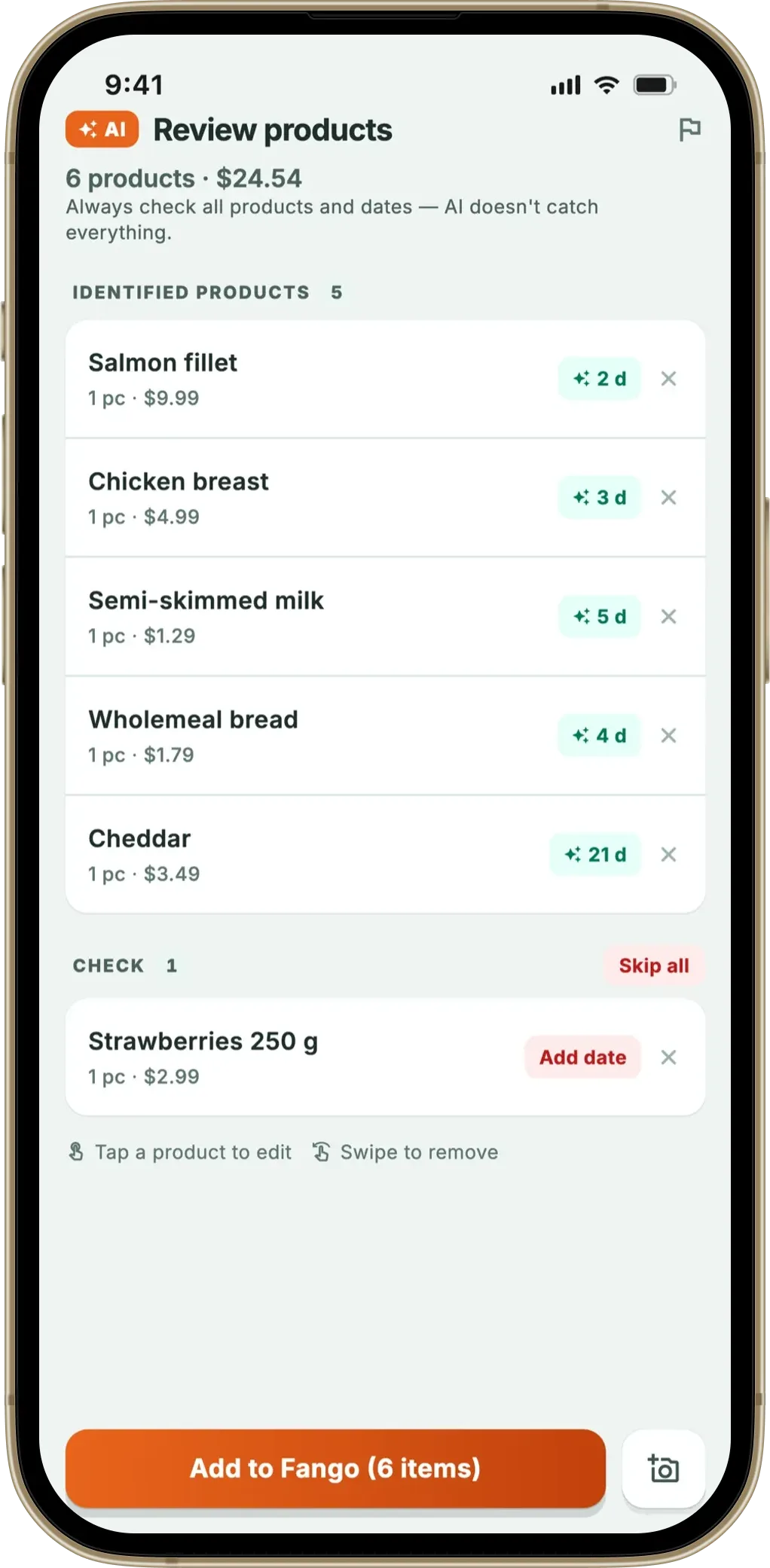
This article is a plain-English walkthrough of what actually happens when you scan a receipt with an AI grocery app. The example throughout is Fango, since that’s the app we know the implementation of in detail; the underlying ideas apply to any AI-powered grocery tracker.
- Two paths — iOS reads the text on-device and sends text only; Android sends the image directly
- Anthropic Claude identifies products, prices, currency and country in 3–5 seconds
- More than 60 countries supported — each with its own price-formatting and discount rules
- Staged fallback — strict parse, best-effort pass, then a per-item CHECK section — so the app fails gracefully when it isn’t sure
- Nothing stored on Anthropic’s side — Fango has no account, so there’s nothing to attach a receipt to
What an “AI grocery app” actually does
The job is narrow:
If you are choosing between apps, our guide to picking an expiry date tracker lists the features that decide whether you are still using it a month later.
- Take a photo (or PDF) of a grocery receipt.
- Identify which lines are products and which are headers, discounts, payment info, or restaurant items.
- Extract the product name, price, quantity and currency for each product line.
- Suggest a category-appropriate expiry date.
- Drop the products into the user’s digital fridge in the right currency and language.
That’s it. There’s no recipe generation, no meal planning, no smart-fridge integration — just the receipt-to-inventory pipeline. Done well, it removes the single biggest friction point in tracker apps: typing items in by hand. It’s also why a one-photo receipt covers a full shop faster than scanning each item — see receipt scan vs barcode scan.
Step 1 — getting the receipt into the app
Three input paths matter:
- Camera. The most common. You snap a photo of the paper receipt — Fango’s UI guides you to fit it in the frame.
- Photo library. Useful if you already took a picture for your own records or your spouse sent it via WhatsApp.
- PDF. Online grocery orders (Wolt, Foodora, Tesco delivery, Ocado, K-Ruoka.fi, Foodie.fi, Prisma) usually come as PDF. Fango handles up to 5 pages — Costco-style long receipts get a warning that page 6+ wasn’t scanned.
On Android, sharing from any other app also works — long-press a receipt photo in Files, share to Fango, and the scan starts immediately. Same flow on iOS via the share sheet.
Step 2 — the two paths to text
This is where iOS and Android diverge — for a privacy-relevant reason.
On iOS, Fango runs Google’s ML Kit text recognition on-device first. The phone reads the receipt and extracts plain text — entirely without any network connection. In the typical case only that text is used to identify products; the image is sent along only as a fallback the server can use if the text can’t be read cleanly, and for messy or column-broken receipts Fango uses the image directly. This hybrid path was added in version 1.1.10 specifically to make scanning faster (3–5 seconds vs 15–20) and to reduce what travels over the network.
On Android, the receipt image is sent directly to Claude’s vision API, base64-encoded. Android’s on-device text recognition isn’t as consistent across manufacturers as iOS’s, so the simpler path is the more reliable one. The image is held in memory only for the few seconds the API call takes and is discarded immediately after.
Both paths land at the same place: a structured list of products. The iOS path just gets there with one less round-trip.
Step 3 — Anthropic Claude reads the list
The text (iOS) or the image (Android) goes to Anthropic Claude with a country-specific prompt — Fango supports more than 60 countries, and each has its own quirks. UK receipts use comma decimals or dot decimals depending on the chain. German receipts have a different VAT layout. Wolt, Foodora and Tesco delivery use three-column tabular formats (unit price · quantity · total). Each of these would confuse a generic prompt; country-specific rules cover them.
Claude returns a structured response — typically in 1–3 seconds for the AI itself, plus network time. Each product has:
- The product name, in the receipt’s original language
- The price, with currency code (EUR, GBP, USD, SEK, NOK, DKK, PLN, CHF, CZK, HUF, RON, TRY, CAD, AUD)
- The quantity
- A category hint for expiry estimation
If the receipt date is on the receipt (most chains print it), Claude extracts that too — important for receipts scanned a day or two after the shop, so the expiry estimates count from the shop date and not from “today.”
Step 4 — three-tier review when AI isn’t sure
This is the safety net. AI gets confident answers wrong sometimes, and a tracker app full of phantom items is worse than no app at all. Fango uses a three-tier pipeline:
- Strict mode. The default. AI applies country-specific rules tightly — if the receipt doesn’t match the expected format, strict mode returns nothing.
- Lenient mode. If strict returns 0 items, the app retries with a looser prompt that asks AI to extract at least the product names, even if prices or dates are uncertain.
- Flagged rows. Items the model was unsure about are grouped into a separate CHECK section on the review screen, and their day estimate is not used as-is. If the whole receipt type is unfamiliar, a banner at the top says plainly that products were added but prices or dates may be missing.
The point isn’t to never make mistakes — it’s to know when a mistake is likely and ask the user to verify, rather than silently shoving wrong items into the inventory.
Step 5 — guessing expiry dates
Receipts don’t print expiry dates. What AI can do is identify the product category and apply typical shelf life. Raw chicken: 1–2 days. Hard cheese (sliced): 2–4 weeks. Eggs: 3–5 weeks. UK FSA guidance on chilling and the USDA FoodKeeper database are good ground truth for these estimates.
One small but useful feature: Fango remembers items you’ve personally adjusted. If you typically buy milk that’s printed with a 5-day use-by instead of the AI’s default 7, the next time you scan milk the suggested expiry is 5 days. Only the items you’ve explicitly customised are remembered — AI’s defaults aren’t overwritten by accepting them.
Step 6 — what actually gets stored where
The fridge inventory, your statistics, your scan history and your customised expiry preferences are stored on your phone. There is no Fango account, and nothing syncs anywhere unless you choose to share a fridge with your household. If you uninstall the app, the data goes with it.
The receipt itself touches the Anthropic API for the few seconds the scan takes, and then it’s gone. Nothing is attached to a user identity because Fango doesn’t have user identities to attach things to.
Other AI grocery apps work differently — most do store receipts on their own servers under an account. If privacy is a priority, it’s worth checking the privacy policy before deciding which AI app to use.
What AI grocery apps can and can’t do
It helps to be explicit about the limits, because marketing copy rarely is:
AI is good at:
- Reading printed receipts, including non-Latin scripts such as Japanese, Korean, Greek, Cyrillic, Hebrew and Arabic in the countries Fango supports
- Identifying product categories from short names (“BROILER 700g” = chicken, fresh)
- Parsing currency, prices and discounts in more than 60 countries
- Recognising when a receipt is from a restaurant, café or hotel (and refusing to add restaurant dishes to a fridge)
AI struggles with:
- Faded thermal receipts (the receipt store-side problem, not AI’s)
- Hand-written receipts from market stalls
- Receipts photographed at sharp angles or with heavy glare
- Countries outside the more than 60 supported (a receipt from Russia, for example, won’t work in Fango today)
- Items without a clear product name on the line (raw weight produce sold by the kilo without a label name)
The honest pitch isn’t “AI does everything” — it’s “AI removes 90% of the typing for a typical shop, and the user fills the gaps.”
How AI grocery apps compare
“AI” gets attached to a lot of apps that aren’t really using a vision/language model — usually they mean pattern-matching OCR. A short reality check:
| App | What’s actually “AI” | Receipt result |
|---|---|---|
| Fango | Anthropic Claude vision/text model | Full product list, country-aware |
| Grocery AI | Vision model, US-focused | Strong on US receipts, weaker elsewhere |
| NoWaste | Receipt scanning on iOS, plus barcode, photo and an AI assistant | Check the current store listing for supported receipt formats |
| Fridgely | — | No longer in the App Store or Google Play |
| Kitche | Receipt scanning (UK) | No longer available — removed from the stores after Remy acquired it (February 2025) |
← scroll →
Free to try for one month — no sign-up, no email. Photograph a receipt, AI adds the products in 3–5 seconds. After the trial, Fango is a monthly or yearly subscription, with the price for your country shown in the app.
Download on the App Store Get it on Google PlayFree for a month · No sign-up · iOS and Android

Summary
An AI grocery app, done well, turns the most tedious part of fridge tracking — typing in items — into a one-photo step. The hard parts of the implementation are everywhere except the AI call itself: input handling, country-specific rules, graceful failure, privacy boundaries and expiry estimation. The AI is the easy bit; making it useful in practice is the rest of the work.
If you’d like to try AI receipt scanning, Fango is free to try for a month, no sign-up required. Related reading: food waste tracker comparison, how grocery receipt scanner apps work, best free food waste app and food waste apps without registration.
The same purchase history feeds the other half of the app. Fango’s shopping list reads your fridge and your scanned receipts: it suggests what is genuinely running low, offers the things you buy regularly when they are due, and works out which of the 13 supermarket aisles each item belongs to on the phone rather than in the cloud — no AI call involved in that part at all.
Frequently Asked Questions
What is an AI grocery app?
An AI grocery app uses a vision or language model to read a photographed receipt and add the items to a digital fridge. Instead of typing each item, you take one photo and the AI extracts product names, prices, expiry-relevant information and currency. Fango is an example: it sends the receipt to Anthropic Claude, which returns a structured list of products in 3 to 5 seconds.
How does AI read a grocery receipt?
There are two main paths. On iOS, Fango first runs on-device text recognition (Google ML Kit) to extract the receipt as plain text, then sends that text to Anthropic Claude for product identification — so in the typical case only the text is used, and the image travels only as a fallback the server can use if the text can’t be read cleanly. On Android, Fango sends the receipt image base64-encoded directly to Claude’s vision API. Either way, the AI returns a structured list of products with prices, currency and country information. Total round trip: 3 to 5 seconds for a typical paper receipt.
Is it safe to scan my grocery receipts with AI?
It depends on the app. In Fango, the receipt is sent to Anthropic Claude only for the few seconds the AI needs to read it; nothing is stored on Anthropic’s side under your name, and Fango itself has no user account to attach the receipt to. The product list is saved locally on your phone unless you share it with your household. Other AI grocery apps may store receipts on their own servers under an account you created — worth checking the privacy policy before using one.
How accurate is AI receipt scanning?
On clearly printed paper receipts from supported countries (Fango supports more than 60), modern AI gets close to 100% on product names and prices. Accuracy degrades on faded thermal receipts, multi-column tabular receipts (some delivery PDFs), receipts photographed at sharp angles, and receipts from countries the app’s rules don’t cover. Fango falls back in stages — a strict country-specific parse, then a looser best-effort pass, then a per-item CHECK section — so the app asks you to confirm rather than guessing.
Can AI guess expiry dates from a receipt?
Not directly — most paper receipts don’t print expiry dates. What AI can do is identify the product category (fresh chicken, hard cheese, leafy greens, etc.) and apply category-typical shelf-life estimates. Fango uses these as a default and lets you adjust per item. The “previous days for this product” memory means that if you’ve ever customised, say, milk to 5 days, the next milk you scan defaults to 5 instead of the AI’s generic estimate.
