Online grocery is now around a tenth of UK food spending, and almost all of it arrives as a PDF — an Ocado order summary, a Tesco delivery confirmation, a Wolt itemised receipt. A PDF receipt scanner reads those files directly and turns them into a fridge inventory, usually faster and more accurately than a photo of a paper receipt would.
Save the order PDF from Ocado, Tesco, Wolt or your online grocery, then share it to Fango. AI reads the line items, fills in expiry estimates, and your phone reminds you in time. Free to try for a month, no sign-up.
Download on the App Store Get it on Google PlayFree for a month · No sign-up · iOS and Android
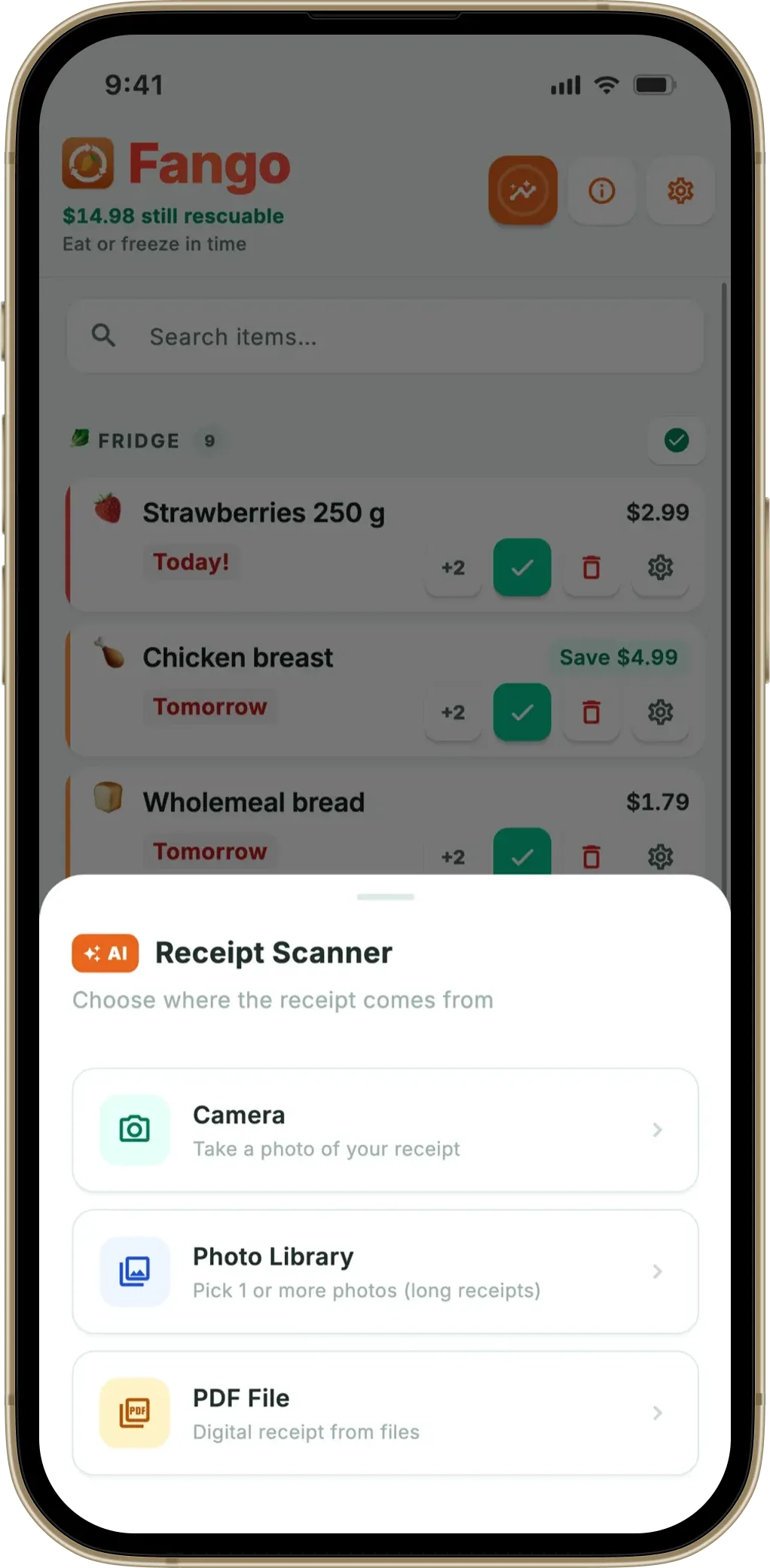
This article explains what a PDF receipt scanner actually does, why a digital PDF often beats a photographed receipt, and where it can go wrong. Fango is used as the working example throughout — it handles PDFs from the photo library or the iOS/Android share sheet up to five pages.
- Why PDFs — online grocery delivery (Wolt, Tesco, Ocado, Amazon Fresh) sends receipts as PDF, not paper
- Cleaner than photos — the text layer is already digital, so there’s no OCR failure on creases or glare
- Multi-page supported — Fango handles up to five PDF pages, which covers nearly every weekly online shop
- Specific errors — Fango detects password-protected and corrupt PDFs separately so the fix is clear
- Privacy — PDF rendered on device first; only line items sent to AI, no storage
What “PDF receipt scanner” actually means
A PDF receipt scanner is an app that takes a PDF file as input and outputs a structured list — product, quantity, price, currency — usually saved to a fridge inventory or grocery list. There are two ways apps approach this:
If you are choosing between apps, our guide to picking an expiry date tracker lists the features that decide whether you are still using it a month later.
The PDF has a real text layer (most online grocery PDFs). The app reads characters directly — no OCR needed for the text portion.
The PDF is a photo wrapped in a PDF container (a “scanned” PDF). The app has to render each page to an image and run OCR.
Most online grocery PDFs in 2026 are text-layer PDFs, which is why they scan so reliably. Fango handles both — when the text layer is missing or partial, it falls back to rendering each page as an image and sending it to Anthropic Claude for vision-based extraction.
Why PDFs often scan better than photos
A photographed paper receipt has to clear a long chain of obstacles: focus, lighting, creases, glare, thermal-paper fading, the cashier’s pen marks. Any of these can make OCR misread a product or skip a line. A digital PDF starts past every one of them.
- Prices stay aligned. A photo of a long receipt can warp the price column. In a PDF the columns are exact.
- Special characters survive. “Ä”, “ö”, “€”, “£” and the trailing-minus on Finnish discount lines (“0,84-”) render cleanly.
- Discount lines aren’t misread as products. S-Bonus, Clubcard, Plussa-etu, Nectar — the structured layout makes them easy to recognise as adjustments, not items.
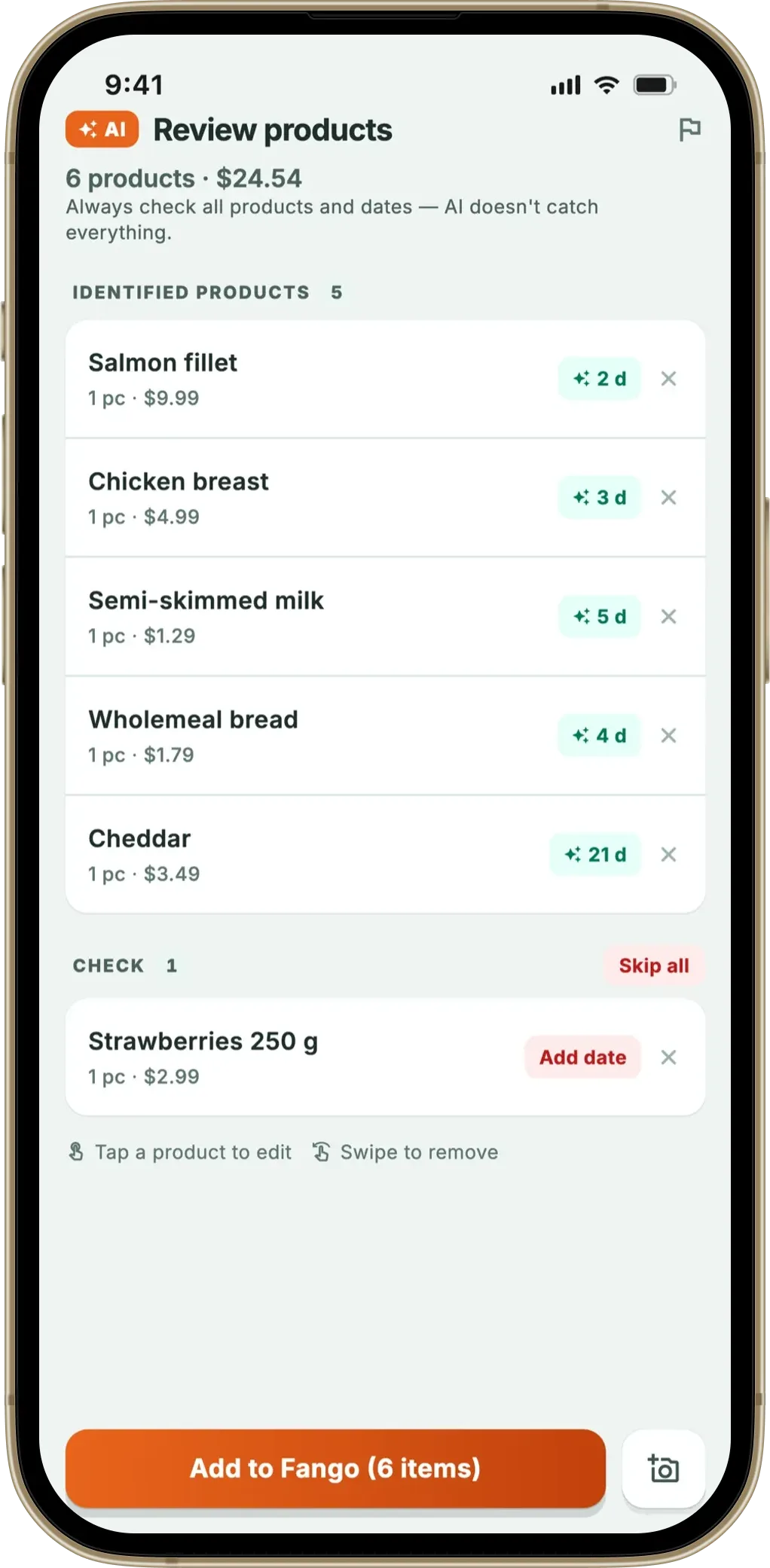
- The total at the bottom is reliable. Fango’s review screen now shows the receipt total above the product list; in a PDF that total matches the line-by-line sum almost every time.
Practical result: a 25-item Ocado PDF typically needs zero manual corrections; a 25-item paper receipt averages two or three.
Which PDF receipts work in practice
Anything that comes back from an online grocery order works. Fango has been tested against the following formats and receipt variants from more than 60 countries:
| Service | PDF format | Multi-page? | Notes |
|---|---|---|---|
| Wolt | Itemised PDF | 1–2 pages | Available in the Wolt app under “Order details” |
| Foodora | Email PDF attachment | 1–2 pages | Forwarded from the order-confirmation email |
| Tesco / Sainsbury’s / Ocado | Order summary PDF | 1–3 pages | Found under “Your orders” in the online account |
| Amazon Fresh | Invoice PDF | 1–2 pages | Downloaded from order details on the web |
| K-Ruoka.fi / S-Kaupat | Tilausvahvistus PDF | 1–3 pages | Finnish online grocery; Plussa/S-bonus lines handled |
| Albert Heijn / Picnic | Order confirmation PDF | 1–3 pages | Dutch grocery; THT/TGT date markings handled |
| Email “saved as PDF” | Browser-generated PDF | Any | Save any HTML order email as PDF and share to Fango |
← scroll →
The five-page limit in Fango exists because a household weekly shop almost never goes past four pages — anything longer is usually a wholesale order or a multi-week consolidated invoice, which doesn’t fit a fridge inventory cleanly. If you have a longer document, split it into pages first.
How a PDF gets turned into a fridge list
Step by step inside Fango:
- Pick the PDF. Either from the photo library, the share sheet (e.g. share-from-Mail), or the file picker.
- Render on device. Each page is rendered locally on the phone. If a text layer is present it’s read straight off; if not, the page becomes an image.
- Send to AI. The extracted text — or the rendered page image, for image-only PDFs — is sent to Anthropic Claude with a country-specific extraction prompt covering the more than 60 supported countries.
- Receive line items. Claude returns a structured list: name, quantity, price, currency, expiry estimate, plus a tier (perishable / user-check / non-perishable).
- Review and save. The receipt total, shop date, and product count appear above the product list. Edits are quick — tap a product to adjust the price, expiry or quantity.
The whole flow typically takes 4–7 seconds for a one-page PDF and 8–15 seconds for a four-page one. The model deadline inside the app is 60 seconds for multi-page PDFs (versus 40 seconds for image scans), which leaves comfortable headroom.
When PDF scanning fails — and what the app does
Three error cases come up often enough to handle specifically:
- Password-protected PDFs. Common with bank statements and some Amazon receipts. Fango detects the password prompt and shows a clear “PDF is locked — save an unprotected copy or take a screenshot” message. The app deliberately doesn’t try to brute-force passwords.
- Corrupt or truncated PDFs. Usually from an interrupted download. The error message points to re-downloading from the original source — usually the order confirmation page on the web account.
- Generic PDF failure. Catch-all for unsupported PDF features (forms, exotic compressions). The retry suggestion is to convert to image first, or send a photo of the screen as a fallback.
Each error keeps the original receipt source memory, so the “Try again” button retries the same action (camera / gallery / PDF) instead of restarting the scan picker. That detail matters more than it sounds: scanning a PDF, hitting a transient timeout, and being kicked back to the picker would be a small but constant source of friction.
Privacy with PDFs specifically
A receipt PDF can contain more personal data than a paper receipt — delivery address, partial card number, sometimes loyalty card. Fango’s flow is built to avoid sending any of that to AI:
- The PDF is rendered on the phone, not uploaded.
- For text-layer PDFs, only line items and the receipt total are extracted before sending to Claude — the header and footer (with the address and card information) are normally not included unless the AI needs them for currency or shop-date detection.
- For image-only PDFs that have to be sent as a rendered image, the page is sent to Claude once and not stored. No stored copy, no account, no per-user history.
- The resulting fridge list, scan history and statistics live only on the device.
If a fully cloud-free scan is non-negotiable, no current receipt scanner does true on-device AI scanning at this quality — the smallest vision models that can handle grocery receipts from more than 60 countries aren’t yet small enough to run on a phone. The pragmatic privacy floor today is the Fango approach: send once, store nothing.
Save the order PDF from Ocado, Tesco, Wolt or your online grocery, then share it to Fango. AI reads the line items, fills in expiry estimates, and your phone reminds you in time. Free to try for a month, no sign-up.
Download on the App Store Get it on Google PlayFree for a month · No sign-up · iOS and Android
Where PDF scanning fits in the broader scan flow
For most households, a typical month of scans is a mix: weekly online shops via PDF, top-up paper receipts from the corner shop via camera, occasional gallery imports from screenshots. The fact that all three sources go through the same review screen is what makes the inventory stay coherent — a household doesn’t end up with one app for online and one for offline.
Related reading: grocery receipt scanner app overview, grocery list app from receipt, how long does it take to scan a receipt, which stores does a receipt scanner support.
Frequently Asked Questions
Can an app scan a PDF receipt instead of a photo?
Yes. A PDF receipt scanner extracts text directly from the digital file rather than running OCR on a photo. Fango supports PDFs from the photo library or share sheet up to five pages. Online grocery receipts from Wolt, Foodora, Tesco, Ocado, Amazon Fresh and K-Ruoka.fi all work, usually faster than a paper photo because the text layer is already digital.
Why does a PDF receipt scan more cleanly than a photo?
A photographed receipt has to be read with OCR — pixels to characters — which fails on creased thermal paper, glare or low light. A PDF already has a text layer the app can read straight off the page. Prices line up, special characters survive, and discount lines aren’t misread as product lines. The end result is a more reliable fridge list with fewer manual corrections.
Which online grocery PDFs work in a PDF receipt scanner?
Wolt, Foodora, Tesco, Ocado, Sainsbury’s, Amazon Fresh, K-Ruoka.fi, S-Kaupat, Picnic, Albert Heijn, Gorillas-style on-demand delivery receipts and order-summary emails saved as PDF all work in Fango. The app handles multi-page PDFs up to five pages, which covers nearly every weekly online shop. Anything longer is usually a wholesale order rather than a household receipt.
What if the PDF is password-protected or corrupt?
Fango detects both cases and shows a specific error. For password-protected PDFs (most online banking statements, some Amazon receipts), save an unprotected copy first or take a screenshot of the receipt page. For corrupt PDFs (truncated download or partial save), re-download the file from the original source. The app doesn’t try to brute-force passwords or repair corrupt files — both would be slower and less reliable than the user-side fix.
Is PDF receipt scanning private?
In Fango, the PDF is rendered locally on the phone first. The extracted text (and, where the page can’t be read as text, the rendered page image) is sent to Anthropic Claude for product identification and discarded after the response. No copy is stored, no account is created, and the resulting fridge list lives only on the device. PDFs that contain non-grocery personal data — addresses, card numbers — never need to be sent because Fango only cares about line items.
