Short answer: a typical paper grocery receipt scans in 3 to 10 seconds with a modern AI receipt scanner. The fastest path is Fango on iOS at around 3–5 seconds. The slowest path is a cloud-OCR app on a weak connection at 15+ seconds. Almost all the speed variation comes from one decision: where the text recognition happens.
Free to try for one month, no sign-up. Median 3–5 seconds per receipt on iOS, 5–8 on Android. After the trial it’s a monthly or yearly subscription, with the price for your country shown in the app.
Download on the App Store Get it on Google PlayFree for a month · No sign-up · iOS and Android
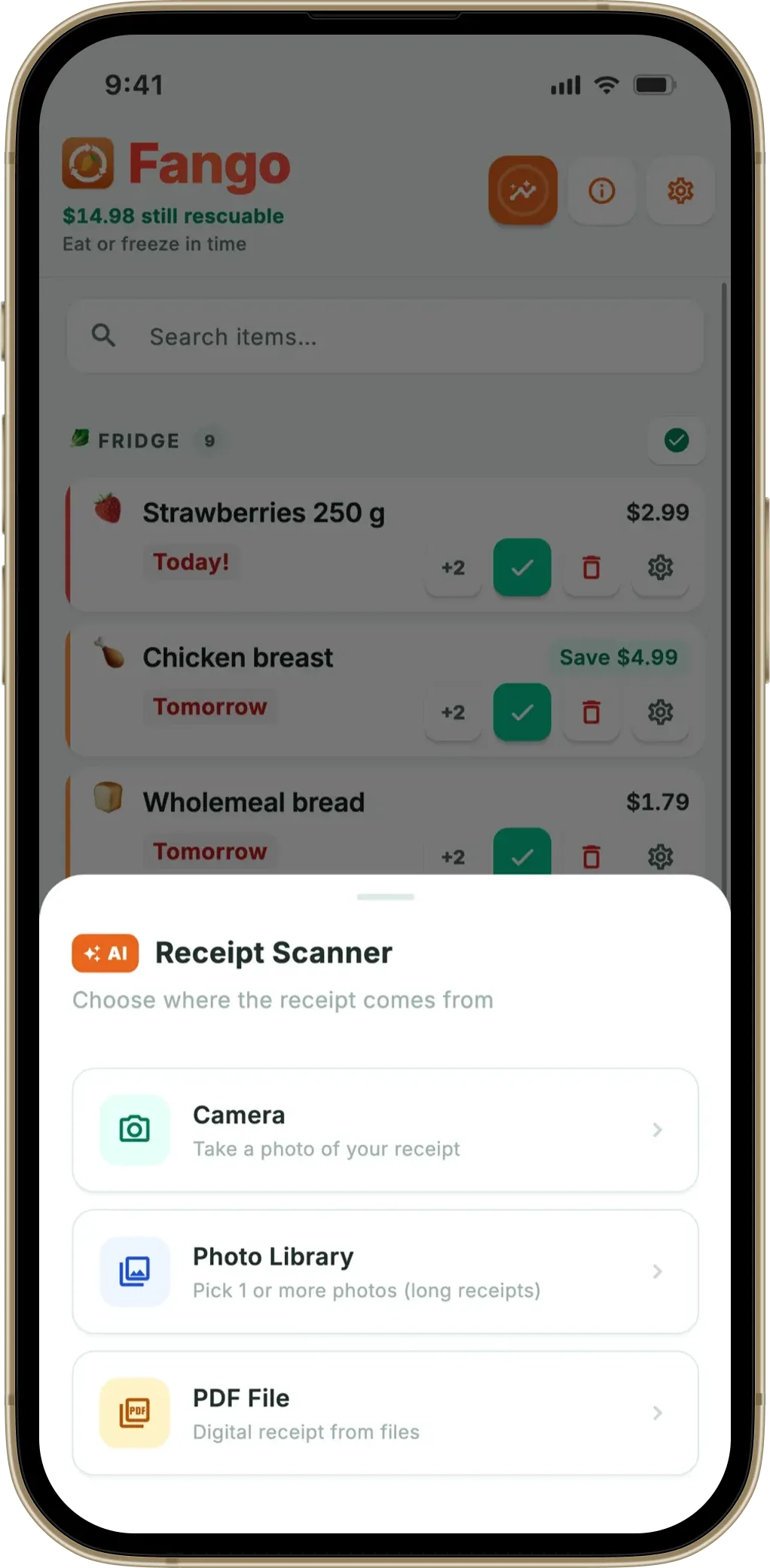
This article gives the timings for the apps people actually use in 2026, explains why the gaps exist, and walks through how to speed up your own scans.
- Fango (iOS) — 3–5 seconds, on-device OCR then text-only to AI
- Fango (Android) — 5–8 seconds, image to AI
- NoWaste — 8–15 seconds, receipt scanning on iOS, results vary by receipt
- Fridgely and Kitche — no longer in the app stores
- Speed-killers — bad lighting, multi-page PDFs, weak network, unfamiliar receipt formats
Real timings, 2026
Tested on a typical 12-item Tesco / S-Market paper receipt, indoor lighting, phone over wifi:
If you are choosing between apps, our guide to picking an expiry date tracker lists the features that decide whether you are still using it a month later.
| App | Median time | Fast case | Slow case |
|---|---|---|---|
| Fango (iOS) | 3–5 s | 2–3 s (clear receipt, wifi) | 10–12 s (low confidence, retries) |
| Fango (Android) | 5–8 s | 4–5 s (clear, wifi) | 10–15 s (low confidence) |
| NoWaste | 8–15 s | 6 s | 20+ s |
| Fridgely | n/a — no longer in the app stores | — | — |
| Kitche | n/a — removed from the app stores after Remy acquired it (Feb 2025) | — | — |
← scroll →
The “median” is what most users see most of the time. The slow cases happen when the receipt is poor quality, the connection is bad, or the receipt format is unfamiliar enough that the app’s confidence check triggers a fallback retry.
Why iOS is faster than Android in Fango
This is the most-asked question about Fango’s speed, and the answer is mechanical:
iOS path: the phone reads the receipt text on-device using Google ML Kit text recognition, then sends only the text — a few kilobytes — to Anthropic Claude for product identification. Network payload is small, AI processing is fast on text.
Android path: the receipt image is sent base64-encoded to Claude’s vision API. Network payload is much larger (often 1–3 MB), and vision processing takes longer than text processing on the AI side. The result is 2–3 seconds of extra time per scan compared to the iOS path.
The reason for the split isn’t laziness — Android’s on-device text recognition exists, but it varies a lot across manufacturers (Samsung vs Xiaomi vs Pixel), and the inconsistency caused enough wrong scans that the simpler one-call path turned out to be more reliable in practice.
What slows your scan down
Four factors account for nearly all the slow scans we see in support tickets:
- Bad lighting or glare. A receipt in a dim kitchen or with shiny patches takes longer for text recognition. The app retries with different settings, which adds seconds.
- Multi-page PDF receipts. Each page is its own scan. Fango caps at 5 pages and warns you if there are more (Costco-style long receipts).
- Unfamiliar receipt format. If the AI’s first pass returns nothing or returns low confidence, Fango’s three-tier review kicks in: strict mode → lenient mode → text-only fallback. Each retry is another round-trip.
- Weak network. 3G or weak Wi-Fi adds 2–5 seconds. The actual AI processing is fast; the round-trip is the bottleneck on slow connections.
How to speed up your scans
Practical fixes, in order of effort:
- Lay the receipt flat on a contrasting surface. Dark countertop, light receipt. Don’t hold it in your hand — wrinkles and angles slow text recognition.
- Even lighting, no glare. Avoid shooting under a bright kitchen spotlight that puts a shiny patch on the receipt.
- Hold the phone parallel. Angled photos take longer because the text recognition has to deskew them.
- Use the camera at full resolution. Screenshots of a screen showing a receipt are lower quality and slower to process.
- Use wifi. Especially on Android, where the image payload is large.
- For online orders, use the PDF directly. Tesco, Ocado, Wolt, Foodora and K-Ruoka all email PDFs that scan faster than a photograph of a paper receipt because the text layer is already digital.
The speed-vs-accuracy trade-off
Faster isn’t always better. Simple pattern-OCR scanners are blazingly fast on simple receipts (1–3 seconds) because they’re just matching text patterns — but they fail on anything they haven’t been programmed for, and the failure is silent. AI-powered apps take a few seconds longer but recognise much more variation in receipt formats.
The decision worth making isn’t “which is fastest” but “which is fast enough and reliable enough that I’ll actually use it for every shop.” For most people, a few extra seconds is worth it if the parse comes back right first time — a fast scan you have to correct line by line costs more than it saves.
Summary
A typical grocery receipt scans in 3–10 seconds with a modern AI receipt app. Fango is at the fast end at 3–5 seconds on iOS. The biggest speed gains come from clean photographs and a decent network — both are user-controllable.
Related reading: how grocery receipt scanner apps work, how AI reads receipts, food waste tracker comparison, grocery list apps from receipt.
Free to try for one month, no sign-up. Median 3–5 seconds per receipt on iOS, 5–8 on Android. After the trial it’s a monthly or yearly subscription, with the price for your country shown in the app.
Download on the App Store Get it on Google PlayFree for a month · No sign-up · iOS and Android
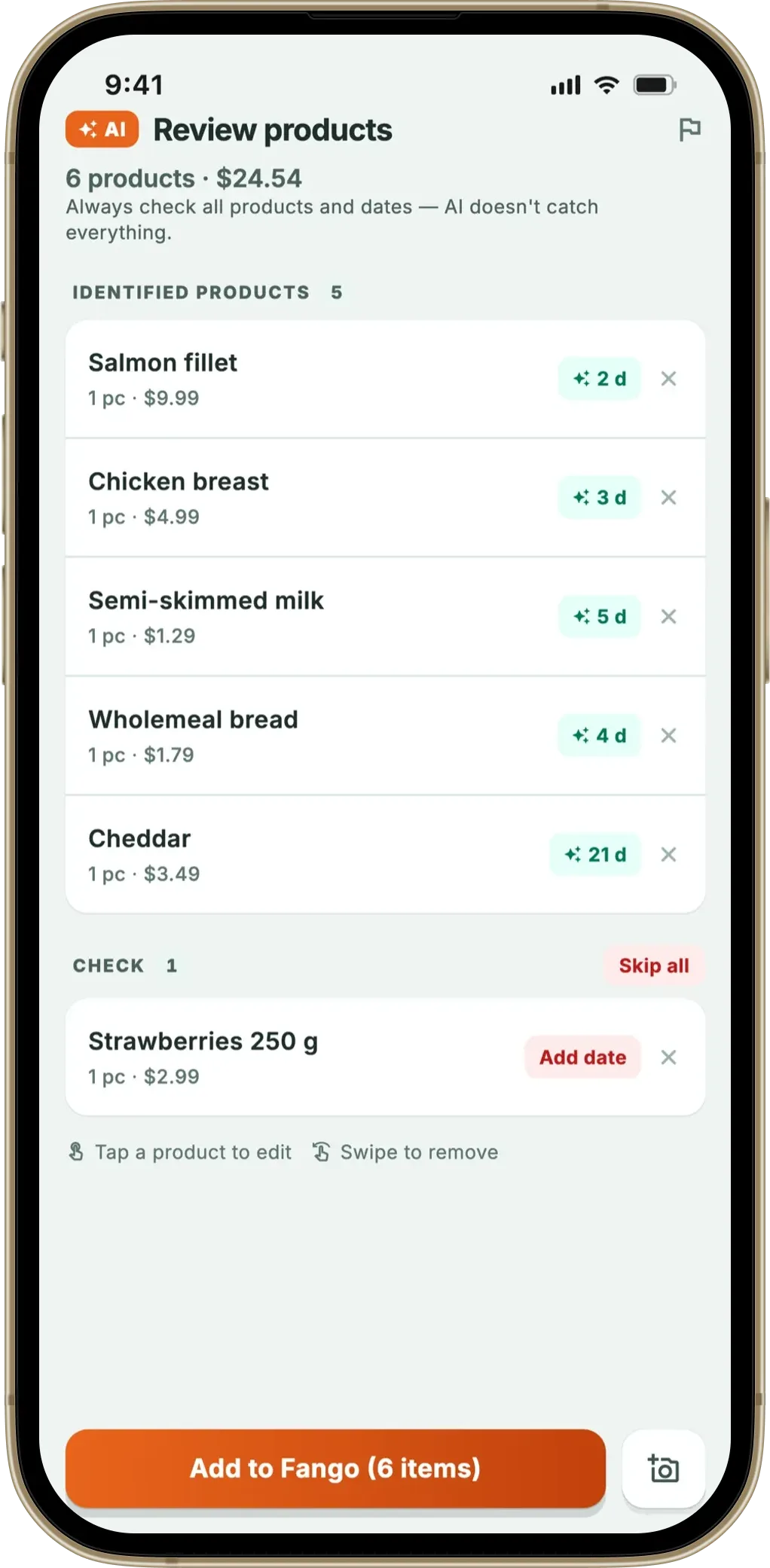
Frequently Asked Questions
How long does it take to scan a grocery receipt with an AI app?
Modern AI receipt scanners typically take 3 to 10 seconds for a normal paper receipt. Fango is at the fast end (3–5 seconds on iOS, 5–8 on Android) because on iOS it reads the receipt text on-device first and only sends text to the AI. Simple pattern-matching OCR can be faster on simple receipts (1–3 seconds) but struggles with messy ones because it can’t fall back to AI.
Why is Fango faster on iOS than Android?
On iOS, Fango runs on-device text recognition (Google ML Kit) first and sends only the extracted text to Anthropic Claude. On Android, the image itself is sent (base64-encoded) because Android’s text recognition isn’t consistent across manufacturers. The Android path makes one more network round-trip with a larger payload, which adds 2–3 seconds.
What slows receipt scanning down?
Four main factors. Bad lighting or glare on the receipt makes text recognition slower or forces an AI fallback. Multi-page PDF receipts take longer per page. Receipts in unsupported countries or layouts can trigger Fango’s three-tier review (strict → lenient → text-only), which adds a few seconds. A weak mobile connection adds network time. The fastest scans happen on clearly photographed paper receipts over wifi.
How does receipt scanner speed compare across apps?
Rough timings on a typical 12-item paper receipt in 2026: Fango 3–5 seconds on iOS, 5–8 on Android. NoWaste 8–15 seconds (its receipt scanning is on iOS; results vary by receipt). Kitche, which used to offer receipt scanning, and the original Fridgely are no longer available in the App Store or Google Play.
Can I speed up receipt scanning?
Photograph the receipt flat against a contrasting background (table top, not crumpled in your hand) in even lighting. Hold the phone parallel — angled photos force more processing. Use the camera at full resolution rather than a screenshot. Connect to wifi if available. PDF receipts from online delivery scan faster than paper because the text layer is already digital.
