There are several good apps for reducing food waste at home — but they suit different needs. Some people want a quick barcode scanner, others want recipes and a shopping list, others care about privacy and don’t want to create an account. If you’re approaching this from a specific app, we also compare CozZo alternatives and FoodShiner alternatives separately, and weigh up the wider best food storage apps.
This comparison covers four iOS apps: Fango, BEEP, NoWaste and Fridgely. Here’s an honest look at what each does well — and where there’s room for improvement.
- Fango — AI receipt scanning, no account needed, all data on device; iOS and Android
- BEEP — fast barcode scanning, household sharing included
- NoWaste — most features (recipes, shopping list) but requires account and cloud
- Fridgely — completely free, no subscription, but older interface and no AI
Quick comparison
| Feature | Fango | BEEP | NoWaste | Fridgely |
|---|---|---|---|---|
| AI receipt scanning | ✓ | — | ~ unreliable | ~ basic |
| Barcode scanning | — | ✓ | ✓ | ✓ |
| Expiry reminders | ✓ 1–14 days | ✓ | ✓ | ✓ |
| No sign-up required | ✓ | — | — | — |
| Data stored locally | ✓ | cloud | cloud | cloud |
| Recipes | — | — | ✓ | — |
| Household sharing | ✓ up to 4 people | ✓ | ✓ | — |
| Android | ✓ | — | ✓ | ✓ |
| Free tier | — | ✓ limited | ✓ 6 lists | ✓ |
| Price | from $2.99/mo or $22.99/yr | Not listed publicly | ~$7/year (~€6) | No subscription |
| Free trial | 1 month free | 30 days free | — | — |
← scroll →
BEEP — best for barcode scanning
BEEP is a tightly scoped app: scan a barcode, the app fetches the product name and image, you enter the expiry date. That’s it. No receipt scanning, no recipes — just expiry tracking.
That simplicity is also BEEP’s strength. Setup is fast and the interface is clean. Household sharing is included, which makes it a solid choice for families where multiple people add items to the fridge.
The downside is that barcode scanning sometimes returns incorrect information or fails to recognise a product altogether. Expiry dates always have to be entered manually — there’s no automatic detection.
- Clean, simple interface
- Barcode scanning works reliably
- Household sharing included
- iOS only — no Android version
- No receipt scanning
- Expiry date always entered manually
- Account required
- Barcode recognition can be inaccurate
NoWaste — most feature-complete
NoWaste is the most feature-rich app in this comparison. It includes barcode scanning, receipt scanning, recipe suggestions, a shopping list, and household sharing. If you want complete kitchen management in a single app, NoWaste is a strong candidate.
User reviews tell a different story though: receipt scanning frequently fails, barcodes sometimes return incorrect expiry dates, and duplicate entries crop up. There’s more on paper than with most competitors, but execution is uneven.
NoWaste requires an account and stores data in the cloud — relevant if privacy matters to you. The Pro tier is affordable (~$7/year), but the free version is limited to six lists.
- Most features of any app here
- Recipes and shopping list
- Household sharing
- iOS and Android, affordable Pro
- Receipt scanning unreliable (user reviews)
- Account and cloud storage required
- Free tier heavily limited
- Interface can feel complex
Fridgely — the established free option
Fridgely is one of the oldest apps in this space. It includes both barcode and receipt scanning, expiry reminders, and fridge management — all free, with no subscription required. That’s a meaningful advantage.
The trade-off is age: the interface feels dated and the app isn’t developed as actively as newer alternatives. Receipt scanning works, but recognition accuracy falls behind AI-powered competitors. An account is required.
- Completely free
- Barcode + receipt scanning
- iOS and Android
- Well-established, long track record
- Dated interface
- Development has slowed
- Account required
- No AI recognition
Fango — receipt scanning first, typing last
Fango differs from the competition in two key ways: your fridge data stays on your device by default (no Fango cloud account) and no sign-up is required. Setup takes under a minute.
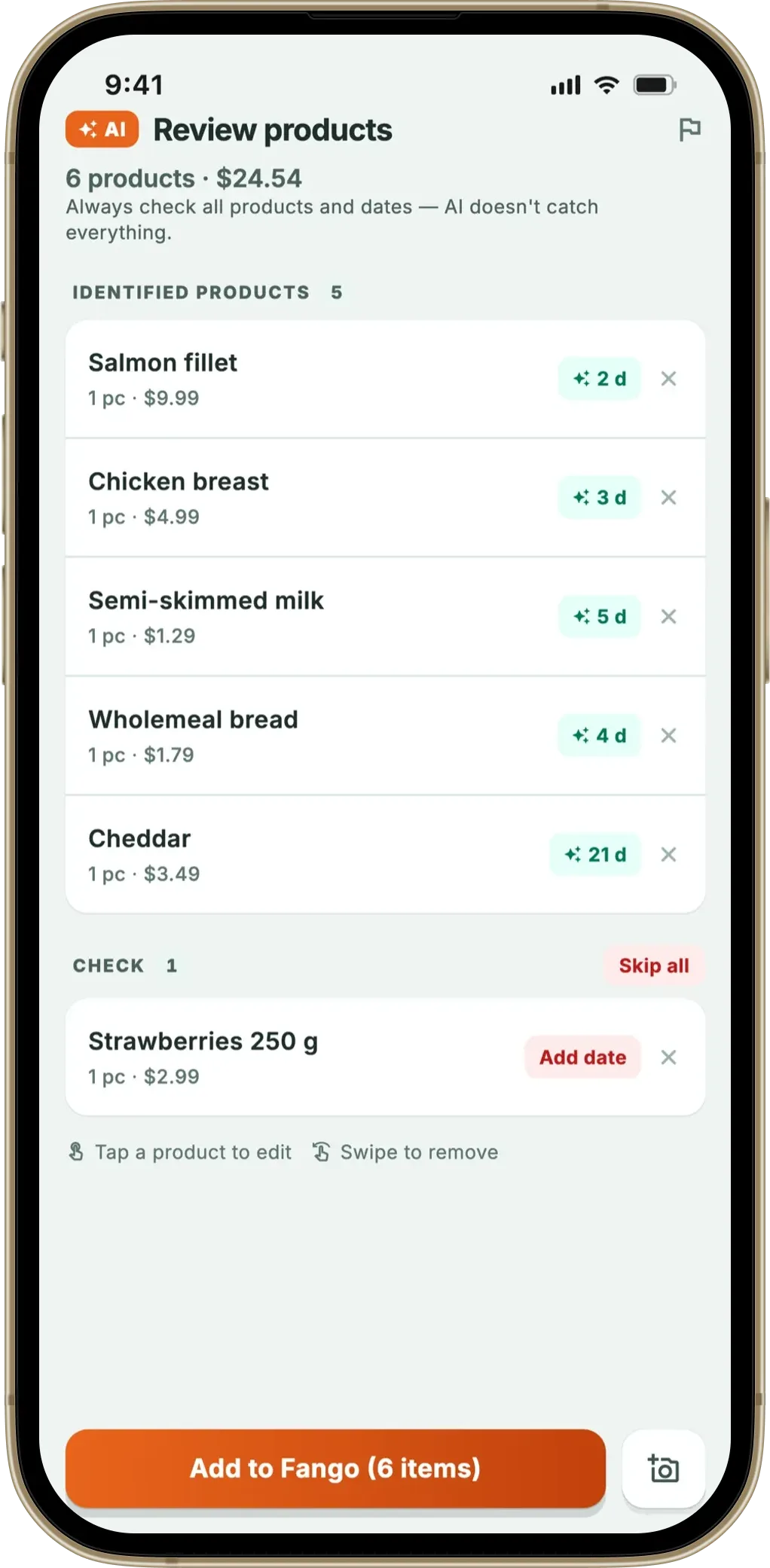
Receipt scanning is Fango’s core feature. You photograph your grocery receipt, and AI automatically identifies the products and adds them to your digital fridge — you only need to confirm the expiry dates. Fango is free to try for one month with full access to every feature, then from $2.99/month or $22.99/year.
Where does Fango fall short? There’s no barcode scanner and no recipes. There is a shopping list, and household sharing puts it — and the fridge — on up to four phones in the same home. Android support is now available. If those features matter to you, NoWaste or BEEP may be a better fit.
- No account required
- Fridge data stays on your device by default — no cloud account
- AI receipt scanning works reliably
- Simple, fast to set up
- 1-month free trial
- Shopping list that suggests what you’re running low on
- Household sharing: the same view for up to four people, one subscription
- No barcode scanning
- No recipes or meal planning
Which app is right for you?
The best app depends on what you’re looking for. Here’s a quick summary:
Scan your grocery receipt, AI adds your products, and you get a notification in time. No sign-up, no cloud account by default. Free to try for one month with full access, then from $2.99/month or $22.99/year.
Download on the App Store Get it on Google PlayFree for a month · No sign-up · iOS and Android
Summary
There’s no single “best” app — it comes down to your priorities. If privacy and quick setup matter most, Fango stands out. If you want recipes and household sharing, NoWaste covers more ground. For barcode-only tracking, BEEP is clean and uncomplicated.
All four apps are free to try — it’s worth downloading one or two and seeing which feels most natural to use. Also see our roundup of the best pantry inventory apps and our dedicated expiry date tracker guide — plus CozZo app alternatives and NoWaste app alternatives if you’re coming from either of those apps.
Related reading: Best KitchenPal App Alternatives.
Frequently Asked Questions
What is the best food expiry tracker app for iPhone in 2026?
The best app depends on your priorities. Fango is best if you want AI receipt scanning with no account required and a fridge list that stays on your device by default. BEEP is best for fast barcode scanning and household sharing. NoWaste offers the most features (recipes, shopping list, household sharing) but requires an account and cloud storage. Fridgely is the best fully free option with no subscription.
Does Fango require an account or registration?
No — Fango requires no account, email address or registration. The app works immediately after installation, and your fridge data is stored locally on your device. The only network step is the optional AI receipt scan, where the image is sent to Anthropic Claude for product recognition and then discarded. This is one of Fango’s main differentiators from competitors like NoWaste, BEEP and Fridgely, which all require an account.
What is the difference between Fango and NoWaste?
The main differences are: Fango stores your fridge data locally (no cloud account by default), requires no sign-up, and focuses on AI receipt scanning. NoWaste requires an account, syncs to the cloud, and offers more features — recipes, a shopping list, and household sharing. Fango’s receipt scanning works more reliably according to user reviews; NoWaste’s receipt scanning has reported accuracy issues.
Which food tracker app works without a cloud account?
Fango is the only app in this comparison that stores your fridge inventory locally on your device — no account required. Unless you turn on family sharing, the only data that leaves the device is the optional receipt scan image, which is sent to Anthropic Claude for AI product recognition and immediately discarded. NoWaste, BEEP and Fridgely all require an account and store inventory data in the cloud.
