KitchenPal is an established app with more than 100,000 downloads on Google Play and a genuinely generous free tier. It bundles pantry tracking, barcode and receipt scanning, shared grocery lists, meal planning, recipe search by ingredient and family sharing into one app. That’s a lot of app. And “a lot of app” is exactly why some people go looking for something else — they want to track what’s in the fridge without meal-planning calendars, shopping lists or a family setup getting in the way. Fango is one such simpler alternative, but it’s honestly not for everyone, and this guide will tell you when it isn’t.
UNEP estimates that around one fifth of all food available to consumers is wasted. WRAP reports UK households alone throw away roughly 6.4 million tonnes of food each year. A tracking app can genuinely help — but only if it matches how you actually shop and cook. Here’s an honest look at the alternatives in 2026.
- You want everything (recipes + meal planning + family sharing) → stick with KitchenPal
- You want no account and data on your device by default → Fango
- You want the fastest way to add a whole shop → Fango (AI receipt scan)
- You want a shared pantry with expiry alerts → Fango (no account) or KitchenPal itself (sharing works on the free version)
Why people look for KitchenPal alternatives
KitchenPal is a well-built, popular app, and for many households the all-in-one approach is exactly the appeal. But the most common reasons people start searching for something else are:
The feature that matters most in any of these apps is the reminder — see what a good expiry date tracker app does differently.
- Too many features. Recipes, meal-planning calendars, product comparisons and shopping lists are great if you use them — but if you only want to know what’s about to go off, the extra surface area can feel like clutter.
- Data online. KitchenPal’s sharing and sync features keep your kitchen data online. Some people would rather their fridge list never leave their phone.
- Premium upsell. The core app is free, but unlimited scanning and other extras sit behind Premium ($3.99/month or $14.99/year in the US App Store, or $29.99 lifetime).
- They just want reminders. A large group of users only ever wanted one thing: a nudge in time. Everything beyond that is noise to them.
None of these make KitchenPal a bad app — it’s a good one. They’re just reasons a different tool might suit you better. Below is a clear breakdown of the main alternatives, including where KitchenPal still wins.
Is KitchenPal free? Free vs Premium
Mostly, yes. The free version of the KitchenPal app covers the core of what most people install it for: a pantry, fridge and freezer inventory, shopping lists and recipe search, and you can share your kitchen with family at no cost. Premium ($3.99/month or $14.99/year in the US App Store, or $29.99 lifetime) is a paid upgrade for heavier users. It removes the scanning limit and adds other extras, and when you upgrade, your family members get Premium too. If you mostly add items by barcode and use the recipes, the free tier goes a long way; if you scan every item of a big weekly shop, the limits show up sooner.
The alternatives price things differently. NoWaste is free for up to 6 lists and 500 items, with NoWaste Pro at $6.99 a year or $29.99 lifetime. CozZo has shut down. Fango has no free tier at all: it is free for one month with everything switched on, then a monthly or yearly subscription (price for your country shown in the app), with one subscription covering up to four people. The fair way to compare them is not the sticker price but whether the app gets used every week, because a tracker only saves money when it keeps food from going in the trash, and most families can save up to $60 a month when it does.
The alternatives at a glance
| Feature | Fango | KitchenPal | NoWaste | CozZo (shut down) |
|---|---|---|---|---|
| No sign-up required | ✓ | Not confirmed | Not confirmed | — |
| Data stays on device by default | ✓ | ✗ | ✗ | — |
| AI receipt scanning | ✓ | Receipt scan | Receipt scan on iOS | — |
| Barcode scanning | ✗ | ✓ (limited on free) | ✓ | — |
| Recipe suggestions | ✗ | ✓ | Not confirmed | — |
| Meal planning | ✗ | ✓ | ✗ | — |
| Shopping / grocery list | ✓ | ✓ | ✓ | — |
| Family / household sharing | ✓ up to 4 people | ✓ also on free | Not confirmed | — |
| Expiry push notifications | ✓ | ✓ | ✓ | — |
| iOS | ✓ | ✓ | ✓ | Removed |
| Android | ✓ | ✓ | ✓ | — |
| Pricing | ✓ 1-month free trial | Free + Premium from $3.99/mo | Free up to 500 items; Pro $6.99/yr | Shut down (Dec 2025) |
← scroll →
The honest takeaway from that table: KitchenPal and NoWaste both do more than Fango. Fango’s whole design philosophy is to do less — and to do the one thing it does (fridge tracking with reminders) with no account and no cloud by default. Whether that’s a feature or a limitation depends entirely on you.
Fango — best for AI receipt scanning and a simple fridge list
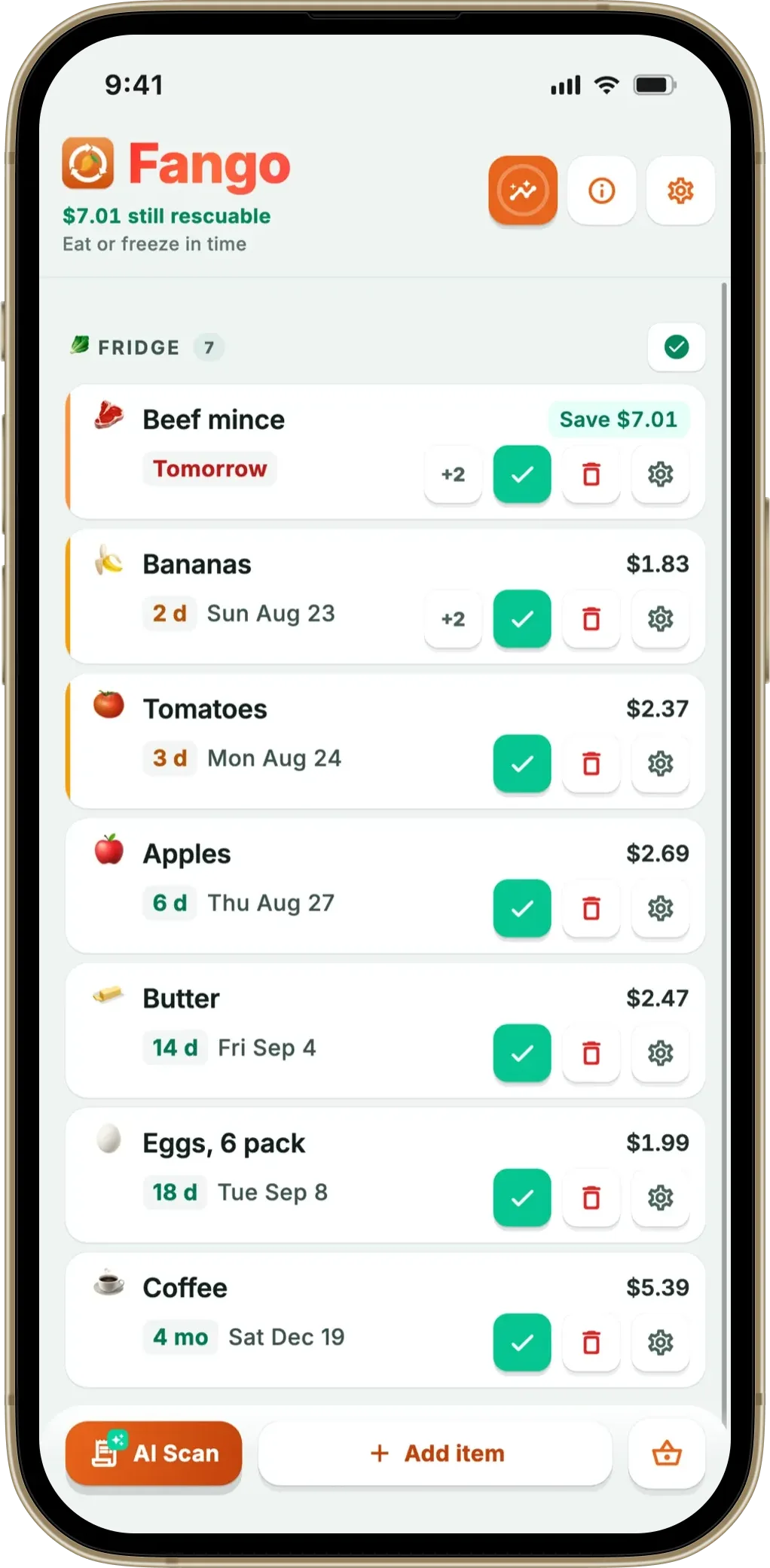
Fango was designed for people who found apps like KitchenPal to be more than they needed. There’s no account, no household setup and no recipe library — you download it, and you’re tracking immediately. No email, no password, no verification. Your fridge data stays on your device unless you share it with your household; otherwise the only network step is the optional AI receipt scan.
The standout feature is that receipt scan: photograph your grocery receipt (or import a PDF) and Fango reads the products automatically, estimating reminder dates by item type across more than 60 countries. For a big weekly shop, you’re done in under a minute instead of scanning barcodes one at a time. Fango then sends push notifications in time — anywhere from one to fourteen days ahead, configurable per item, with action buttons and a home-screen widget. It works in 8 languages and dozens of currencies.
Be clear on what it doesn’t do: no barcode scanning, no recipes, no meal planning, no cloud sync by default. Household sharing is there, though: up to four people on one subscription. If you need the first three, Fango is the wrong app and KitchenPal is the better one. If you don’t, that missing weight is the point. Our guide to a food tracking app without recipes explains the philosophy in more detail.
- No account or sign-up required
- Fridge data stored locally — no cloud sync by default
- AI receipt scan adds a whole shop in seconds
- Configurable expiry reminders (1–14 days) + widget
- 1-month free trial, then subscription (price in app)
- Household sharing: the same view for up to four people, one subscription
- No barcode scanning
- No recipes or meal planning
- No multi-device sync by default
Scan your receipt — AI adds everything automatically. Get a reminder in time. No account, no cloud sync by default, fridge data stays on your device by default.
Download on the App Store Get it on Google PlayFree for a month · No sign-up · iOS and Android
KitchenPal — best if you want everything in one app
It’s worth saying plainly: if you like KitchenPal’s breadth, no simpler app fully replaces it. KitchenPal organises your kitchen into pantry, fridge, freezer and custom sections, tracks quantities and expiry dates, and alerts you in time. You can add items by barcode, receipt, text or voice, and its recipe-by-ingredient system suggests meals based on what you already have.
On top of that it offers shared grocery lists, meal planning and kitchen sharing, which works on the free version too — and when you upgrade to Premium, your family members get Premium as well. The core app is free; Premium ($3.99/month or $14.99/year in the US App Store, or $29.99 lifetime) unlocks unlimited scanning and other extras. If you want a genuine kitchen command centre for a household, KitchenPal remains one of the strongest picks in 2026.
- Barcode and receipt scanning
- Recipe suggestions by ingredient
- Meal planning + shared grocery lists
- Family sharing (Premium shared with family)
- Generous free tier, kitchen sharing included
- Data kept online for sharing and sync
- Can feel feature-heavy if you only want reminders
- Unlimited barcode scanning and other extras need Premium
NoWaste — best for syncing across devices
NoWaste is another established name in food tracking, built around inventory lists that sync across your devices, with a web app as well. It includes manual entry and barcode scanning, and on iOS also receipt scanning and an AI assistant for adding items by voice or text. It’s lighter than KitchenPal on meal planning. The free version covers 6 lists and 500 items; NoWaste Pro costs $6.99 a year or $29.99 lifetime in the US App Store. If you’re choosing between scanning receipts and scanning barcodes, our receipt vs barcode food app guide breaks down which suits which shopper.
- Syncs across devices, plus a web app
- Barcode scanning
- Receipt scanning on iOS
- Available on iOS and Android
- Free version limited to 6 lists and 500 items
- Pro is a paid upgrade ($6.99/yr or $29.99 lifetime)
- The Android listing mentions barcode scanning only, not receipts
CozZo — no longer available
CozZo overlapped closely with KitchenPal: pantry and fridge inventory, barcode scanning, a receipt reader, shopping lists and a shared household account, with expiry alerts throughout. It has since shut down. Its developer ended the app and its cloud service, supported a final free version until December 30, 2025, and CozZo is no longer in the App Store. If you were a CozZo user looking for a like-for-like replacement, KitchenPal is the closest match. For a broader look at this whole category, see our best pantry inventory app roundup.
- Full pantry inventory + shopping lists
- Barcode scanning, receipt reader and a household account
- Shut down; the final version was supported until December 30, 2025
- No longer in the App Store
Which app is right for you?
If you only take one thing away: the honest choice between these apps isn’t about which is “best” in the abstract — it’s about whether you want more app or less app. KitchenPal and NoWaste give you more. Fango gives you less on purpose, and for a lot of people that’s the relief they were looking for.
Related reading: Best “Best Before” App Alternatives in 2026.
Sharing with family members: KitchenPal vs the alternatives
Sharing is one of the main reasons households pick KitchenPal, and it works even on the free version: you share your kitchen with a link, and the shared inventory is kept online. That works well, and it is the right model if you want the same data on several of your own devices. NoWaste syncs across devices too, and CozZo, which had a household account, has shut down.
Fango shares without accounts. One person creates a household and the others join with an 8-character invite code, up to four people in total on one subscription. Everyone sees the same fridge, freezer and pantry list, the monthly savings total is shared, and each shopping list can be shared with the household or kept on your own phone, a choice the app asks about for every list. Changes appear on the other phones within seconds. Reminder times, sounds and language stay personal, so one person’s notification settings never overrule another’s.
Frequently asked questions
What is the best KitchenPal alternative?
It depends on what you want. If you need everything KitchenPal does — barcode scanning, recipes, meal planning and family sharing — no simpler app fully replaces it, and KitchenPal itself may still be your best bet. If you found KitchenPal too feature-heavy and just want to track what’s in your fridge without an account, Fango is a strong pick: AI receipt scanning, expiry reminders and local on-device storage, with no sign-up. Also see our best food waste tracker app comparison.
Does Fango have recipes and family sharing like KitchenPal?
Recipes, no; family sharing, yes. Fango does not have recipe suggestions, meal planning or barcode scanning. It does have household sharing: up to four people on one subscription. The shopping list is shared within that household too; outside it, everything stays on your device by default. It deliberately does one thing: track what you bought and remind you in time. If those extra features matter to you, KitchenPal is the better choice. Fango is for people who want a simpler, private tool.
Is KitchenPal free?
KitchenPal is free to download on iOS and Android and covers the core pantry, list and recipe features at no cost. It also offers Premium ($3.99/month or $14.99/year in the US App Store, or $29.99 lifetime), which unlocks extras such as unlimited scanning. Kitchen sharing is included in the free version, and when you upgrade, your family members get Premium too.
Is there a food tracking app that does not require an account?
Yes. Fango requires no account or sign-up — you download it and start tracking immediately, and your fridge data stays on your device by default. The one exception is optional AI receipt scanning, where the image is processed by Anthropic Claude momentarily and then discarded. See our full article on food tracking apps with no registration.
Which KitchenPal alternatives are free?
None of them is completely free with every feature. NoWaste is free for up to 6 lists and 500 items, with NoWaste Pro at $6.99 a year or $29.99 lifetime in the US App Store, while KitchenPal’s own free tier already covers the core features. CozZo has shut down. Fango is free for one month with full access, then a monthly or yearly subscription (price for your country shown in the app) for the whole household. If you only want to try receipt scanning, that month is enough to see whether it fits how you shop.
Can family members share a food list without each creating an account?
With Fango, yes. Up to four people join one household with an 8-character invite code, with no email or password, and they all see the same fridge, freezer and pantry list plus any shopping lists you choose to share. KitchenPal lets you share a kitchen with a link, even on its free version; check its current listing for whether each person needs to sign in.
