Scanning a receipt to track your food is a fast, almost effortless way to cut waste — and there’s plenty to cut, with the UNEP Food Waste Index estimating roughly a fifth of the food available to consumers goes to waste. But it’s fair to pause before pointing your camera at a record of what you bought and handing it to an app. The honest answer is that safety depends entirely on the app, not on receipt scanning itself. A grocery receipt doesn’t contain your card number or your address, but some apps are built to harvest your shopping habits, while others never keep a thing. This guide explains what’s actually on a receipt, what to check before you trust an app, and how a privacy-first one like Fango handles it.
- A grocery receipt shows the store, date, items and total — not your full card number, PIN or address.
- The risk isn’t the receipt, it’s the app: whether it needs an account, keeps copies on a server, or sells your purchase data.
- Red flag: if an app pays you points or cash to scan receipts, your data is usually the product being sold.
- Fango sends the receipt once to read the products, then discards it — no account, no cloud copy, list stays on your phone by default.
What’s actually on a grocery receipt
Before worrying about safety, it helps to know what a receipt does and doesn’t reveal. A standard grocery receipt prints the store name and location, the date and time, each item with its price, the total, and the payment type — “card” or “cash”. What it does not print is the thing that would actually let someone spend your money: card receipts show only the last four digits of your card, never the full number, and never your PIN, name or address.
If keeping track of dates like these by hand is the part that never sticks, an expiry date tracker app can do it from your grocery receipt.
So a scanned grocery receipt tells an app what you bought, not how to access your account. That’s a meaningful distinction. The sensitive part of a receipt is the picture it paints of your habits — what you eat, how often you shop, roughly what you spend — not a route into your bank. Which is exactly why the question that matters is what the app does with that picture.
The real question: what does the app do with it?
Receipt scanning is just a tool; the safety comes down to the company behind it. Two apps can scan the identical receipt and treat it in completely opposite ways. Ask three things of any receipt app before you trust it:
- Does it require an account? An account ties every receipt you scan to your identity and, usually, stores it on the company’s servers. No account means there’s nothing to tie your shopping to and no central copy to leak.
- Where does the data live? Some apps keep your full receipt history in the cloud so they can show it across devices. Convenient, but it also means a copy of your purchases sits on a server you don’t control.
- What’s the business model? This is the big one. If an app is free and pays you — points, cashback, gift cards — for scanning receipts, you are not the customer. Market-research firms buy that purchase data, and the rewards are what they pay for it.
That last point separates two entire categories of “receipt scanner”. One category exists to monetise your shopping data; the other exists only to help you. Knowing which you’re using is most of the safety question answered. Our best privacy-first food app guide breaks down what privacy-first actually looks like in practice.
Fango reads your receipt once to build your fridge list, then discards it. No account, no cloud history by default, nothing sold to advertisers — your data stays on your phone by default.
Download on the App Store Get it on Google PlayFree for a month · No sign-up · iOS and Android
Receipt-reward apps vs food-tracking apps
It’s worth being blunt about the difference, because both call themselves receipt scanners. Reward apps like the well-known cashback scanners are designed to collect and sell purchase data — that’s not a side effect, it’s the entire point, and the few pennies per receipt are your cut. There’s nothing hidden about it if you read the terms, but it is the opposite of private.
A food-tracking app that scans receipts has no such incentive. Its job is to turn the receipt into a fridge list with expiry dates and then get out of the way. Fango falls in this second category: it doesn’t pay you, doesn’t run ads, and doesn’t sell anything — the receipt is used purely to build your own list. The way it stays sustainable is a simple optional subscription, not your data. If you want the mechanics of how the scan itself works, the grocery receipt scanner app guide walks through it.
How Fango handles a scanned receipt
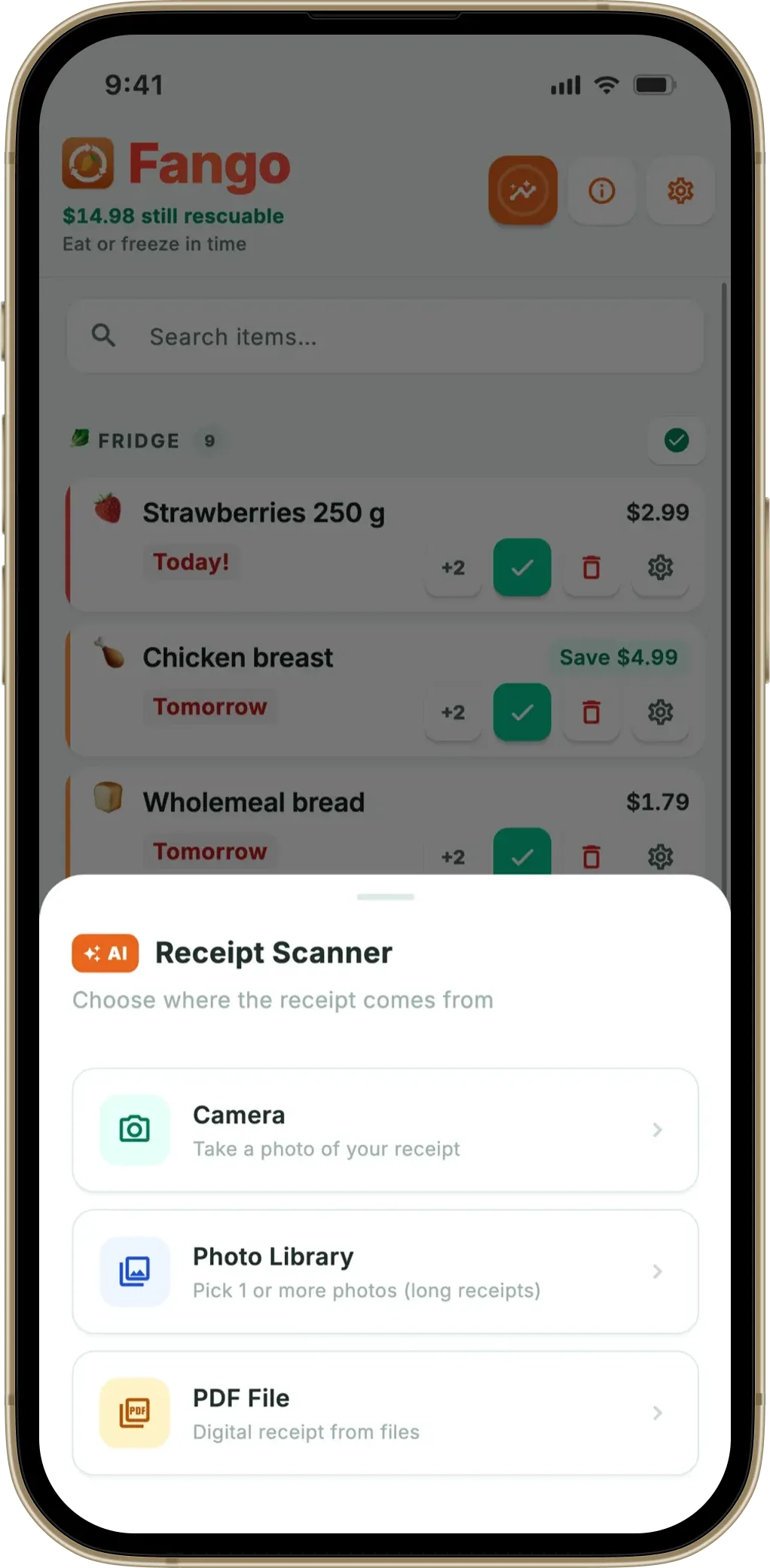
Here’s exactly what happens when you scan with Fango, so there’s no mystery. You photograph the receipt; the image (or its text) is sent once to identify the products and estimate an expiry date for each; then it’s discarded. It isn’t stored on a server, isn’t tied to an account, and isn’t linked to a profile of you — because there is no account and no profile. The only thing kept is the resulting list of products, and that stays on your phone unless you share it with your household.
That design choice runs through the whole app. There’s no sign-up, nothing syncs to a cloud unless you share a fridge with family, and for everyone else the single moment data leaves the device is during the scan itself. Even your reminders and statistics are computed locally. If keeping your data off the cloud matters to you, our guide on a food app with no cloud sync by default explains how that works and the trade-offs involved.
Fango sorts everything by reminder date and colour-codes the urgent items in red. The home screen widget shows what to use next without opening the app.
Download on the App Store Get it on Google PlayFree for a month · No sign-up · iOS and Android

A quick checklist before you trust any receipt app
If you only remember a few things, make them these. Run any receipt app past this list and you’ll quickly sort the food-trackers from the data-harvesters:
Receipt scanning is genuinely safe to use for food tracking when the app behind it has no reason to keep your data — and a clear reason not to. For where receipt-scan apps sit among everything else, the best food waste tracker app roundup compares the main options on exactly these points.
Frequently Asked Questions
Is it safe to scan grocery receipts with an app?
It depends entirely on the app. A grocery receipt holds the store, date, items and total — not your card number, which isn’t printed in full. The real questions are whether the app needs an account, whether it keeps a copy of your receipts on a server, and what it does with the data. A privacy-first app like Fango sends the receipt once to read the products, then keeps the resulting list on your phone by default.
What data is on a grocery receipt?
A typical grocery receipt shows the store name and location, date and time, each item with its price, the total, and the payment method as a type (such as “card”). It does not print your full card number, PIN, name or address. Card receipts usually show only the last four digits, so a scanned grocery receipt reveals what you bought, not how to access your account.
Does scanning a receipt share my shopping with advertisers?
Some receipt apps are built specifically to sell your purchase data to market researchers — that’s their business model. Others, built only to help you track food, never share it. Check the privacy policy: if an app rewards you with points or cash for scanning, your data is usually the product. Fango doesn’t pay you and doesn’t sell anything; the receipt is used only to build your fridge list.
What happens to the receipt photo after Fango reads it?
The receipt is sent once to identify the products and their likely expiry dates, then discarded — it is not stored on a server or tied to an account. Only the resulting list of products lives on your phone. There is no sign-up and no cloud copy by default, so nothing about your shopping is kept anywhere you can’t see.
