“How long do I have left on this?” is the question most people ask while standing at the open fridge. WRAP estimates the average UK household throws away £1,000 of food a year, and most of that is food whose expiry date got past you. An expiry date check app is the tool for answering the fridge-door question without doing maths in your head — open the app, see what’s about to go off, plan dinner around it. Fango is built for that exact moment: a single screen sorted by reminder date, with the thing about to go off at the top.
This guide covers what an expiry-date-check workflow actually looks like in practice — checking a single item, logging a whole shop, and how Fango compares to barcode-based or photo-OCR alternatives.
- Check single items in 5 seconds — type a name, accept the suggested expiry date
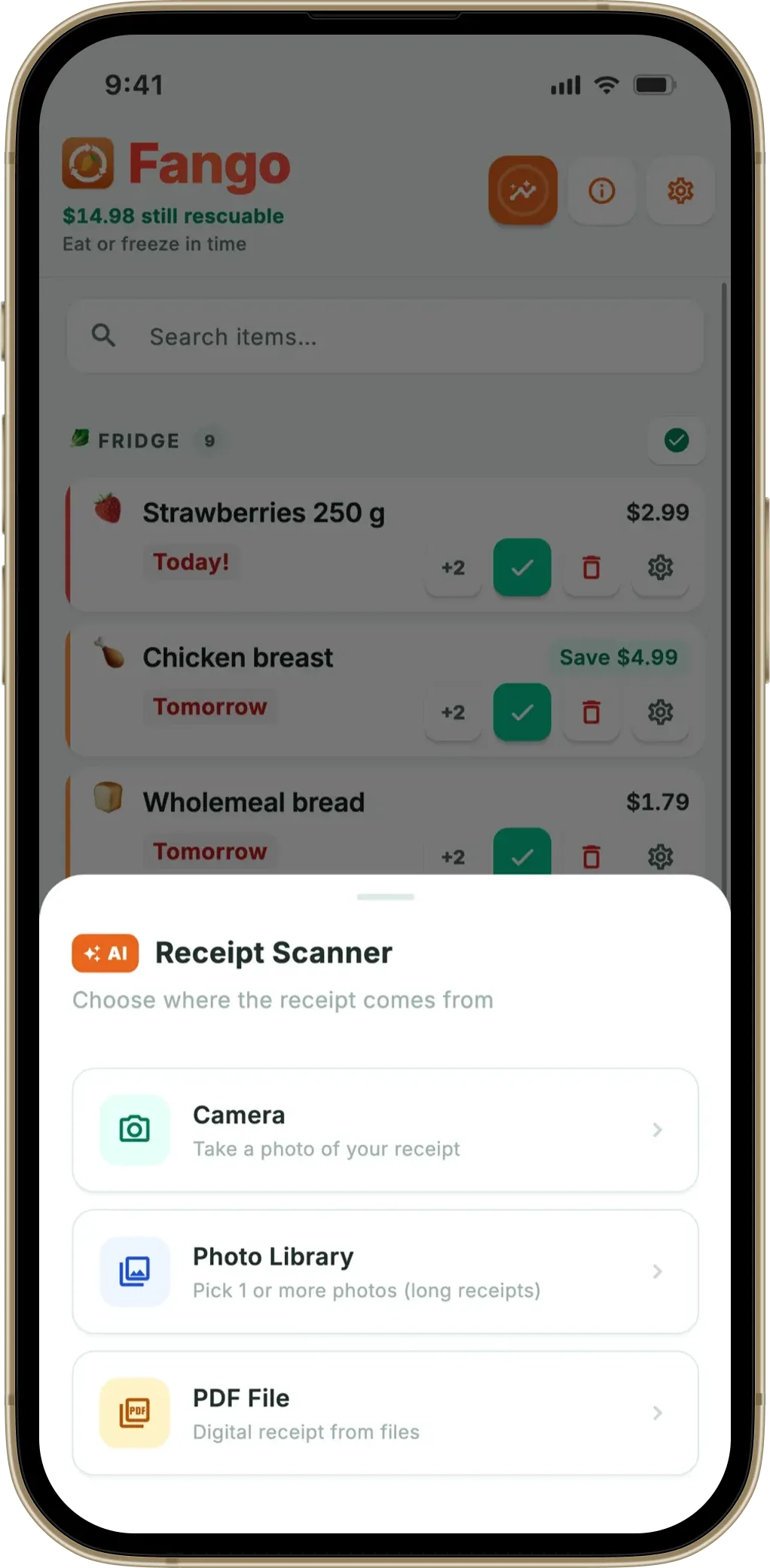
- Log a full shop in 30 seconds — scan the receipt, AI does the rest
- Push notifications 1–14 days before expiry — configurable per product
- No account, no cloud sync by default — Fango stores everything locally
Three Ways to Check an Expiry Date
An expiry date check app is only as fast as its slowest step. There are three common input methods, ranked by friction:
If you are choosing between apps, our guide to picking an expiry date tracker lists the features that decide whether you are still using it a month later.
-
1
Receipt scanning (fastest). Photograph the till receipt after a shop. AI identifies every product and assigns a default expiry date based on category. A 25-item shop is logged in 30–60 seconds with no typing. Fango uses this approach as the primary input.
-
2
Manual lookup (good for one item). Type the product name, accept the suggested expiry. Useful when you bought one thing off-receipt or want to check what something will be by next week. Around 5 seconds per item.
-
3
Barcode scanning (slow, precise). Scan the barcode, the app fetches product info. Reliable but slow at 25 items, and many EU supermarket products have inconsistent barcode databases.
A fourth method — photographing the printed expiry date and using OCR — is what most people expect when they hear “expiry date check app”. In practice it’s the least reliable: print quality, low-contrast labels, curved packaging, and ink smudges defeat OCR more often than they help. Most reliable apps either skip it or use it as a last-resort manual override.
Fango holds the reminder date for everything in your fridge, freezer, and pantry — sorted so the next thing to use is always at the top. Receipt scanning means a weekly shop is logged in 30 seconds. No sign-up, no cloud account by default — fridge data stays on your phone by default.
Download on the App Store Get it on Google PlayFree for a month · No sign-up · iOS and Android
How Fango’s Single-Item Check Works
-
1
Open the app, tap +. The add-item sheet opens with a search field and a list of common product suggestions (over 400 per language).
-
2
Type or tap a product. Auto-complete kicks in after 2 characters. If the product is in the suggestions, one tap fills in the name and a default category-based expiry date.
-
3
Adjust the date. The default is conservative — for milk, 3–4 days from today. If your milk has a longer printed date, override it. The app remembers your override for that product next time.
-
4
Set how many days before expiry to be reminded. Defaults work for most products; override per item when needed (1 day for chicken, 5 days for jam).
-
5
Save. The item joins the main list, sorted by reminder date. The notification is scheduled. Done — total time around 5 seconds.
Default Expiry Windows Used by the App
If you don’t know the printed date, the category default is usually right within a day. Common ones:
For per-product detail, see how long does food last in the fridge. For storage habits that make these dates accurate, see food storage tips.
Use-By vs Best-Before — Why the Distinction Matters in the App
Two different printed dates mean two different things, and an expiry date check app should treat them differently. UK Food Standards Agency draws the line clearly:
Food is safe after this date — it just won’t be at peak quality. Tinned goods, dry pasta, biscuits, eggs.
Don’t eat after this date — bacterial growth makes food unsafe. Raw meat, fresh fish, deli items, ready meals.
For a deeper explanation, see best before vs use by date and what “best before” actually means.
Fango sorts everything by reminder date and colour-codes the urgent items in red. The home screen widget shows what to use next without opening the app.
Download on the App Store Get it on Google PlayFree for a month · No sign-up · iOS and Android

What an Expiry Date Check App Won’t Do
- Read printed dates from blurry package photos reliably — manual entry is faster
- Make food safe past its use-by date — the date is a real safety threshold for risky items
- Track items you didn’t add — the inventory only knows what you’ve logged
- Replace good fridge hygiene — the app’s dates assume the fridge is at 0–5°C
Frequently Asked Questions
Is there a free expiry date check app?
Fango is free to try for one month, with full access to every feature including unlimited AI receipt scans and per-product notification timing. After the trial it’s from $2.99/month or $22.99/year.
Can I check expiry dates without an internet connection?
The list, manual entry, and notifications all work offline in Fango. Only AI receipt scanning needs a connection — the AI runs server-side. Once items are logged, no connection is needed for daily use.
Does the app know about regional date formats?
Yes — Fango supports 34 country setups with auto-detected currency (26+ supported). Receipts from US/CA are read as MM/DD/YYYY; everywhere else as DD/MM/YYYY. Manual entry uses your phone’s locale.
What’s the difference between this and a fridge tracker?
An expiry date check app is the workflow; a fridge tracker app is the wider category. Fango is both — and also covers freezer and pantry items in the same list.
How does the app actually check the date — barcode, AI or manual?
Fango uses AI receipt scanning to capture items in bulk, plus manual entry for individual items. For a side-by-side comparison of the three common methods (barcode lookup, AI scanning, manual typing), see our breakdown: app to check expiration date — barcode vs AI vs manual.
