According to WRAP, the average UK household throws away around £1,000 worth of food every year — and most of it is perfectly edible. The most common reason is not carelessness: it’s simply that food gets pushed to the back of the fridge and forgotten until it’s too late. A food expiry reminder app solves this directly — it tracks what you have and notifies you in time.
Scan your grocery receipt when you get home — AI identifies the products and adds them to your fridge with expiry dates. You get a push notification 1–14 days ahead. No sign-up, fridge data stays on your device by default.
Download on the App Store Get it on Google PlayFree for a month · No sign-up · iOS and Android
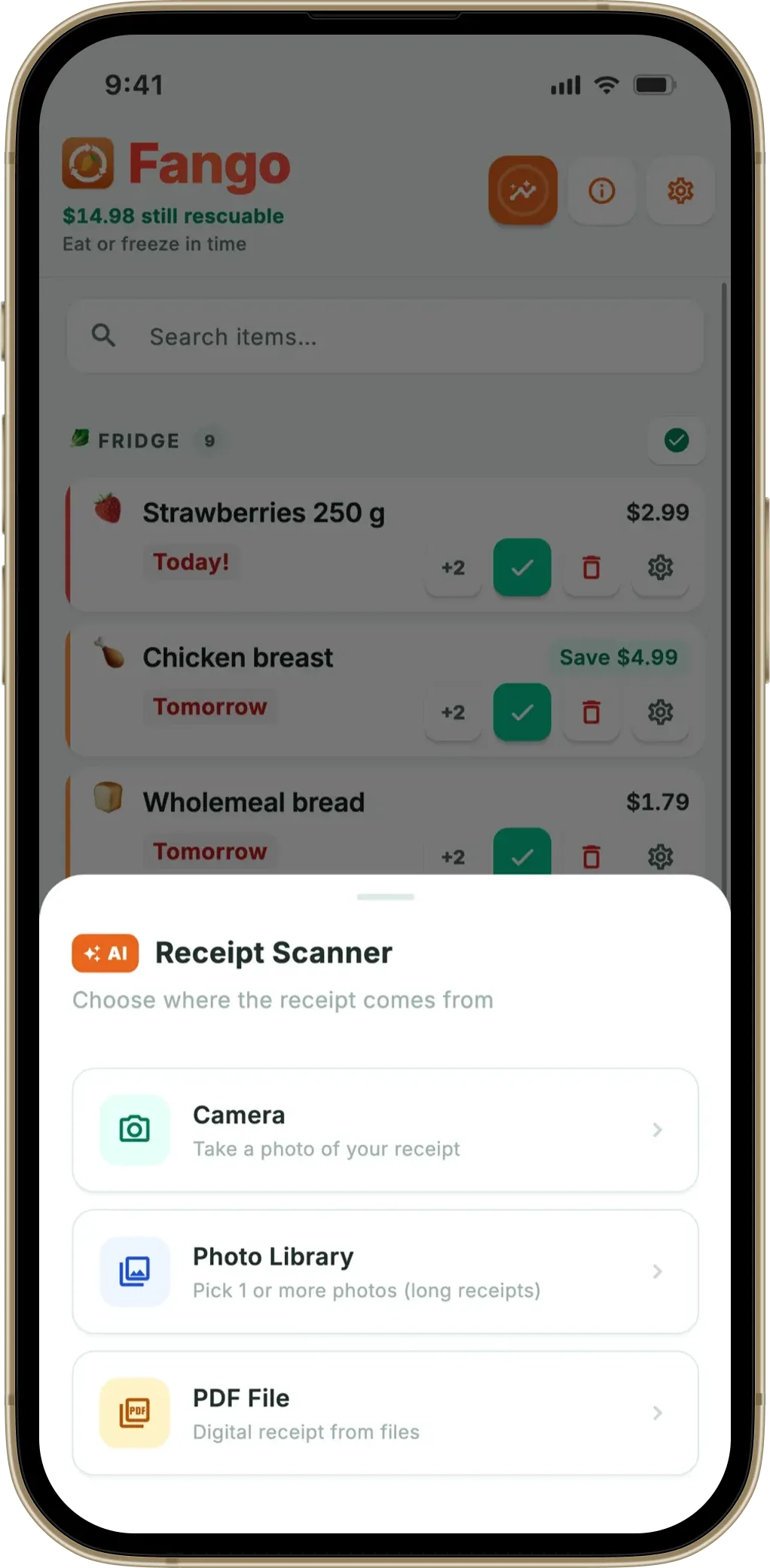
Fango is a food expiry reminder app for iPhone and Android that goes one step further: instead of adding items manually, you photograph your grocery receipt and AI adds everything to your digital fridge automatically — with estimated expiry dates. You get a push notification 1–14 days before each item expires, with timing you control. This type of app is also called an expiry date tracker, a fridge tracker app, or a best before app.
- A food expiry reminder app tracks your fridge and notifies you in time
- Fango scans your receipt automatically — no manual item entry needed
- Set reminders 1–14 days in advance — you choose the timing for each product
- No account required — works immediately, all data on your device by default
Why manual tracking doesn’t work
The idea of tracking expiry dates manually sounds reasonable — until you try it. After a weekly shop of 20–30 items, entering each one with a name and date takes 10–15 minutes. That’s every week. In practice, most people do it twice and then stop.
Even when you do add items, checking them daily requires opening the app and scrolling through a list — which is easy to skip. By the time you remember, the item has already expired.
The only system that works long-term is one that requires minimal effort to maintain and actively reminds you — not one that requires you to remember to check it.
What a food expiry reminder app actually does
A food expiry reminder app does two things: it keeps a record of what’s in your fridge with dates, and it sends you a push notification before something is about to expire. The notification arrives on your phone — just like a calendar reminder — with enough advance notice to actually use the food.
The best apps let you customise the advance notice window. Fango lets you set it anywhere from 1 to 14 days before the reminder date. For raw meat you might want a 1-day reminder; for yoghurt or cheese, 3–5 days gives you more time to work it into meals.
How Fango’s expiry reminders work
Most food expiry apps require you to add each item manually — which is why many people stop using them. Fango solves this with AI receipt scanning:
-
1
Scan your grocery receipt with your phone camera. You do this once when you get home from the shop. The full receipt, including multiple pages, can be scanned in one go.
-
2
AI identifies the products automatically. Fango reads the receipt and adds each food item to your digital fridge — with an estimated expiry date based on the product type.
-
3
Review and adjust if needed. The app shows you all recognised items before saving. You can edit dates for items where the packaging shows a specific date.
-
4
Receive push reminders in time. Fango notifies you 1–14 days before each item’s reminder date — you set the timing once and the app handles the rest.
What you can do straight from the reminder
A food reminder app is only as good as what happens after the notification lands. If every alert means unlocking the phone, opening the app and finding the item, most people start swiping them away within a week. Fango puts the decision in the notification itself, with four buttons:
- ✅ Eaten marks the item as used and takes it off the list. If it was close to its date, it counts toward the money you saved this month.
- 🗑 Wasted records honestly that it went in the bin, so your statistics stay true.
- ➕ 2 days snoozes it when you know you’ll cook it the day after tomorrow.
- ❄️ Freeze moves it to the freezer, where it gets a new, much longer date.
That last button is the one that saves the most food. Bread, minced meat and cooked leftovers that you won’t get to in time are usually fine frozen, and the reminder is exactly the moment you need to be told.
How many days before expiry should you set the reminder?
The right advance notice depends on the food. Short-lived items need a quick heads-up; longer-lived ones give you more room to work them into meals. Here’s a practical starting point for your reminder window:
Not sure how long something keeps? Our storage guides cover the details — for example, how long yoghurt lasts, how long chicken lasts in the fridge, and how long bread lasts. With Fango you set the reminder window once per item, and it applies automatically every time you scan that product — so you don’t have to think about it again.
An app for food that’s about to go out of date
Plenty of people don’t search for a “reminder app” at all. They want an app that simply shows which food is about to go out of date, so they can cook from that first. That view matters as much as the push notification, because it is what you look at when you are deciding what’s for dinner.
In Fango the list is sorted by reminder date, so the food that needs using today sits at the top and urgent items are marked in red. Items worth money get a small “Save $X” badge in their last couple of days, which turns a vague “should use that” into a number. Anything more than two days past its date moves into a “Check these” section at the top, so it can’t hide at the bottom of the list, and anything a week past is tidied into an archive where you can still bring it back. If you’d rather see the fridge without opening the app at all, the home screen widget shows what to use next. Our fridge tracker app guide covers the list view in more detail.
What to look for in a food expiry reminder app
Not all expiry reminder apps are equally practical. Here are the features that matter most:
Fango vs. other food expiry reminder apps
The main alternatives are BEEP and NoWaste. Fridgely, once a common pick, is no longer in the App Store or on Google Play and is shown for reference only. The differences are in how you add items and what happens to your data.
| Feature | Fango | BEEP | NoWaste | Fridgely (no longer available) |
|---|---|---|---|---|
| Push expiry reminders | ✓ 1–14 days | ✓ | ✓ | n/a |
| AI receipt scanning | ✓ | — | receipt scan (iOS) | n/a |
| No account required | ✓ | — | not stated | n/a |
| Data stays on device by default | ✓ | cloud | cloud | n/a |
| Adjustable reminder timing | ✓ 1–14 days | limited | ✓ | n/a |
| Free to try | ✓ 1-month free trial | ✓ free tier | ✓ free tier | n/a |
← scroll →
Fango sorts everything by reminder date and colour-codes the urgent items in red. The home screen widget shows what to use next without opening the app.
Download on the App Store Get it on Google PlayFree for a month · No sign-up · iOS and Android

Why food expiry reminders reduce waste — and save money
The maths is straightforward. WRAP estimates that UK households waste around £1,000 per year per household. Most of that food was edible when it expired — it simply wasn’t used in time. A push notification a few days ahead gives you the one thing you were missing: advance warning.
Even catching two or three items per week that would otherwise have been thrown away adds up to meaningful savings over a year. And the habit compounds: once you’re used to getting reminders, you naturally start planning meals around what’s about to expire first — which reduces waste further. Globally, UNEP reports approximately a fifth of the food available to consumers is wasted, with most household waste coming from forgotten items rather than overbuying.
The key is making the system as frictionless as possible. Scan your receipt when you get home, and Fango handles everything else — no daily check-ins, no manual date entry, just a push notification when you need it. Storing food at the right temperature also matters: the UK Food Standards Agency recommends 0–5°C for fridge storage, which combined with active expiry tracking gives you the longest possible safe window.
Frequently Asked Questions
What is a food expiry reminder app?
A food expiry reminder app tracks the items in your fridge and sends you a push notification in time — typically 1–14 days in advance. This gives you time to use food before it goes off, rather than discovering it too late. Fango is a food expiry reminder app for iPhone and Android that also scans your grocery receipt automatically so you don’t have to add items manually.
How far in advance does a food expiry reminder app notify you?
Most food expiry apps let you choose your own advance notice window. Fango allows you to set reminders 1–14 days in time — so for meat you might set 1–2 days, while for longer-lived items like cheese or yoghurt you might prefer 3–5 days. You choose the setting that works for your shopping and cooking rhythm.
Does a food expiry reminder app require an account?
It depends on the app. Many do: BEEP asks you to create an account, and apps that sync across devices, such as NoWaste, keep your data in the cloud. Fango is an exception: no sign-up or account is needed, and your fridge data is stored locally on your device by default. The app works immediately after installation.
How do I add food to an expiry reminder app without typing everything manually?
Fango’s AI receipt scanner reads your grocery receipt and adds all products to your fridge automatically — including estimated expiry dates. You photograph the receipt when you get home from shopping, and the app does the rest. This takes under 30 seconds for a full shop, compared to 10–15 minutes of manual entry.
Which is the best food expiry reminder app for iPhone?
Fango stands out for its combination of AI receipt scanning, adjustable push reminders (1–14 days), and privacy-first design: no account required, data on device by default. It’s the fastest to set up and requires the least ongoing effort. Other options include BEEP (best for barcode scanning) and NoWaste (most features, with cloud sync). For a broader comparison, see the best pantry inventory apps.
Is there an app that tells me when food is about to go out of date?
Yes. A food expiry reminder app keeps a list of what you bought and sends a push notification when something needs using. Fango also sorts the list by reminder date, so the food that is about to go out of date is always at the top, and it fills the list from your grocery receipt.
Can I mark food as eaten straight from the reminder?
In Fango, yes. The notification has buttons for eaten, wasted, snooze two days and freeze, so you can deal with the item without opening the app. Food marked as eaten close to its date counts toward the money you saved that month.
