The Best Before – Food Tracker app (published by Peytu) is a popular free expiry-date tracker: you type in what’s in your fridge, sort it into categories and storage locations, and it reminds you in time. It does that job well and it’s genuinely free. But plenty of its users eventually go looking for something else — usually because typing every item in by hand gets tedious, or because they want a home-screen widget or a faster way to log a full shopping trip. This guide is specifically about alternatives to that named app. If you’re unsure what a best-before date even means, that’s a separate question — our best-before date app explainer covers it — but here we’re comparing the tools, not the labels.
UNEP estimates that around a fifth of the food available to consumers globally is wasted. WRAP reports UK households alone throw away roughly 6.4 million tonnes of food a year. Any expiry-tracking app helps — but only if you actually keep using it, and that comes down to how much effort each one asks of you. Here’s a clear look at what’s available in 2026.
- Sticking with free and simple → the Best Before app itself is hard to beat
- Tired of typing each item → Fango (AI receipt scanning adds a whole shop at once)
- Shared household inventory → Fango (no account) or NoWaste (cloud sync)
- Barcode-first workflow → NoWaste (the original Fridgely is no longer in the app stores)
- Best overall for busy shoppers → Fango (no account, receipt scan, home-screen widget)
Why people look for Best Before app alternatives
The Best Before app has earned its good reviews — it’s free, lightweight, and covers the fundamentals. But the most common reasons people start hunting for a replacement are:
The feature that matters most in any of these apps is the reminder — see what a good expiry date tracker app does differently.
- Manual entry is slow. Every item goes in one at a time. There’s product auto-completion to speed it up, but after a big weekly shop you’re still tapping through a lot of entries.
- The “barcode” isn’t a real scan. As of 2026, several reviewers note the barcode feature actually takes a photo to attach a name and image, rather than reading the UPC from a product database — so it isn’t the shortcut people expect.
- No receipt scanning. There’s no way to point your camera at a grocery receipt and have the whole shop appear at once.
- Missing extras. Some users want a home-screen widget, or richer expiry-date estimates, which the app doesn’t currently offer.
None of these make the Best Before app a bad choice — for a lot of people, free and simple is exactly right. But if any of the above is your reason for switching, here’s how the main alternatives stack up.
One thing worth deciding up front: what actually stops you keeping a fridge tracker going? For most people it isn’t the reminders — every app on this list handles those — it’s the friction of getting food into the app in the first place. If logging your shopping feels like a chore, you quietly stop doing it, and the tracker goes stale. That’s the lens we’ve used to compare these four: how much effort each one asks of you at the moment you get home from the shop, and what you trade away in privacy or price to reduce it.
The alternatives at a glance
| Feature | Fango | Best Before app | NoWaste | Fridgely |
|---|---|---|---|---|
| No sign-up required | ✓ | ✓ optional account | Check listing | — |
| Data stays on device by default | ✓ | ✓ unless you sync | ✗ | — |
| AI receipt scanning | ✓ | ✗ | Receipt scan (iOS) | — |
| Add a whole shop at once | ✓ | ✗ | ✗ | — |
| Barcode scanning | ✗ | Photo-based | ✓ | — |
| Push notifications | ✓ | ✓ | ✓ | — |
| Home-screen widget | ✓ | ✗ | ✗ | — |
| Multi-device sync | ✓ in household sharing | ✓ with account | ✓ | — |
| iOS | ✓ | ✓ | ✓ | ✗ removed |
| Android | ✓ | ✓ | ✓ | ✗ removed |
| Price | ✓ 1-month free trial | ✓ Free | Free up to 6 lists / 500 items | No longer available |
← scroll →
Fango — best for skipping the typing
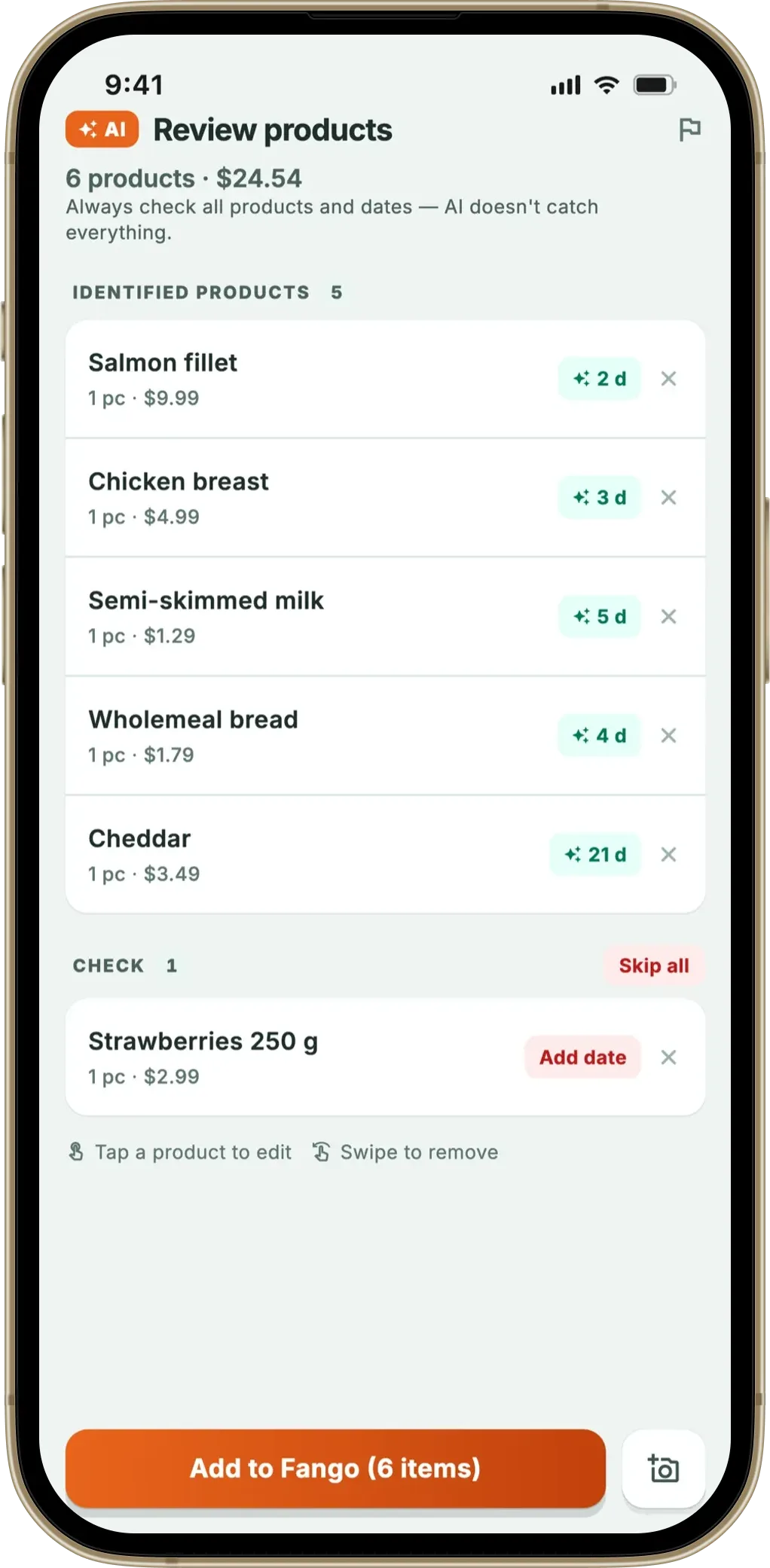
If the thing pushing you away from the Best Before app is the manual entry, Fango is the most direct answer. Instead of adding items one at a time, you photograph your grocery receipt and the app reads the products automatically, estimating an expiry date for each based on what it is. A full weekly shop takes under a minute to log. Fango then sends push notifications before things go off — anywhere from one to fourteen days ahead, with quick action buttons right on the reminder. There’s also a home-screen widget so your soonest-to-expire items are visible without opening the app.
Like the Best Before app, Fango needs no account to get started, and your fridge data lives locally on your device rather than in a cloud service, unless you share it with your household. The receipt scan sends the photo once, and it is processed momentarily and then discarded. It works with receipts from more than 60 countries, in 15 languages and dozens of currencies, and can even read a PDF receipt. If you’re deciding between scanning receipts and scanning barcodes, our receipt vs barcode guide lays out which suits which kind of shopper.
- AI receipt scanning adds a whole shop in one photo
- No account or sign-up required
- Fridge data stored locally — no cloud sync by default
- Home-screen widget and action-button reminders
- 1-month free trial, then subscription (price in app)
- Household sharing: the same view for up to four people, one subscription
- No barcode scanning
- No multi-device sync by default
- Paid after the free month (the Best Before app is free)
Scan your receipt — AI adds the whole shop automatically and reminds you in time. No account, no cloud sync by default, fridge data stays on your device by default.
Download on the App Store Get it on Google PlayFree for a month · No sign-up · iOS and Android
Best Before app — best if free and simple is enough
It’s worth being fair to the app you’re already using. Best Before – Food Tracker is completely free, lightweight, and does the core job reliably. You add products manually with helpful auto-completion, organise them by category and storage location, keep a shopping list, and get reminders in time or after they’ve been opened. An optional free account lets you sync a list with family or friends. For a lot of households, that’s genuinely all they need — and no other app on this list matches it on price.
Its limits are the flip side of that simplicity: everything goes in by hand, the barcode feature is photo-based rather than a true UPC scan, there’s no receipt scanning, and no home-screen widget. If none of that bothers you, the best “alternative” might be to keep what you have. The apps below only make sense as replacements if one specific gap — entry speed, real barcode lookup, or shared sync — matters enough to give up “completely free” for it.
- Completely free, including optional sync account
- Categories, storage locations and shopping list
- Reminders for expiry and after opening
- Available on both iOS and Android
- Every item entered manually
- Barcode feature is photo-based, not a true scan
- No receipt scanning
- No home-screen widget
NoWaste — best for multi-device sync
NoWaste is one of the most established names in the category, and the thing it does best is cloud sync across your devices, including a web app. Fango shares one fridge with an invite code for up to four people instead. NoWaste includes manual entry and barcode scanning, and on iOS also receipt and photo input. The free tier covers 6 lists and 500 items; NoWaste Pro costs $6.99 a year or $29.99 lifetime in the US App Store.
- Full multi-device cloud sync
- Barcode scanning with product lookup
- Receipt and photo input on iOS
- Available on iOS, Android and the web
- Data stored in the cloud
- Free tier capped at 6 lists and 500 items
- Receipt scanning is mentioned for iOS only
Fridgely — no longer available
Fridgely was built around real barcode scanning, the shortcut the Best Before app’s photo-based feature doesn’t quite deliver. But the original Fridgely is no longer in the App Store or on Google Play (checked September 2026), so it isn’t an option today. The app now listed as “Fridgely” on Google Play is a different, newer app from another developer. If you want barcode lookups, NoWaste still offers them.
- Was a simple barcode-based fridge tracker
- Supported inviting family members or roommates
- No longer available on iOS or Android
- Same name now used by an unrelated Android app
Which app is right for you?
If you liked the privacy angle of the Best Before app — local data, no mandatory login — it’s worth knowing Fango keeps that while removing the manual-entry chore. We go deeper on both points in our guides to food waste apps with no sign-up and the best expiry date trackers. And for a broader field of options, see our best food waste tracker app comparison.
Related reading: Best Recipy App Alternatives in 2026.
Frequently asked questions
What is the Best Before app?
Best Before – Food Tracker (by Peytu) is a free food inventory app for Android and iOS. You add items manually with help from product suggestions, sort them by category and storage location, keep a shopping list, and get notifications in time or after it’s been opened. An account is optional and only needed if you want to sync your list with family or friends. As of 2026 it does not scan grocery receipts.
Is the Best Before app free?
Yes. As of 2026 the Best Before – Food Tracker app is free to use, and the optional account for syncing with family or friends is free too. That’s its main strength. Fango takes a different approach: it’s free to try for one month, then a monthly or yearly subscription (price for your country shown in the app), and adds AI receipt scanning so you can log a whole shop at once instead of typing items in one by one.
What is the best alternative to the Best Before app?
It depends on why you’re switching. If manual entry feels slow, Fango is the strongest option because AI receipt scanning adds an entire shopping trip in one photo, and it works with no account. If you want a synced inventory with barcode lookup, NoWaste is worth a look. The original Fridgely, once the usual barcode-first pick, is no longer in the App Store or on Google Play. See our full best food waste tracker app comparison for more detail.
Does the Best Before app scan receipts?
No. As of 2026 the Best Before app relies on manual entry with product suggestions, plus a photo-based barcode helper for names and images. It does not read a grocery receipt and fill in your whole shop. If you want that, Fango scans receipts from more than 60 countries and adds every item automatically with estimated reminder dates.
