According to WRAP, UK households throw away £17 billion worth of food every year — roughly £1,000 for a family of four. A large part of that waste comes from the same two causes: forgetting food exists in the fridge, and misreading date labels. An expiry date tracker app solves both. Fango is an expiry date tracker for iOS and Android, free to try for a month that scans your grocery receipt and adds products automatically — no manual entry, no sign-up, no account. Also known as a best before app, a fridge tracker app, or a food expiry reminder app — same core function, different names.
Scan your grocery receipt after shopping — AI reads the products and adds them to your fridge with expiry dates automatically. Get a push notification 1–14 days ahead. No sign-up, no account.
Download on the App Store Get it on Google PlayFree for a month · No sign-up · iOS and Android
- What it does — logs your food with expiry dates and sends a push notification in time
- Best feature to look for — receipt scanning, so you don’t have to enter products by hand every shop
- Fango — free to try, no sign-up, AI receipt scan, works on iOS and Android
- Result — less food thrown away, less money wasted
What Does an Expiry Date Tracker Do?
An expiry date tracker is an app that keeps a list of your food items alongside their expiry dates. When a product is approaching its date, the app sends you a push notification — giving you enough time to plan a meal around it instead of finding it mouldy at the back of the fridge a week too late.
The core loop is simple:
-
1
Add your groceries. Either scan your receipt, scan barcodes, or enter products manually depending on the app.
-
2
The app logs expiry dates. Either read from the receipt, the barcode database, or entered by you.
-
3
Get notified. A push notification arrives 1–14 days in time — time to use it.
-
4
Mark as eaten or wasted. The item leaves the list. Over time you can see how much waste you’ve prevented.
What to Look for in an Expiry Date Tracker
Not all trackers are equally useful. Here is what separates a good one from one you will stop using after a week:
How to Keep Track of Expiration Dates at Home: Three Methods Compared
There are really only three ways to keep track of expiration dates in a home kitchen, and each one fails in a predictable place.
- Marker and fridge rules. Writing the date on the lid and putting the oldest food at the front (first in, first out) costs nothing and works well for leftovers. It breaks down for the weekly shop, because nobody labels 30 items, and it only helps when you actually open the fridge.
- A list or spreadsheet. A note on your phone or a shared spreadsheet gives you one place to look. The catch is that it never tells you anything: you have to remember to check it, and keeping it current means editing it every time something is eaten.
- An expiry tracker app. The app holds the list and comes to you with a notification when something needs using. Its weak spot is the same as the spreadsheet’s, getting the food in, which is why the input method matters more than any other feature.
Most households end up combining the first and third: labels for leftovers and opened jars, an app for everything that came home from the shop. If you want the app to cover dry goods and the freezer as well, our guide to the best pantry inventory apps compares the options for longer-keeping food.
Why Manual Entry Kills Most Trackers
The most common reason people stop using expiry date trackers is manual entry fatigue. A typical weekly shop involves 20–40 items. Entering each one by hand — product name, category, expiry date — takes 5–10 minutes every time. After a few shops, most people give up.
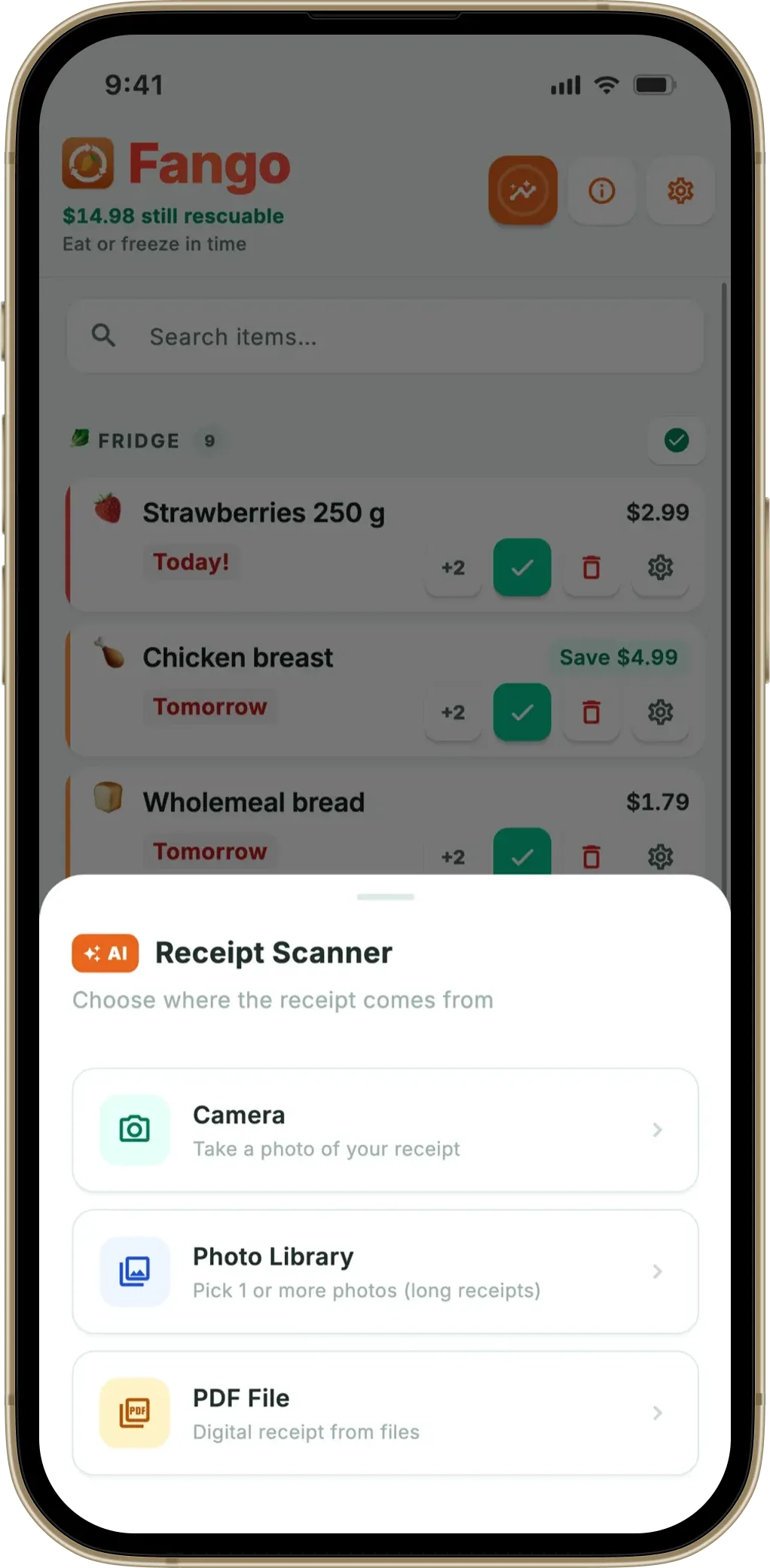
Receipt scanning solves this. Fango uses AI to read your grocery receipt and identify the products automatically. After scanning, the items appear in your fridge list within seconds. The whole process takes about 30 seconds per receipt — regardless of how many products are on it.
Expiry Date Tracking Without Manual Entry: How the Receipt Scan Works
Expiry date tracking only works if adding food is quicker than forgetting about it. Here is what actually happens between the checkout and the reminder:
-
1
Get the receipt in. Photograph a paper receipt, pick it from your photo library, open a PDF, or share an e-receipt straight from your email, banking app or delivery app — Fango sits in the share sheet, so a digital receipt never needs printing or photographing. A long receipt can go in as several photos.
-
2
AI reads the products. Each line becomes a product with its name, quantity and price. The AI estimates how long that food keeps, suggests where it lives (fridge, freezer or pantry) and greys out the lines that aren’t food — bags, deposits, discounts.
-
3
You check the list. Before anything is saved you see every product with its estimated date. Change a date, remove a line, mark something as “don’t track this again” — Fango remembers your corrections by product name, so the next receipt with the same product needs no fixing.
-
4
The reminder does the rest. When the date approaches, the notification itself has the buttons you need: eaten, wasted, give it two more days, or freeze it. You rarely have to open the app at all.
A product you buy without a receipt — a loaf from the bakery, vegetables from the market — can still be added by hand in a couple of taps. The point is that the weekly shop, the part that generates 20–40 items at once, never needs typing.
Expiry Tracker or Expiration Date Tracker? Same App, Two Spellings
If you have searched for a food expiry tracker, an expiration date app or a food expiration date tracker and found the same handful of apps every time, that is because they are the same product category. British and Irish English says expiry; American and Canadian English says expiration. Australian usage sits somewhere in between. The apps themselves do not care — Fango works with receipts from shops across the UK, Ireland, the US, Canada and most of Europe, and the reminder logic is identical whichever word you use.
What does differ is the date label on the packet. In the UK and EU, use by is a safety date and best before is a quality date; in the US most labels are quality dates with no legal safety meaning. A good tracker doesn’t need you to know the difference: it estimates a realistic shelf life for each product from what the food is and where it’s stored, and you adjust it if the packet says otherwise. If the label terminology itself is what confuses you, our guide to best before versus use by covers it.
Where Does Your Data Go?
Fango has no user accounts — no email, no password, nothing to sign up for. Your fridge list lives on your phone. The only thing that leaves the device during a scan is the receipt image itself, which the AI reads and returns as a product list; the image is not kept. If you share your fridge with your household (more on that below), the shared list is stored on a server so everyone’s phone shows the same thing — a list you keep to yourself never leaves your phone.
How Much Food Waste Can a Tracker Prevent?
According to UNEP, approximately a fifth of the food available to consumers globally is wasted. At the household level, WRAP research shows UK households waste an average of 70 kg of edible food per person per year — worth £1,000 for a family of four.
Most of that waste is avoidable. It comes from food being forgotten, bought in excess, or thrown away because of date label confusion. An expiry date tracker directly addresses the first two causes. Used consistently, it can reduce household food waste by a significant margin — and the savings add up quickly. For other angles, see the simpler expiration date app and product expiration date app overviews.
Fango sorts everything by reminder date and colour-codes the urgent items in red. The home screen widget shows what to use next without opening the app.
Download on the App Store Get it on Google PlayFree for a month · No sign-up · iOS and Android

How Far Ahead Should a Tracker Remind You?
A reminder is only useful if it arrives with enough time to act — but not so early that you forget again. The right lead time depends on the food. Raw fish and meat want a one-day warning, because the window to cook them is short. Dairy, opened sauces, and prepared salads work well at two to three days. Hard cheese, butter, and eggs can take five to seven days, since they keep longer and you may want to plan around them.
This is where a single global setting falls short — one blanket “remind me 2 days before” either nags you about cheese or warns you about fish too late. Fango lets you set the lead time per item, so the alert matches how quickly each thing actually turns. Pair that with sensible default windows from a guide like best-before dates, and the notifications stay useful instead of becoming noise you swipe away.
A Food Expiration Date Tracker for the Whole Household
Most expiry date trackers are built for one phone. That breaks down the moment two people share a fridge: one of you scans the shopping, the other opens the fridge and has no idea what’s about to turn. Fango lets up to four people share the same fridge, freezer and pantry list. Someone joins with an eight-character invite code — still no account, no email — and from then on a product added, eaten or thrown away on one phone shows up on the others within seconds. Everyone gets the reminders, and the month’s savings count for the household, not just the person who scanned.
Reminder times, sounds and language stay personal, so a partner who prefers a one-day warning isn’t forced into your three-day setting. One subscription covers the whole household.
Does a Product Expiration Date App Work for Non-Food Items?
Fango is built for groceries: the receipt scan and the shelf-life estimates are tuned to food. You can add any item by hand with a name and a date — a jar of face cream or an opened bottle of sunscreen tracks exactly like a jar of pesto — but you won’t get an automatic estimate for it, and the categories and reminders are designed around what’s in your kitchen. If your main need is medicines or cosmetics, a general-purpose product expiration date app may fit better.
Expiration Date Tracking at Home vs. in Foodservice
Searches for expiration date tracking often come from restaurants, cafés and care kitchens, and their needs are different. Foodservice date tracking is about compliance: prepared food gets a label with the prep date and a discard date, stock rotates first in, first out, and an inspector may ask to see the records. Those kitchens typically use printed day labels and dedicated labelling systems built for staff and audits.
A household tracker like Fango solves a different problem. Nobody inspects your fridge; the goal is simply to eat what you bought before it turns, and to stop paying for food that ends up in the bin. That is why Fango starts from the grocery receipt rather than from prep labels, and why it counts the money you saved rather than logging who discarded what. For a small café the home app will feel too light; for a family fridge, a commercial labelling system is overkill.
Frequently Asked Questions
What is an expiry date tracker?
An expiry date tracker is an app that logs your food items with their expiry dates and sends push notifications in time. The best ones include receipt scanning so you don’t have to add products manually after every shop.
What is the best free expiry date tracker app?
Fango is an expiry date tracker for iOS and Android, free to try for a month. It scans your grocery receipt using AI, adds products automatically, and sends a push notification 1–14 days ahead. No sign-up required, fridge data stays on your device by default. It also doubles as a pantry inventory app and a food expiry reminder app.
Does an expiry date tracker app require sign-up?
Most do, but Fango does not. You download it, scan your receipt, and it works immediately — no account, no email, no password.
Can an expiry date tracker scan receipts?
Yes — Fango uses AI to read your grocery receipt and identify the products, adding them to your fridge tracker automatically with estimated expiry dates.
How does an expiry date tracker reduce food waste?
By sending a push notification in time, the app gives you time to plan a meal around it. Forgotten food and date label confusion are the two leading causes of household food waste — a tracker eliminates both.
How many days before expiry should I get a reminder?
It depends on the food: one day for raw fish and meat, two to three days for dairy and prepared items, and five to seven days for longer-keeping foods like hard cheese, butter, and eggs. A single global setting is a compromise — per-item lead times keep the alert in step with how quickly each thing actually spoils.
Is an expiry tracker the same as an expiration date tracker?
Yes. Expiry is the British and Irish term, expiration the American one. The apps — and the reminders — are the same; only the date labels on the packaging differ between countries.
Can my family use the same expiry date tracker?
With Fango, up to four people can share one fridge list using an invite code — no accounts needed. Changes made on one phone appear on the others within seconds, and everyone receives the reminders.
How do I keep track of expiration dates at home?
Label leftovers and opened jars with the date, keep the oldest food at the front, and use an expiry tracker app for the weekly shop. An app that reads your grocery receipt removes the typing, which is the step that makes most people give up on tracking.
Can I use an expiry date tracker for a restaurant or café?
Household trackers are built for home kitchens. Foodservice date tracking usually needs prep-date labels, first-in-first-out rotation and records for inspections, which dedicated labelling systems handle. Fango is designed for households that want to eat what they buy and save money.
