You do a big weekly shop, get home, unpack — and then you’re supposed to type all of it into a food tracker, one item at a time? That’s exactly the step where most people quietly give up. The promise of tracking your fridge so nothing rots at the back is real, but the data-entry tax kills it. This guide explains a faster way: photograph the receipt you already have in your hand and let AI add everything for you. We’ll cover how receipt scanning actually works, how it compares to typing items in or scanning barcodes, what happens to your receipt photo, and where it falls short.
Photograph your grocery receipt and Fango adds every product automatically, then reminds you in time. No account, no cloud sync by default — your fridge list stays on your device by default.
Download on the App Store Get it on Google PlayFree for a month · No sign-up · iOS and Android
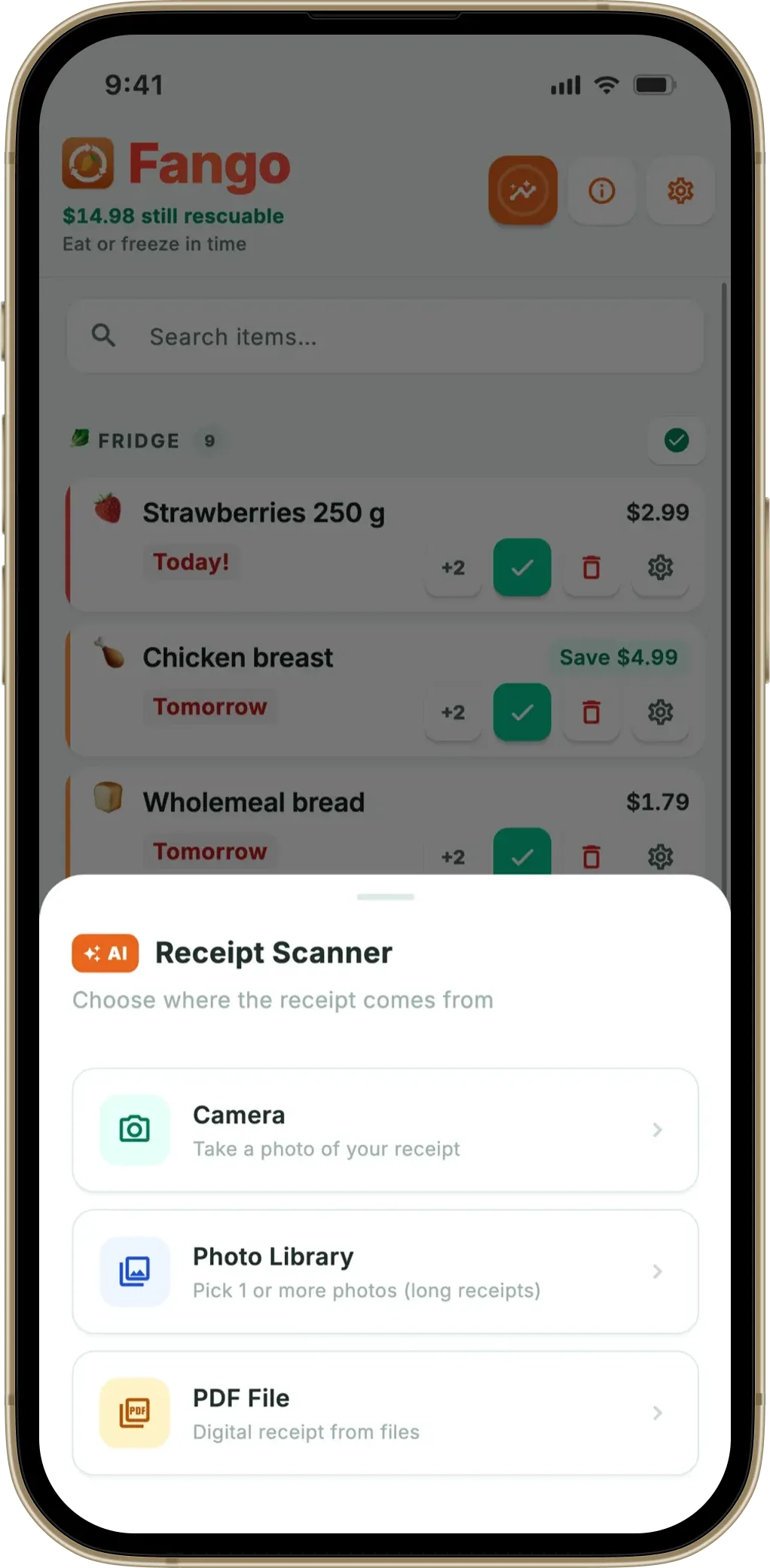
- The idea: photograph your grocery receipt, AI reads the line items and adds every product to your fridge list automatically.
- Why it wins: one photo captures a full weekly shop in seconds — no typing, no scanning each barcode.
- Privacy: in Fango, your fridge list stays on your device by default; the receipt image is read momentarily and then discarded.
- Limits: faded thermal paper, torn receipts and cryptic internal codes can need a quick manual fix.
The problem with typing in your groceries
Food waste is not a niche concern. The UNEP Food Waste Index Report 2024 found that the world wasted the equivalent of over one billion meals every single day in 2022, and that around 60% of all food waste happens in households — roughly 79kg of food per person, per year, thrown away at home. Most of that isn’t carelessness. It’s forgotten yoghurt behind the milk and a bag of spinach that turned before you got to it.
If you are choosing between apps, our guide to picking an expiry date tracker lists the features that decide whether you are still using it a month later.
A tracker solves that, in theory, by keeping a running list of what you own and nudging you in time. The catch is the front door. Manual entry means opening the app after every shop and typing each product, picking a category, and setting a date — for twenty or thirty items. It’s tedious the first week and abandoned by the third. Barcode scanning is a little better, but you still point your camera at every single package, one beep at a time, and loose produce has no barcode at all. Either way, the effort scales with the size of your shop, which is precisely backwards: the bigger the trip, the more you’d benefit from tracking, and the less likely you are to bother.
Receipt scanning flips that. The effort is fixed. One photo covers two items or forty.
How receipt scanning works
When you photograph a receipt, a few things happen in sequence. First the image is cleaned up — modern systems correct for blur, glare and skew so the text is legible. Then optical character recognition (OCR) turns the pixels into raw text. The hard part comes next: a machine-learning model has to look at that messy text and decide which lines are products, which are prices, and which are noise like the store address, the loyalty message or the VAT summary. As one industry explainer on receipt OCR puts it, the goal is to parse merchant name, date, individual line items and totals from wildly varied layouts into a structured, machine-readable format.
The reason this needs AI rather than a simple template is that no two receipts are laid out the same. A German discounter, a British supermarket and a Finnish corner shop print prices in different places, abbreviate product names differently and use different currencies and tax lines. Rather than hard-coding a rule for each chain, a good model learns the general shape of a receipt so it can handle formats it has never seen before. Newer approaches go a step further and use a large language model to read the receipt in context — understanding that “SEMI SKIM MLK 2PT” is milk, and that a line marked with a minus sign is a discount, not a product. Fango’s scanner is built on exactly this kind of AI reading rather than a fixed template, which is how it copes with more than 60 countries out of the box. If you want the technical version, our piece on how AI reads a grocery receipt goes deeper.
Once the products are identified, the app does the part a raw OCR service doesn’t: it estimates how long each item typically lasts and turns that into an expiry date and a reminder. Milk gets a few days; a jar of pasta sauce gets much longer. That estimate is the bridge between “here’s what you bought” and “here’s when to use it.”
Receipt scan vs barcode scan
Both are automated, so which is better? It depends on how you shop. Barcode scanning is item-by-item and pulls precise product data from a database — brand, exact name, sometimes package size. It’s excellent when you add things one at a time, like restocking a single item, and it handles branded packaged goods well. But it’s slow for a full trolley, and it simply can’t scan loose fruit, vegetables, bakery or deli items that never had a barcode.
Receipt scanning is the opposite. It’s built for the weekly shop: one photo, everything at once, including the loose produce, because whatever the till printed, the scanner can read. The trade-off is that it depends on how the receipt describes each item — a clear name reads cleanly, a cryptic code may need a tweak. For a deeper side-by-side, see our receipt scan vs barcode scan comparison. In short: barcode suits people who add a few items at a time; receipt scanning suits anyone who does one big shop and wants it all in the list without the busywork.
What happens to your receipt photo (privacy)
This is the question worth asking of any app that scans your shopping. A receipt is a small window into your life — what you eat, when you shop, roughly where. So it matters where that image goes.
In Fango, the design is deliberately minimal. Your fridge list lives on your device by default. There’s no account and no login, and no cloud profile syncing your groceries somewhere unless you deliberately share a household. The one time anything leaves your phone is the optional receipt scan itself: to read the receipt, the image is sent to Anthropic Claude, processed to pull out the products, and then discarded — it isn’t stored on a server or attached to a profile. We’re careful not to overclaim here. It would be wrong to say “nothing ever leaves your phone unless you share a household,” because the scan step does send the image away momentarily; the honest version is that it’s read and then dropped. If you’d rather not send anything at all, you can add items by hand and skip scanning entirely. We wrote a whole honest breakdown in is it safe to scan receipts with an app.
Step by step: from receipt to reminders
Here’s what the whole flow looks like in practice with a receipt-scanning tracker like Fango:
- 1. Shop as normal. Keep the paper receipt, or the PDF one if you shopped online — the scanner reads both.
- 2. Photograph it. Lay the receipt flat, get decent light, and take one photo. Long receipts are fine; the app handles tall receipts.
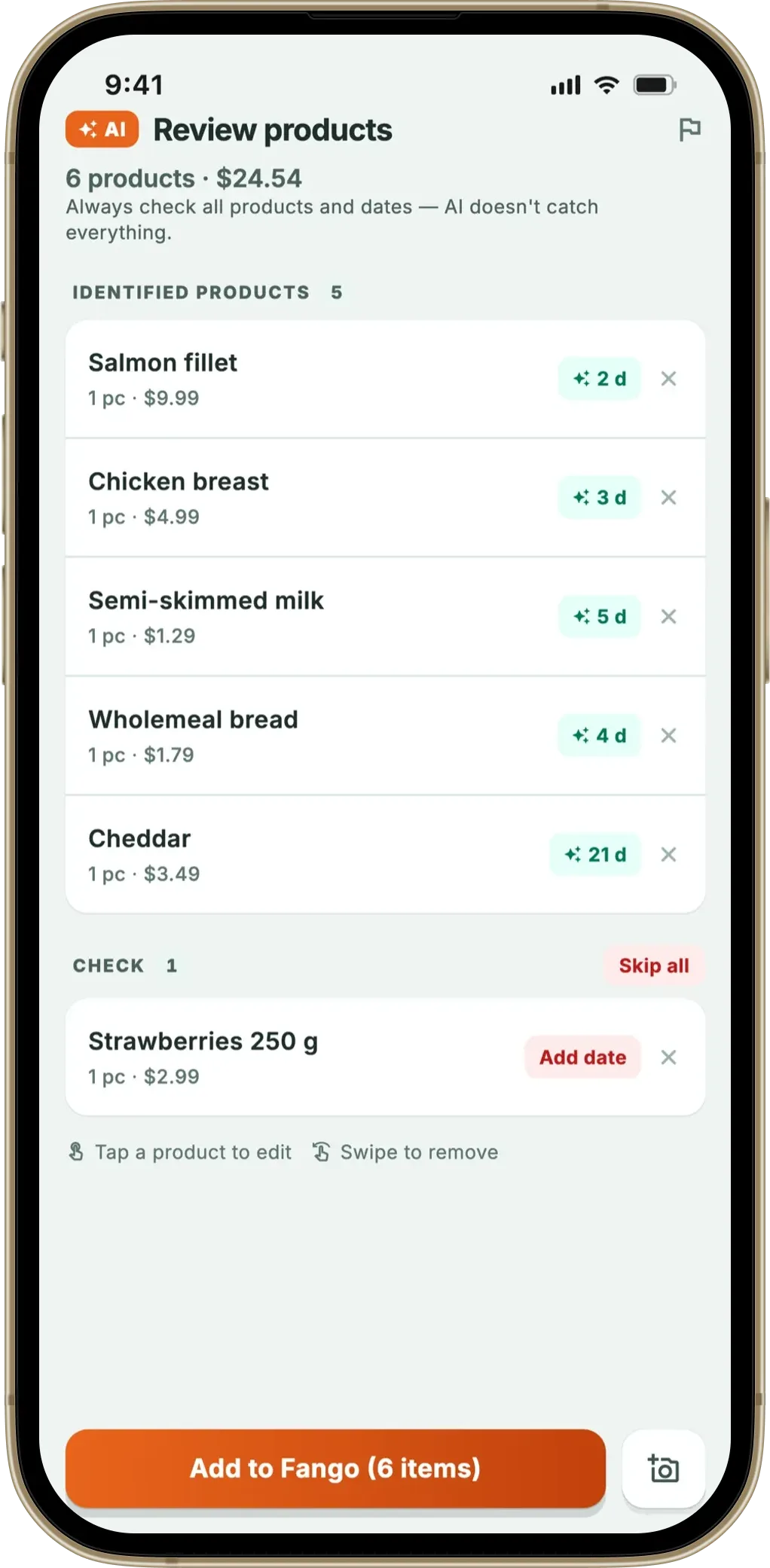
- 3. Let the AI read it. Within a few seconds the products appear as a list, each with an estimated expiry date.
- 4. Review and adjust. This is the important step. Glance down the list, remove anything that isn’t food you’re tracking (a carrier bag, say), and fix any name or date that looks off. You’re always in control before it’s saved.
- 5. Get reminded. Fango sends a push notification one to fourteen days before each item expires — you choose the lead time. Notification action buttons let you mark something as eaten or thrown away straight from the alert, and a home-screen widget shows what’s next to go.
- 6. See the impact. Over time the app tallies what you used versus wasted, so you can watch the waste stats trend down.
The review step is the honest bit. No scanner is perfect, so a good app shows you the list first rather than silently trusting the machine. Ten seconds of scanning plus a quick glance beats ten minutes of typing.
Photograph your grocery receipt and Fango adds every product automatically, then reminds you in time. No account, no cloud sync by default — your fridge list stays on your device by default.
Download on the App Store Get it on Google PlayFree for a month · No sign-up · iOS and Android
What it can and can’t read
Being straight about the limits matters. Receipt scanning reads most standard printed grocery receipts well — across more than 60 countries and dozens of currencies, in multiple languages, plus PDF receipts from online orders. It copes with the common abbreviations supermarkets use and with the odd promotional or discount line.
Where it struggles is exactly where OCR always has. Thermal receipt paper fades over time, so a receipt that’s been in a coat pocket for weeks may be too faint to read cleanly. Crumpled, torn or curled receipts lose text. Poor lighting and heavy glare hurt accuracy — one reason apps ask you to lay the receipt flat. And occasionally a store prints an item only as an internal code or a heavily truncated name with no real product word in it, which even a human would have to guess at. In all of those cases you fall back to adding or editing the item by hand, which takes seconds for the one or two lines that didn’t come through. It’s a tool that removes almost all the typing, not a promise of zero-touch magic. If your main goal is to turn the same receipt into a reusable shopping list, our guide to a grocery list app from a receipt covers that angle too.
Put together, receipt scanning is the single biggest thing that makes food tracking actually stick, because it removes the step that makes people quit. For a broader look at the category, see our roundup of the best food waste tracker apps or the deep dive on a dedicated grocery receipt scanner app.
Frequently asked questions
How do I scan a receipt to track my food?
Open a food tracker that supports AI receipt scanning, such as Fango, and photograph your grocery receipt after you shop. The app reads the printed line items, adds each product to your fridge list and estimates an expiry date for every item. You review the list, adjust anything that looks off, and the app sends a push notification before things go off. A full weekly shop takes well under a minute end to end instead of typing each item by hand.
Is scanning a receipt more accurate than typing items in manually?
For a large shop, receipt scanning is usually faster and captures more items, because it reads the whole receipt at once instead of relying on you to remember and type everything. Accuracy depends on the receipt: a clear, flat, well-lit receipt reads well, while faded thermal paper or cryptic abbreviations may need a quick manual correction. You always get a chance to review the list before it is saved.
What happens to the photo of my receipt after I scan it?
In Fango, your fridge list is stored on your device with no account, unless you share it with your household. Otherwise the only network step is the optional receipt scan: the image is sent to Anthropic Claude, read to extract the products, and then discarded rather than stored. Nothing about your fridge is uploaded or synced to a cloud profile.
Can a receipt scanner read any grocery receipt?
It reads most standard printed grocery receipts across more than 60 countries and dozens of currencies, and it can also read a PDF receipt. It handles common abbreviations and multiple languages. It struggles with badly faded thermal paper, crumpled or torn receipts, handwritten notes, and items printed only as an internal code with no readable name. In those cases you can add or fix the item manually.
