The marketing pitch for a smart fridge — Samsung Family Hub, LG InstaView, the equivalent Bosch and Haier offerings — leans heavily on food tracking. Inside cameras, “see what’s in your fridge from the shop”, an inventory app on the door screen. The implicit comparison is to a regular fridge that knows nothing. The actual comparison should be against a subscription tracking app on a £400 standard fridge — and on that comparison, the smart-fridge food-tracking story is usually weaker than the price tag suggests.
Scan a receipt, AI fills the fridge list and expiry dates, your phone reminds you in time. No fridge upgrade needed. No account, no cloud by default.
Download on the App Store Get it on Google PlayFree for a month · No sign-up · iOS and Android
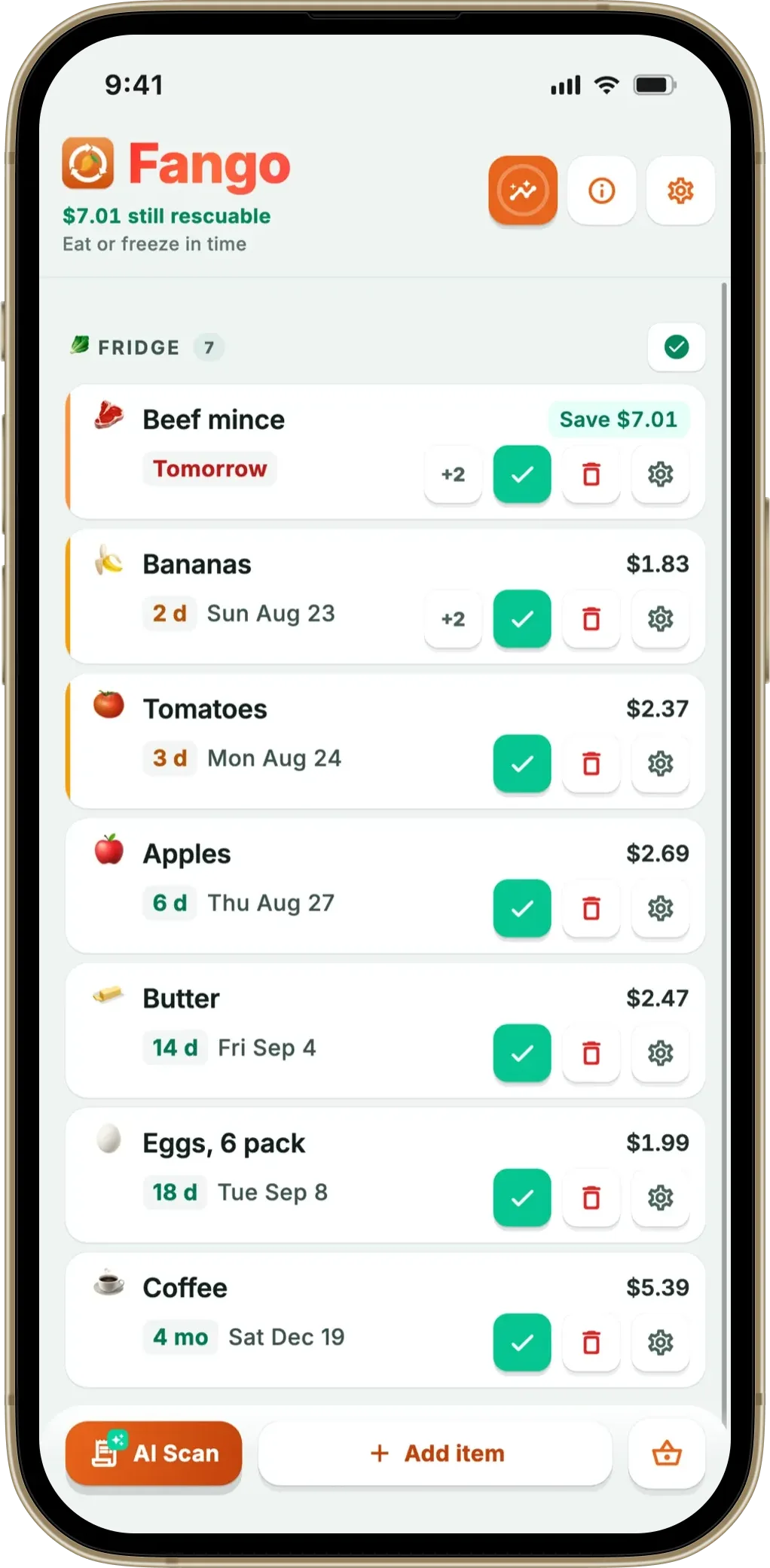
This article walks through what each side actually does well, where the £1,000–£2,000 price gap goes, and which households should pick which. Fango is the worked example for the app side; Samsung Family Hub and LG InstaView are the examples for the fridge side.
- Smart fridge food-tracking is still mostly manual — cameras don’t read best-before dates
- Receipt-scan apps are better at the actual tracking — fast input + per-item reminders
- Smart fridges add convenience features — door screen, streaming, family scheduling
- Price gap £1,000–£2,000 — buy the smart fridge for the kitchen-tech, not the food tracker
- Best combo — standard fridge + tracking app delivers most of the waste-reduction value
What a smart fridge actually does
Stripped of the marketing layer, a 2026 smart fridge offers:
- Inside cameras. Two or three wide-angle cameras that snap a photo every time the door closes. Viewable from a phone app while you’re at the supermarket.
- Door-screen inventory. Manually tagged items with expiry dates you type in. Sometimes auto-suggested categories.
- Receipt scanning, sometimes. Samsung Family Hub used to integrate with some grocery apps; current state varies by model year and region.
- Recipe / streaming / family calendar. Non-food-tracking features that justify a chunk of the price.
- Voice assistant. Add to shopping list, set timer, play music.
The food-tracking part itself is, in practice, a manual list. The cameras let you confirm what’s in the fridge without opening it — which is useful — but the expiry tracking still depends on someone tagging each item with a date.
What a food tracking app actually does
The receipt-scan tracker approach in 2026:
- AI receipt scan turns a 20-item shop into a list in 5–30 seconds.
- Per-item expiry estimates based on category, applied automatically, editable on the review screen.
- Push reminders 1–14 days ahead, configurable per user.
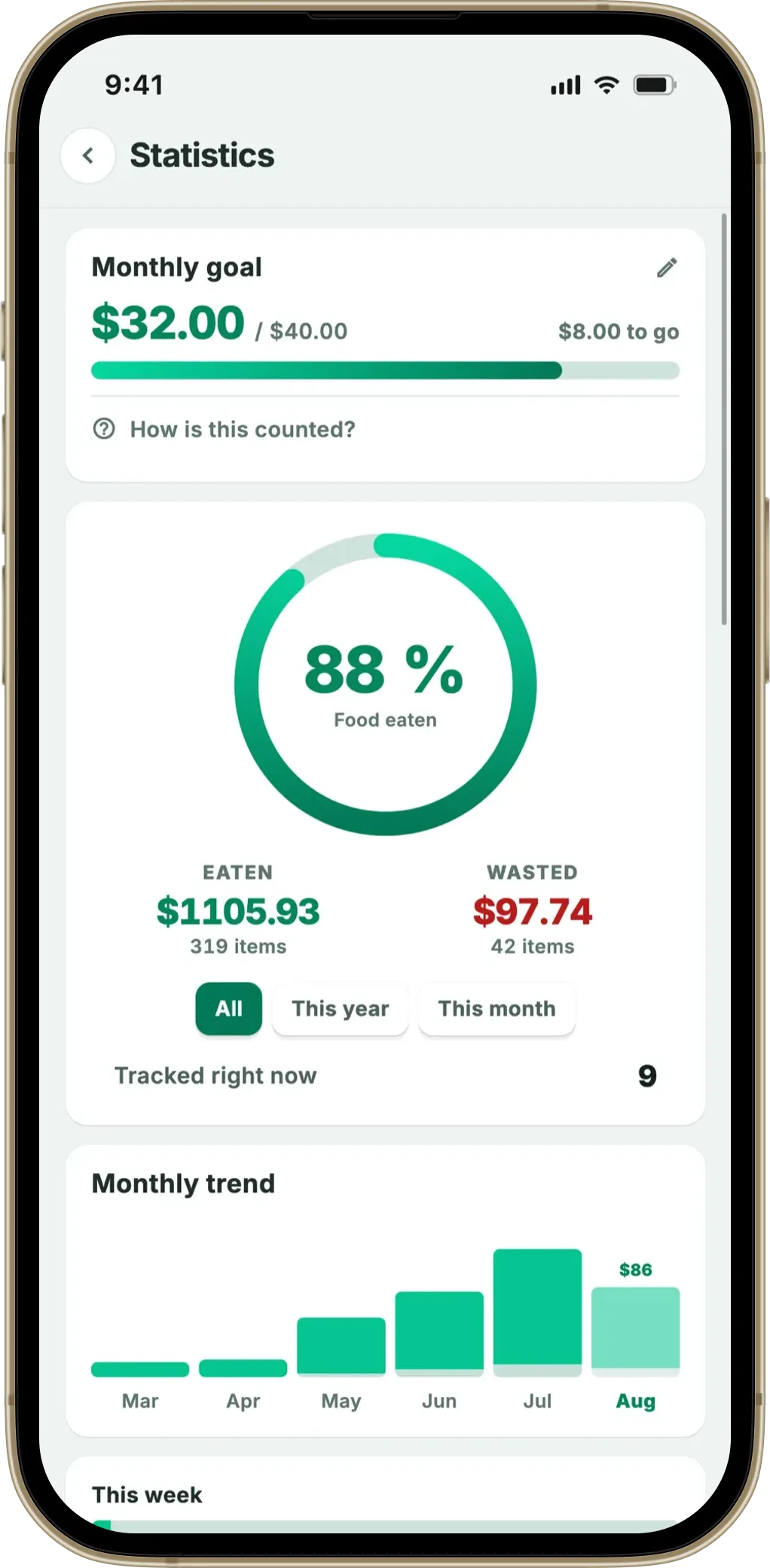
- Statistics showing what gets eaten versus wasted by category over months.
- Widget on the home screen for at-a-glance “what’s expiring this week”.
None of these depend on the fridge knowing anything. They depend on the receipt — which is consistent regardless of which fridge it’s heading into.
Where each one wins
| Capability | Smart fridge | Tracking app (Fango) |
|---|---|---|
| View contents without opening | ✓ — inside cameras | ✗ — list view only |
| Per-item expiry reminder | Manual tagging | ✓ — AI auto-fills |
| Receipt → list | Limited / model-dependent | ✓ — 5–30 sec, 60+ countries |
| Works on existing fridge | ✗ — need to buy fridge | ✓ — any fridge |
| The same view for the whole household | ✓ — but only in the kitchen | ✓ up to 4 phones |
| Family calendar / streaming | ✓ — door screen | ✗ |
| Voice assistant / smart-home integration | ✓ | ✗ |
| Statistics over time | Limited | ✓ — eaten vs wasted |
| Privacy-first (no account) | ✗ — Samsung / LG account required | ✓ — no account in Fango |
| Cost | £1,000–£2,000 premium over standard | Free 1-month trial, then subscription (price in app) |
← scroll →
The honest reading: smart fridges win on view-without-opening and on non-food convenience. Tracking apps win on the actual food-tracking job — receipt input, per-item reminders, statistics, privacy and price.
The honest “buy the smart fridge for…” list
Smart fridges have legitimate value — just usually not for food tracking. Reasons that hold up:
- You’re replacing the fridge anyway and the £1,000–£2,000 premium fits the budget.
- You value the door-screen as a family hub — shared calendars, sticky notes, photo display.
- You’d use the inside cameras to check the fridge from the supermarket, regularly.
- You’re invested in a smart-home ecosystem and the fridge is the missing piece.
- You’d actually use the streaming / recipes on the door (most people stop using these after month one — be honest).
And reasons that don’t hold up under scrutiny:
- “It’ll reduce my food waste” — a tracking app reduces waste at least as well and probably better.
- “I won’t have to tag items manually” — you still do, on the door screen. The cameras don’t read dates.
- “It scans receipts” — most current models don’t, reliably. Confirm before relying on this.
The honest “buy the app for…” list
App-only is the right answer for most households thinking primarily about food waste:
- You want to test whether tracking helps at all before spending anything significant.
- You’re renting and replacing the fridge isn’t your call.
- You shop online (Ocado, Tesco delivery) and a PDF receipt scanner matters more than a fridge camera.
- You’re privacy-conscious and don’t want a Samsung or LG account tracking your kitchen.
- You travel — the same app handles foreign-currency receipts; the fridge stays at home.
The combination that actually makes sense
For households that do end up with a smart fridge for the non-tracking reasons, the honest configuration is: use the smart fridge for what it’s good at (view without opening, family hub) and run a tracking app alongside for what it’s good at (receipt scan, per-item reminders, statistics). The two don’t conflict, and the app’s subscription is rounding error against the fridge’s price tag.
For households not already replacing the fridge, a tracking app on the existing fridge captures most of the realistic waste-reduction value the smart fridge marketing implies. A category comparison of food waste trackers is a more useful starting point than a fridge spec sheet.
Summary
Smart fridges and tracking apps both market themselves on food waste reduction, but the underlying job is split unequally: smart fridges add convenience around the fridge (cameras, door screen, voice), while tracking apps do the actual food tracking (receipt scan, per-item reminders, statistics). The £1,000–£2,000 premium for a smart fridge buys real value, but very little of it is food-tracking value. For households focused on waste reduction, a tracking app on a standard fridge is the cleaner answer.
Related reading: are food tracking apps worth it, do food waste apps actually work, best food waste tracker app 2026, fridge tracker app, how to organise your fridge.
Scan a receipt, AI fills the fridge list and expiry dates, your phone reminds you in time. No fridge upgrade needed. No account, no cloud by default.
Download on the App Store Get it on Google PlayFree for a month · No sign-up · iOS and Android
Frequently Asked Questions
Does a smart fridge track food expiry automatically?
Not really, no. Samsung Family Hub and LG InstaView have inside cameras and let you tag items manually, but the expiry tracking still depends on you typing or tagging each item. The cameras show what’s there but don’t read best-before dates off packaging reliably, and they don’t connect to receipt scanning. A receipt-scan app like Fango on a regular fridge often delivers more reliable expiry tracking than a £2,000 smart fridge does on its own.
What does a smart fridge actually do that an app doesn’t?
Three things, honestly. A view-without-opening (inside cameras you can check from the supermarket), built-in family scheduling on the door screen, and streaming/recipes on the door. None of those are food-tracking features specifically; they’re convenience features built on top of a tracking layer that’s still manual. The food tracking part itself is roughly equivalent to a phone app, sometimes worse because the door-screen typing is slower than a phone.
Is a smart fridge worth it for food waste reduction?
On waste reduction alone, no — the maths is rough. A £2,000 premium for smart features versus a £400 standard fridge buys £1,600 of capability for which the waste-reduction component is rarely the dominant value. A food tracking app subscription delivers most of the reminder benefit for a small fraction of the smart-fridge premium. The smart fridge is worth it for the convenience features; the waste-tracking benefit is a marketing bullet.
Do smart fridges connect to receipt scanners?
Some attempts exist — Samsung’s grocery-app integrations have come and gone — but the consistent answer in 2026 is that smart fridges don’t reliably connect to consumer receipt-scan apps. The list inside the fridge stays inside the fridge ecosystem. If you have a smart fridge, you’d still benefit from a separate phone-based tracker for receipt-scan reminders, which somewhat defeats the point of paying for the smart features.
Which households should pick a smart fridge over an app?
Households that are already replacing their fridge anyway and value the non-tracking smart features (family hub screen, inside cameras for convenience, streaming on the door) for £1,000–£2,000 more than the standard fridge. The food-tracking story shouldn’t be the deciding factor; a tracking app on a regular fridge usually wins that comparison. Pick the smart fridge for the kitchen-tech reasons; pick the app for the waste-reduction reasons.
