A grocery list can only tell you what you’re about to run out of if it knows what you already have and when it goes off. That’s the whole trick, and it’s why nearly every list app leaves the job to you: they are blank notepads. Fango works from the other end. Its fridge inventory is built from scanned receipts, so each item carries an estimated date — and the list reads that inventory, putting anything within about three days of its date, or already past it, straight onto your shopping list as a one-tap suggestion.
Scan the receipt, and Fango tracks what you bought with an estimated date for each item. When something is about to go, it appears on your shopping list as a one-tap suggestion. No account and, by default, no cloud — everything stays on your phone by default.
Download on the App Store Get it on Google PlayFree for a month · No sign-up · iOS and Android
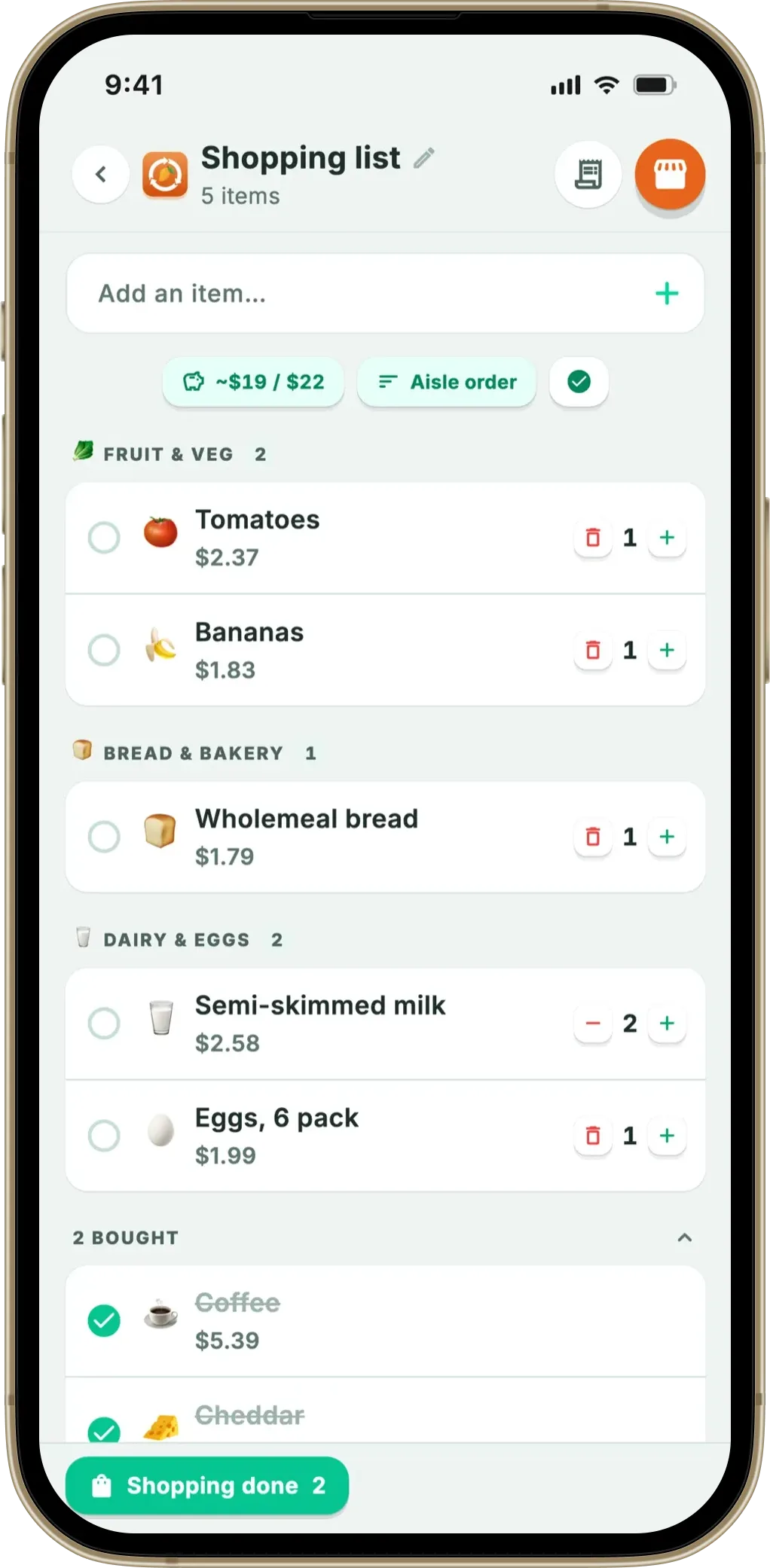
Below: what “running low” means in practice, where the dates come from, and the honest limit.
- A plain list is a blank page — it can only hold what you already remembered
- Fango reads your fridge instead — items within about three days of their date, or past it, appear as suggestions
- The dates come from receipts — a shelf-life estimate per product, not a guess from the word on a list
- It reads dates, not quantities — nothing knows the milk is half gone, so a suggestion is an offer you can ignore
Why a normal list app can’t know what you’re running out of
Open any list app and you get an empty screen with a plus button. Everything on it arrived because you typed it, so the app is only as good as your recall in the ninety seconds before you leave the house — and recall is exactly what fails. The mental note was made on Tuesday in front of an open fridge; the list was written on Saturday by the front door.
If the same problem shows up on the shopping side — buying what you already have — our best shopping list app comparison covers apps that read your inventory.
That gap produces two classic errors, mirror images of each other:
- Buying it twice. You can’t recall whether there’s pesto in the door, so you buy a jar. Now there are two.
- Buying none at all. The half-used crème fraîche wasn’t in your head at writing time, and will be found, furred, in a fortnight.
Both cost more than they look. WRAP’s 2022 household food waste report puts the value of edible food thrown away by UK households at roughly £1,000 a year, and UNEP’s Food Waste Index Report 2024 finds households account for around 60% of all food wasted after it leaves the farm. Almost none of that is decided in the shop — which is why forgetting what’s in your fridge is the expensive habit, not overspending at the till.
A list app can’t help, for a structural reason rather than a design one: it has no idea what’s in your kitchen. Some offer “frequently added” lists, but those are built from what you typed, not from what you carried home.
What “running low” actually means in Fango
Fango turns the notepad round. Above your shopping list sits a row labelled Running low in your fridge, filled from your own inventory by three plain rules:
-
1
Close to the date, or past it. Anything with about three days or fewer left on its estimate qualifies, and so does anything already over — the items that get binned this week if nothing happens.
-
2
Most urgent first. Chips are ordered by how little time is left, so yesterday’s yoghurt sits ahead of Friday’s. Up to six show at once — a row of thirty is just another list to read.
-
3
Nothing you’ve already dealt with. If an item is on your list already, it isn’t suggested again, and once you eat it, bin it or add it to the list, it leaves the row.
Tapping a chip adds the item with its emoji, ready to be sorted into one of the thirteen aisles when you shop. That’s the entire interaction: no “restock” screen, no minimum-quantity setting, no weekly review — the row appears when the fridge has something worth acting on, and not otherwise.
The bit that can’t be faked: where the dates come from
This is the part a pure list app cannot copy. The suggestion isn’t clever software; it’s ordinary arithmetic on data most apps never collect. To know the soured cream is nearly done for, you need a per-item date — and for that, a record of what came into the house and when.
In Fango that record comes from the receipt. You photograph it (or send a PDF, or share one from another app), the AI reads the product lines, and each product comes back with a name, quantity, price, pack size and an estimated shelf life in days, plus a suggested storage place — fridge, freezer or cupboard. The items land in your inventory with real dates attached, which is what makes the expiry reminders and the running-low suggestions possible. See scanning a receipt to track food for the mechanics.
Note what this rules out. Fango does not move items into your fridge when you tick them off in the shop. A tick says you picked something up, nothing about the date on the packet. Inventing an estimate from the word “chicken” would leave every later reminder resting on a guess, so the list never fills your inventory by itself: a receipt scan does, or you add the item by hand — a real date and an invented one differing much as best before differs from use by.
Two different signals: running low vs. bought regularly
It’s easy to lump these together as “smart suggestions”, but they answer different questions.
- Running low looks at the present: today’s fridge, and what’s close to its date. It shifts day by day, and an item leaves the row the moment you eat it, bin it or add it to the list. This is about spoilage.
- You buy these regularly looks at the past: roughly your last dozen receipts, how consistently an item shows up, and how many days usually pass between purchases, floating the ones about due. This is about rhythm — coffee, washing-up liquid, oat milk — and has its own explainer on a grocery list that learns what you buy regularly.
Something perishable can appear in both, which is fine: the running-low row is the urgent one, the frequency row the planning one. Neither uses AI. Both are counting and date comparison on your phone, and neither repeats what’s already on your list — which is also why they work with aeroplane mode on.
The honest limit: Fango reads dates, not quantities
Here’s the caveat any app making this promise ought to state plainly. Fango does not measure how much of something is left. It doesn’t know there are 200ml of milk in the bottle, or that the spinach was finished on Tuesday. There’s no scale, no barcode, no smart shelf and no camera looking into your fridge. What it has is a date per item — a good proxy for perishables, a rough one for anything else.
So the suggestion means something narrower than “you’re out of milk”. It means: this item is near the end of its estimated life, so you’re about to use it up or bin it — do you want it on the list? For fresh food that covers most cases; for a jar of mustard dated months out it stays quiet, correctly.
Three practical consequences:
- A suggestion is an offer, not an action — nothing joins your list until you tap it, so ignoring the row costs nothing.
- If you finish something early, mark it eaten in your fridge list — the confirmation carries an “Add to shopping list” button, the accurate way to restock something that ran out before its date.
- If an estimate looks wrong, edit it. Fango remembers your edited shelf life, price and storage place for that product name and reuses them.
That last point matters: the inventory gets more accurate the more you correct it, and the suggestions inherit the improvement. For the other half of the anti-duplicate habit, shopping your fridge first covers the check to run before you write anything down.
Scan the receipt, and Fango tracks what you bought with an estimated date for each item. When something is about to go, it appears on your shopping list as a one-tap suggestion. No account and, by default, no cloud — everything stays on your phone by default.
Download on the App Store Get it on Google PlayFree for a month · No sign-up · iOS and Android
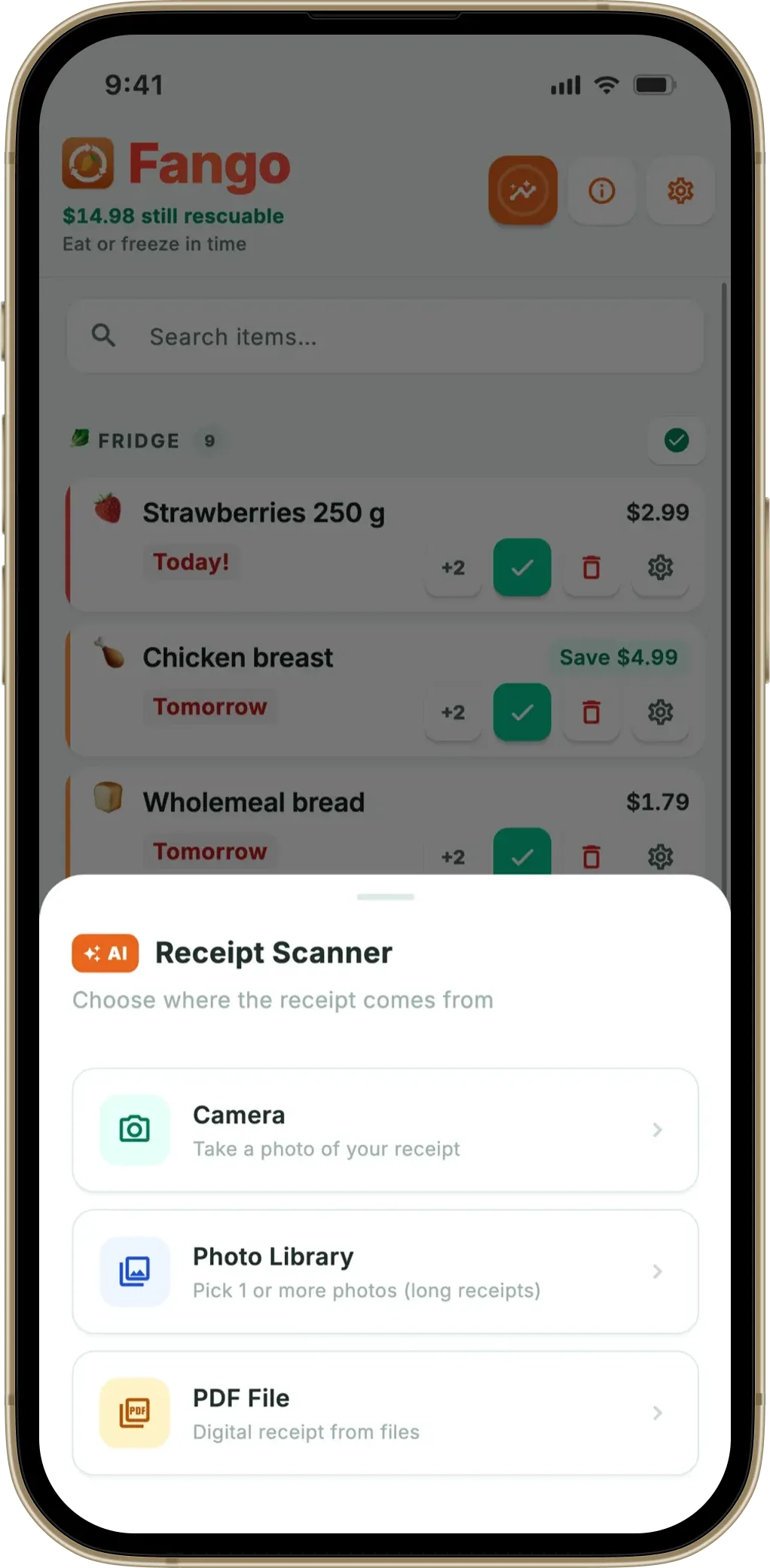
What it looks like across a normal week
Wednesday, a fridge reminder arrives — they can land up to 14 days before an item’s date, depending on how you’ve set them for that product. The soured cream is due Friday, so you open the list, where the running-low row already has it waiting alongside the coriander and the last two sausages. Three taps, and Saturday’s list is half written by things you’d otherwise have found too late.
Saturday you shop in full-screen shopping mode — big rows by aisle, a progress bar, ticks as things go in the trolley, the estimated total falling if you’ve set a budget target. Home again you scan the receipt, the products return to the fridge with fresh dates, and Fango offers to strike off whatever on your list appeared on it. Keeping the list and the expiry tracker in one app is what makes that possible.
Inventory, list, suggestions, budget and aisles all sit on your device with no account — and sharing is opt-in: switch it on and up to four people in one household see the same list. The real trade-off is that there is no list that reduces waste without a receipt scan to feed it. Fango is free to try for a month, then a monthly or yearly subscription (price for your country shown in the app), on iOS and Android.
Frequently asked questions
How does Fango know what I’m about to run out of?
It reads the fridge inventory you already have. Every item added by a receipt scan carries an estimated shelf life, so Fango can see which items are within about three days of their date or already past it, and offers those as chips above your shopping list — most urgent first, and never anything already on the list. It’s date arithmetic on your phone, not a prediction model.
Does the app know how much of something is left?
No, and it doesn’t pretend to. Fango can’t tell whether the milk bottle is full or nearly empty — there’s no weighing, no barcode and no camera pointed at your shelves. It reasons from dates, not quantity, which is why it suggests rather than instructs: a chip appears, and nothing joins your list until you tap it.
What’s the difference between running low and items I buy regularly?
Two different sources. Running low reads your current fridge and flags items close to their date, so it changes day by day. Buy regularly reads your receipt history — roughly the last dozen receipts — for how consistently you buy something and how many days usually pass between purchases. One is about what’s about to spoil, the other about what’s about due.
Do the suggestions need an account or an internet connection?
Neither. There’s no sign-up, and the list, the suggestions and your fridge inventory all live on the device unless you share them with your household. No AI is involved in the shopping list at all — Fango’s AI does one job, reading a receipt you choose to scan, and without household sharing that’s the only moment anything leaves your phone.
