There is no single best shopping list app, and an article that crowns one has usually picked its favourite rather than your requirement. Adding milk to a list is a solved problem — every app on this page does it well. What separates them is the job around the list: sharing it with a household, building it from recipes, connecting it to what is already in the fridge, or staying out of the way entirely. Pick the wrong category and you end up with a beautiful app doing the wrong thing.
So this is a comparison by use case, not a league table: four needs, four recommendations, and an honest note about where each falls down. Why the fridge side belongs in a shopping list article at all: UNEP’s Food Waste Index Report 2024 puts roughly 60% of consumer-level food waste in households, and WRAP puts the UK cost at around £1,000 a year per household — none of it inside the shop, where most list apps stop working. Fango is built for that half of the problem, which is exactly why it is the wrong answer for three of the four cases below.
- Shared family list, real-time sync → Fango (no account) or Bring! (or OurGroceries, whose sharing is free)
- Recipes and meal planning → AnyList
- Cutting food waste and tracking expiry dates → Fango
- Minimal, free, already installed → Apple Reminders or Google Keep
Six things that actually decide which app suits you
Feature lists all look the same in a store listing. These are the choices you notice after a month of use:
-
1
Account or no account. Anything that syncs a list between two phones needs an account — that is arithmetic, not a criticism. An account means a copy of your shopping history on someone else’s server; no account usually means the list is only ever on your phone and cannot be shared — Fango is the exception here. Decide which of those you mind more before you compare anything else.
-
2
Ads, and what pays for the app. A free list app usually earns from advertising, an upgrade that removes the advertising, or retail partnerships. None of those are scandals, but they shape the app: ad-supported tools collect more data, and retail-funded ones show you offers whether you asked or not.
-
3
What happens with no signal. Supermarket basements eat mobile data. Ask whether the list is editable offline, and what happens to two people’s edits when both reconnect.
-
4
Aisle order. A list sorted in the order you walk the shop saves more time than any other single feature. Every app here does some version of it; they differ in whether it is automatic and whether it covers non-food items, as our guide to aisle-ordered lists explains.
-
5
Prices and a budget. If you want a running total or a budget target, check which tier it sits in — in several apps price tracking is the paid feature rather than a free extra.
-
6
The exit plan. Nobody asks this in month one: if the service closes, what happens to your data? Kitchen apps do shut down — we keep a running note on food apps that have closed. A cloud list dies with the servers; a device-only list survives that but not a lost phone without a backup.
The shortlist at a glance
| Feature | Fango | Bring! | AnyList | OurGroceries | Apple Reminders |
|---|---|---|---|---|---|
| Shared list, real-time sync | ✓ up to 4 people | ✓ | ✓ | ✓ | ✓ via iCloud |
| Data stays on your device by default (by default) | ✓ | ✗ cloud sync | ✗ cloud sync | ✗ cloud sync | ✗ iCloud needed for Groceries lists |
| Aisle / category ordering | ✓ 13 aisles | ✓ | ✓ | ✓ | ✓ iOS 17+ |
| Recipes / meal ideas | ✗ | ✓ | ✓ paid tier | ✓ | ✗ |
| Receipt scanning into a food inventory | ✓ | ✗ | ✗ | ✗ | ✗ |
| Expiry dates + reminders | ✓ | ✗ | ✗ | ✗ | ✗ |
| Ads in the free version | None on any tier | Retailer brochures and offers built in | Not stated on its site | Yes — upgrade removes them | None |
| Price | Free for a month, then from $2.99/mo or $22.99/yr | Free; Premium £1.79/mo or £8.99/yr (UK) | Free; Complete $9.99/yr, $14.99/yr household | Free; upgrade ~$1/mo, $6/yr or $20 lifetime | Free with iOS |
← scroll →
1. Best for a shared family list: Bring!
If two or more people add to the same list, this is your category, and Bring! is the most polished answer. Its feature page describes lists shared with others where “changes are shared in real time with the other list members”, sorting “based on the aisles in your supermarket”, weekly seasonal recipe ideas, saving recipes from the internet, browsing local brochures, adding offers straight to the list, and storing loyalty cards. Its UK App Store listing shows 4.8 stars from 6.6K ratings and Bring! Premium at £1.79 a month or £8.99 a year.
The caveat is the retail layer: brochures and offers are part of the product, not a setting you switch off. The free alternative in the same category is OurGroceries, which advertises sharing “with your whole household” across iPhone, Android, Apple Watch, web browser and Echo, plus automatic grouping into store aisles. Its user guide is unusually blunt: upgrading is “not required in order to use OurGroceries, including all features and list sharing” — the upgrade, at “about US$1 per month… US$6 per year… and US$20 for a lifetime (one-time) upgrade”, removes ads for you and for everyone you share with. Listonic belongs here too; see our Listonic alternatives comparison and Bring! alternatives.
Fango is a weaker fit for this use case, plainly: it has no recipes, no meal planner and no barcode scanning. If your household edits one list at the same time, stop reading here and install Bring! or OurGroceries.
2. Best for recipes and meal planning: AnyList
If your list starts from what you plan to cook, AnyList is the most complete package here. Its site describes staying “in sync with family and friends by sharing a list”, changes that “show up instantly to everyone sharing the list”, automatic grouping of items by category, a recipe box that imports “from other sources, like email messages and popular websites and blogs”, and a calendar where you “plan your meals for the coming weeks… then easily add ingredients for upcoming recipes to your shopping list”.
Read the tier boundary before committing. AnyList Complete is “just $9.99 / year for an individual or $14.99 / year for a household”, and it is the tier that unlocks recipe importing, the meal planning calendar, web and desktop apps, item price tracking and location-based reminders. The engine you came for sits behind the subscription — and so does price tracking, if you want a budget view. It is cheap for what it is; our AnyList alternatives comparison goes further into where it fits.
Fango has no recipes and no meal planner at all. If the weekly plan is what drives your list, this is your category and not ours.
3. Best for cutting food waste: Fango
This is the one use case where the list itself is not the point. Every app above helps you buy the right things, then stops at the checkout — none of them knows what you brought home, what date was on the packet, or what you binned a fortnight later. That gap is where the money goes.
Fango is a food waste app that grew a shopping list, rather than a list app that added features. The list does the ordinary work properly: type anything and add it by hand with autocomplete — groceries, but also toilet roll, shampoo or batteries — across 13 aisles in walking order, with quantities, notes, per-item price estimates, several named lists, a full-screen shopping mode with a progress bar, and a budget target that counts down as you tick items off. AnyList charges for that budget side; here it is included.
What no list app can copy is the second half. Photograph the grocery receipt, the AI reads the products, estimates how long each keeps and adds them to your fridge list — a record of what you actually bought rather than what you typed. Reminders arrive up to 14 days ahead. Because that history exists, the list can suggest what you buy regularly and flag what is about to run out of the fridge, so you shop your fridge first instead of buying a third jar of pesto.
The gaps are the first three categories on this page: no recipes or meal planning, no barcode scanning, no web version. Sharing works, but it is capped at four people in one household. Ticking an item off does not move it into the fridge list either — a receipt scan or a manual entry does that. Free for a month, then from $2.99 a month or $22.99 a year, on iOS and Android, in 8 languages.
- No ads on any tier, no sign-up, data stays on the device by default
- 13 aisles, shopping mode and a budget target included
- Suggestions from your own receipts and fridge contents
- Receipt scanning with shelf-life estimates and reminders
- Add anything by hand, including non-food items
- Household sharing: the same view for up to four people, one subscription
- No web or desktop version
- No recipes, meal planning or barcode scanning
- Ticked items don’t move to the fridge — a receipt scan or a manual entry does that
- Paid after the free month
Aisle-ordered list, budget target and suggestions from your own receipts — plus a reminder in time. No ads, no sign-up, everything stays on your phone by default.
Download on the App Store Get it on Google PlayFree for a month · No sign-up · iOS and Android
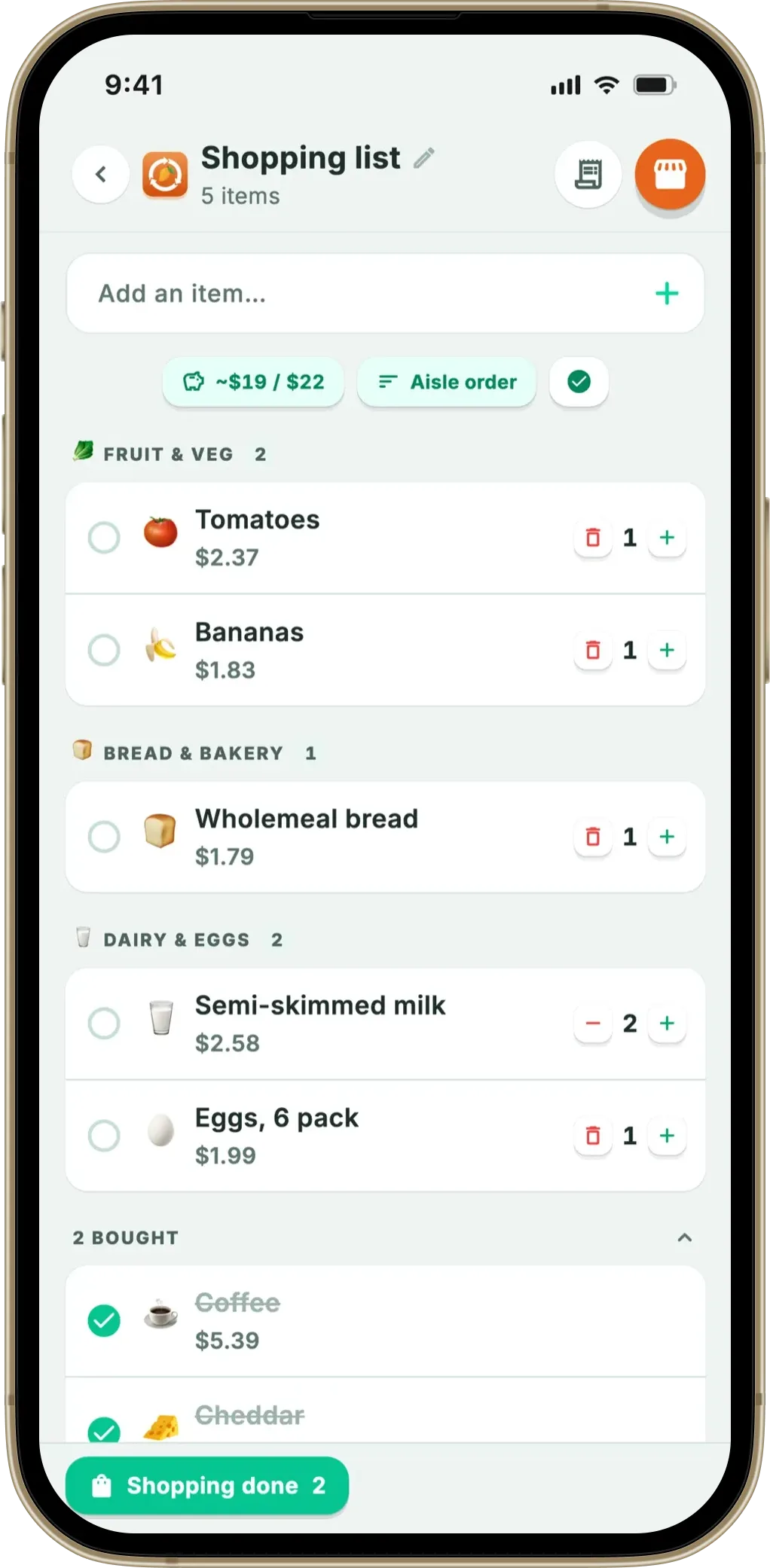
If that loop is the part you want, our guide to a shopping list and expiry tracker in one explains the mechanics in more depth.
4. Best minimal and free option: Apple Reminders or Google Keep
Plenty of people do not need a grocery app at all, and the built-in tools are better than their reputation. Apple’s own guide explains that in iOS 17 and later you can choose Groceries as a list type, after which Reminders automatically categorises and reorders items by grocery type — Produce, Meat, Frozen Foods — and remembers your preference if you drag an item elsewhere. Apple’s iCloud guide describes collaborating on reminder lists with people who use iCloud, where everyone can edit the list and complete items. Google Keep is the cross-platform equivalent: “create and share notes, lists, photos, drawings, and audio”, edited “collaboratively in real-time”, syncing “across all your devices”.
Two honest limits. Neither is account-free — Reminders needs iCloud turned on for Groceries lists, Keep runs on a Google account — so “minimal” and “no account” are not the same category. And a notes app is a blank page: no aisle intelligence beyond Apple’s categories, no price estimates, no budget, no memory of what you buy. We compare that trade-off in grocery list app vs notes app.
A word on accounts
The criterion that changes the answer most often is the least discussed one. A free account costs nothing today, but it decides where your shopping history lives and whether a service closure takes it with it. Among the apps here, only Fango has no account of any kind, and Listonic’s site is unusual in stating you “can use Listonic right away without signing up”, with a free account recommended for syncing and backup but “entirely optional”. Everything else needs one, because sharing needs one. If that criterion decides it for you, read the best shopping list app without an account, which covers what you keep and what you give up in far more detail than this overview can.
Which one should you pick?
The pattern is worth stating plainly: four of these five options compete on the same job and do it well, and the differences are matters of taste and price. Fango competes on a different job — the list is the front half of a loop running through the receipt, the shelf-life estimate and the reminder, which is why it is the only one that can learn what you buy regularly from your own shopping rather than from what you typed. If food waste is not your problem, one of the others is the better app. Head-to-head comparisons for the individual apps are here: OurGroceries alternatives, Cozi alternatives for the shopping list and Out of Milk alternatives.
Frequently asked questions
What is the best shopping list app in 2026?
There isn’t one, and the honest answer depends on the job. For a shared household list edited in real time, Bring! and OurGroceries are the strongest picks, and OurGroceries states that upgrading is not required to use all features and list sharing. For recipes and meal planning, AnyList Complete at $9.99 a year for an individual or $14.99 for a household is the most complete package. For cutting food waste, Fango is the only app here that scans receipts, estimates shelf life and reminds you in time. For something free and minimal, Apple Reminders and Google Keep are already on your phone.
Which shopping list apps work without an account?
Fango has no accounts at all — no email, no sign-up, and the list and prices stay on the phone by default. Listonic states on its site that you can use it right away without signing up, with a free account recommended only for syncing and backup. The built-in options are the surprise here: Apple Reminders needs iCloud turned on for Reminders before you can use a Groceries list, and Google Keep runs on a Google account. Anything that syncs a list between two phones needs an account by definition.
Do any shopping list apps track expiry dates?
Among the apps compared here, only Fango. Bring!, AnyList, OurGroceries, Apple Reminders and Google Keep are list tools that finish their job at the checkout. Fango scans the grocery receipt afterwards, estimates how long each product keeps, adds the items to a fridge list and sends a reminder up to 14 days ahead. Ticking an item off the shopping list does not move it into that fridge list — a receipt scan or a manual entry does.
What happens to my shopping list if the app shuts down?
If the list lives in a company’s cloud, it goes when the servers go, which is why an export option matters more than most people think when they pick an app. Food and kitchen apps do close: several have shut down in the last few years and taken their inventories with them. An app that keeps data on the device instead has the mirror-image risk — nothing to lose to a server shutdown, but a lost or wiped phone takes the list with it unless you have a device backup.
If the running total is what you are after, we compared who actually lets you put prices on the list in grocery list apps with prices.
- Bring!: Features (sharing, real-time changes, aisle sorting, offers)
- Bring! Grocery Shopping List on the UK App Store (ratings, Premium pricing)
- AnyList: official site (shared lists, categories, recipes, meal planning)
- AnyList Complete: features and pricing
- OurGroceries: official site (sharing, devices, aisle grouping)
- OurGroceries: User Guide (upgrade pricing, ads, what is free)
- Listonic: official site (use without signing up, sharing, web access)
- Apple Support: Make a grocery list in Reminders on iPhone
- Apple Support: iCloud and Reminders (shared lists)
- Google Keep: official product page (notes, lists, real-time collaboration, sync)
- UNEP: Food Waste Index Report 2024
- WRAP: Household Food and Drink Waste in the UK
