Pantry Check is a well-liked pantry inventory app with one of the smoothest barcode scanners around, custom storage locations, and cloud sync across a household. But it isn’t the right fit for everyone. Some people are on Android and can’t install it. Others don’t want to scan every single item’s barcode one at a time, or would rather not create an account to track their kitchen. Fango was built for people who want a faster way to log a whole shop with no sign-up — but it’s one of several alternatives worth weighing. If you’re comparing pantry tools generally, our best pantry inventory app roundup is a good companion read.
UNEP estimates that around a fifth of the food available to consumers globally is wasted. WRAP reports UK households alone throw away around 6.4 million tonnes of food a year. An inventory or expiry app can genuinely cut that down — but only if it matches how you actually shop and cook. Here’s a clear comparison of what’s available in 2026.
- Add a whole shop at once, no account → Fango (AI receipt scan, data stays on device by default)
- Barcode lookups + pantry/fridge/freezer locations → Pantry Check (iOS and Android)
- Cross-platform shared inventory → Fango (no account) or NoWaste (freemium, NoWaste Pro for more)
- Simple barcode-first tracking → Fridgely is no longer available; Pantry Check or NoWaste cover this
What is the Pantry Check app?
Pantry Check is a home inventory app for iPhone and Android that tracks food by barcode. You point the camera at a product, it looks the item up in its product database, and you file it under a storage location such as pantry, fridge, freezer or a spot you name yourself. From there it reminds you before items expire, builds shopping lists from what you use, and syncs the inventory across a household through one shared account. Basic use works without registering, but sharing and paid storage need an account. The free version holds around 200 items; larger inventories need a paid plan.
That makes it a precise tool for people who restock a pantry a few items at a time and enjoy keeping it organized. The questions most people have before installing it are the same ones that send them looking for an alternative: does it run on Android, how long does a big shop take to log, and do you have to sign up. The sections below answer each one.
Why people look for Pantry Check alternatives
Pantry Check has earned its fans — the barcode scanner is fast and the location system (pantry, fridge, freezer and custom spots) is genuinely useful. But the most common reasons people go searching for something else are:
- Android is brand new. Pantry Check was an iPhone app for years, and its Android version only recently arrived on Google Play. If your household is split across iPhone and Android, check that the Android app does what you need before you commit.
- One barcode at a time. Barcode scanning is accurate, but logging a full weekly shop means scanning each item’s barcode individually. For a big trip, that’s a lot of beeps.
- Account and cloud sync. The sync and family-sharing features that many people love work through one shared account that every phone signs in to, and the inventory lives in the cloud. Not everyone wants that for a kitchen list.
- Item limits on the free tier. The free version caps how many items you can store (around 200 as of 2026), with paid tiers unlocking larger inventories.
None of these make Pantry Check a bad app — it’s a strong one. But they’re real reasons to look around. Below is a clear breakdown of the main alternatives.
The alternatives at a glance
| Feature | Fango | Pantry Check | NoWaste | Fridgely |
|---|---|---|---|---|
| No sign-up required | ✓ | Basic use only (account for sharing) | Check listing | No longer available |
| Data stays on device by default | ✓ | ✗ | ✗ | — |
| AI receipt scanning | ✓ | ✗ | Receipt scan (iOS) | — |
| Barcode scanning | ✗ | ✓ | ✓ | — |
| Pantry / fridge / freezer locations | ✓ filters on one list | ✓ | ✓ | — |
| Expiry reminders | ✓ | ✓ | ✓ | — |
| Home-screen widget | ✓ | Limited | ✗ | — |
| iOS | ✓ | ✓ | ✓ | ✗ removed |
| Android | ✓ | ✓ | ✓ | ✗ removed |
| Free tier | ✓ 1-month free trial | Up to ~200 items | 6 lists / 500 items | — |
← scroll →
Fango — best for adding a whole shop at once
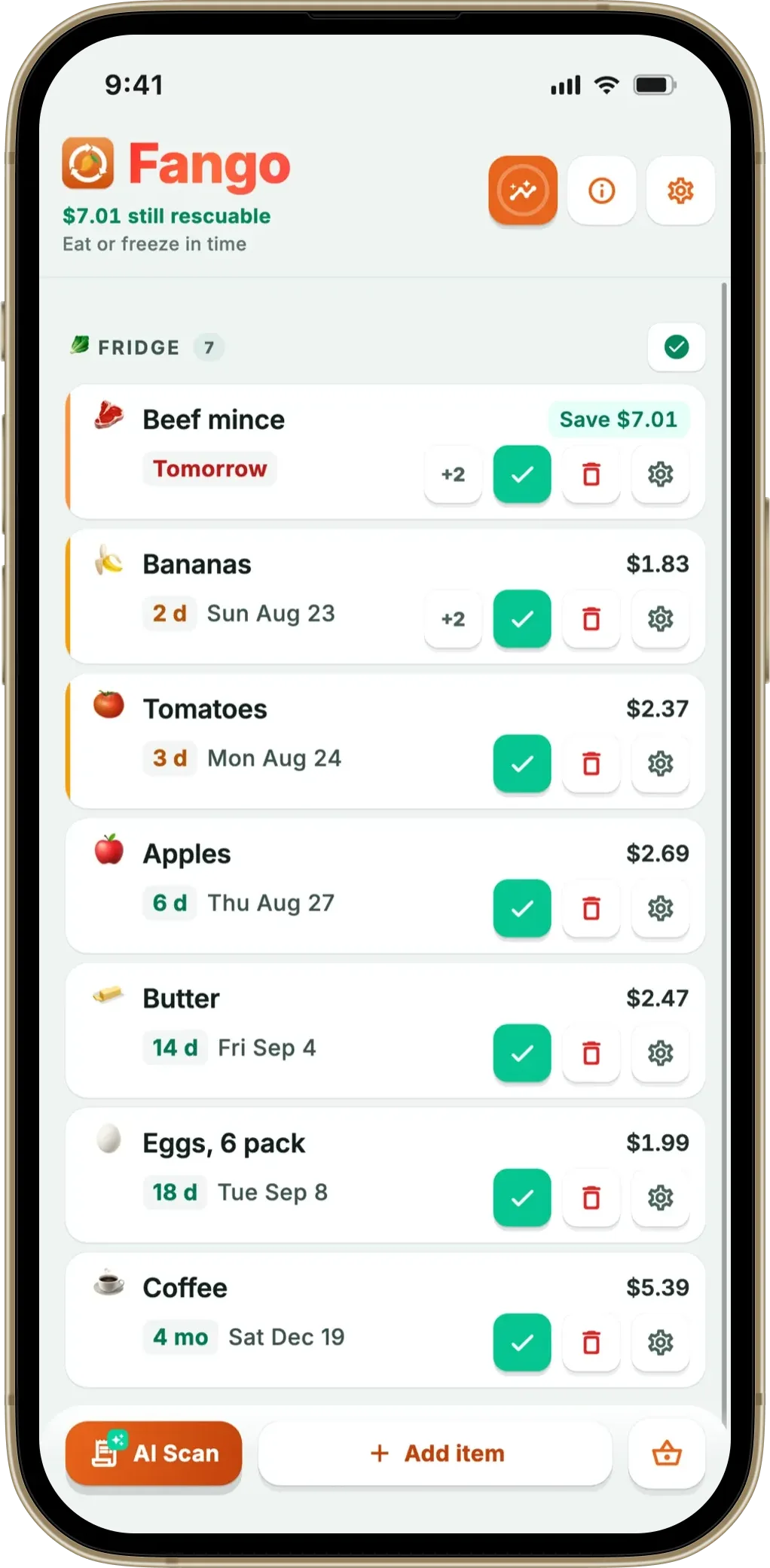
Fango takes a different route to the same goal. Instead of scanning each product’s barcode, you photograph your grocery receipt and the app reads every item at once, estimating an expiry date for each based on what it is. For a full weekly shop, the scan itself takes seconds and the whole log — photo, scan, quick check of the list — is under a minute, rather than a barcode at a time. It works with receipts from more than 60 countries, in 8 languages, and across dozens of currencies, and it can read a PDF receipt too.
There’s no account and no cloud sync by default — you open the app and start straight away, and your list stays on your device by default. The only network step is the optional receipt scan, where the image is processed momentarily and then discarded. Fango then sends push reminders in time (configurable from one to fourteen days ahead), with notification action buttons and a home-screen widget so you can glance at what needs using soon. It also keeps simple waste stats over time. For a deeper look at where a receipt-first approach fits, see our receipt scan vs barcode scan guide.
- Add a whole shop in one photo — no scanning each item
- No account or sign-up; data stays on device by default
- Expiry reminders, action buttons and a widget
- iOS and Android, 8 languages, 60+ countries
- 1-month free trial, then subscription (price in app)
- Household sharing: the same view for up to four people, one subscription
- No barcode scanning
- Fridge, freezer and pantry are filters on one list, not separate sections
- No personal device-to-device sync — a shared view only in household sharing
Scan your receipt — AI adds everything automatically and reminds you in time. No account, no cloud sync by default, your list stays on your device by default.
Download on the App Store Get it on Google PlayFree for a month · No sign-up · iOS and Android
Pantry Check — best for barcode lookups and storage locations
Pantry Check is the app you’re comparing against, and it’s worth being fair about its strengths. Its barcode scanner is one of the fastest in the category, backed by a large product database, and it organises items into custom storage locations — pantry, fridge, freezer or anywhere you like. It sends automatic expiry reminders, generates smart shopping lists from your usage, and syncs across devices with family sharing through one shared account.
The trade-offs are the reasons people look elsewhere: its Android app is still new, sync and sharing need an account, and the free tier caps you at roughly 200 items before a paid plan. And because it’s barcode-based, adding a big shop means scanning each item one by one. If you like the location system but want more inventory depth, our pantry inventory app overview covers that ground.
- Fast, well-regarded barcode scanner with product database
- Pantry, fridge, freezer and custom storage locations
- Smart shopping lists and expiry reminders
- Cloud sync and family sharing
- Android version only recently launched
- Account needed for sharing and sync; inventory stored in the cloud
- Free tier limited to around 200 items
- Scanning a big shop means one barcode at a time
NoWaste — best for a cross-platform shared inventory
If you want a long-established app that runs on iOS, Android and the web, NoWaste is the closest like-for-like alternative. It offers manual entry, barcode scanning, lists for different storage places, and on iOS also receipt and photo input, and it syncs across devices.
That cloud model is the point: it keeps one inventory in step across your devices. The free tier covers 6 lists and 500 items; NoWaste Pro is $6.99 a year or $29.99 lifetime in the US App Store. It’s a solid, established choice if sync matters more to you than staying local.
- Runs on both iOS and Android
- Multi-device sync, plus a web app
- Barcode scanning and separate lists
- Receipt, photo and AI assistant input on iOS
- Data stored in the cloud
- Free tier capped at 6 lists and 500 items
- Receipt scanning is mentioned for iOS only
Fridgely — no longer available
Fridgely used to be a pared-back barcode app: scan a product, track its expiry date, get a reminder. The original app is no longer in the App Store or on Google Play (as of September 2026), so it isn’t a real option any more. An app now listed as “Fridgely” on Google Play is a different, newer app from another developer.
If you were looking for a straightforward barcode tracker, Pantry Check and NoWaste both still offer one. For a broader shortlist, see our best food waste tracker app comparison.
- Was a simple barcode-based expiry tracker
- Supported inviting family members or roommates
- No longer available on iOS or Android
- Same name now used by an unrelated Android app
Which app is right for you?
Related reading: Best PantryWise App Alternatives in 2026.
Switching from Pantry Check: start with your next receipt
The worst way to switch pantry apps is to re-enter everything you already own. It takes an evening, and most people give up halfway. A better approach is to leave the existing stock alone and let the new app fill up from normal shopping. With a grocery receipt scanner like Fango, the next receipt adds the whole shop at once, and after two or three weekly trips the list covers most of what you actually eat. Add by hand only the older items that can still spoil, like an opened jar of pesto or the cheese at the back of the fridge.
The savings start with the first scan, not after the inventory is complete. Every item on the list gets a reminder date and its price from the receipt, so the first notification you act on is already money that would otherwise have gone in the trash. Most households waste far more on fresh food than on pantry staples, which is why a list built from receipts tends to pay off faster than a perfect barcode inventory of the cupboard.
Frequently Asked Questions
What is the best Pantry Check alternative?
It depends on why you’re switching. If you want to add a whole shop at once instead of scanning each barcode, and you’d rather not create an account, Fango is the strongest option — it uses AI receipt scanning, sends expiry reminders and keeps your data on your device by default. If you specifically want barcode lookups plus separate pantry, fridge and freezer locations, Pantry Check itself is still hard to beat, and NoWaste is a close cross-platform alternative.
Is Pantry Check available on Android?
Yes. Pantry Check started on iPhone, but an Android version is now on Google Play (September 2026). It is still new there, so older reviews and some help pages describe it as iOS-only. Fango and NoWaste also run on both iOS and Android.
What’s the difference between barcode scanning and receipt scanning?
Barcode scanning, like Pantry Check uses, adds one product at a time by looking up its code in a product database — accurate but slow for a big shop. Receipt scanning, like Fango uses, photographs your grocery receipt and reads every item in one go, estimating reminder dates automatically. Barcode is better for slowly restocking a pantry; receipts are faster for a full weekly shop. Our receipt vs barcode guide breaks it down further.
Is there a pantry app that does not require an account?
Yes. Fango requires no account or sign-up — you download it and start tracking immediately, and your list stays on your device by default. The only network step is the optional AI receipt scan, where the image is processed momentarily and then discarded. Fango is free to try for one month, then a monthly or yearly subscription, with the price for your country shown in the app. See more in our guide to food apps with no registration.
Is Pantry Check free?
Partly. Pantry Check has a free version that stores up to around 200 items as of 2026, and paid plans unlock larger inventories. For a small pantry the free tier can be enough; a household that tracks fridge and freezer too will usually reach the limit.
Is there a completely free Pantry Check alternative?
Not among the apps compared here. NoWaste and Pantry Check have limited free tiers (the original Fridgely is no longer in the app stores), and Fango is free for one month with every feature switched on, then a monthly or yearly subscription, with the price for your country shown in the app. The better question is whether an app pays for itself: if a tracker helps you use up even one forgotten pack of chicken or salmon a month, it has already covered its price.
