Americans throw away an enormous amount of food, and almost all of it happens quietly at home — groceries bought with good intentions and forgotten at the back of the fridge. The right app turns that around by tracking what you’ve got and nudging you before it expires. For US shoppers the questions are practical: does it read receipts from your grocery store, does it show prices in dollars, and does it actually run on your phone? Here’s how the main options stack up in 2026, with Fango as the receipt-scanning pick.
- Food waste is roughly 30–40% of the US food supply (USDA).
- The EPA estimates ~$728 of wasted food per person a year — about $2,900 for a family of four.
- Receipt scanning suits most US shoppers — one photo of a Walmart or Kroger receipt adds the whole shop.
- Look for: reads US receipts, prices in $, reminders, iOS and Android, no mandatory account.
- Fango ticks all of those, is free to try for a month, and keeps your data on your phone by default.
How much food the US actually wastes
The scale is bigger than most people expect. The USDA estimates food waste at between 30 and 40 percent of the US food supply — its Economic Research Service figure of 31 percent loss at the retail and consumer levels came to roughly 133 billion pounds and about $161 billion of food. In dollar terms per household, the EPA’s 2025 report puts the cost of wasted food at about $728 per person each year — around $14 a week, or close to $2,900 for a family of four. An older, still widely quoted USDA number estimated a household of four wasted about $1,500 of food a year.
If you are choosing between apps, our guide to picking an expiry date tracker lists the features that decide whether you are still using it a month later.
Whichever figure you use, it’s hundreds of dollars of groceries in the trash — and the majority isn’t spoiled-on-arrival food. It’s perfectly good produce, dairy and leftovers that were forgotten until too late. That’s the gap an app fills: if most waste comes from forgetting, a tool that remembers for you and reminds you in time targets the cause directly. For the full breakdown, see how much money food waste costs.
How to track your grocery waste at home
National averages are a starting point, but your own number is what makes the habit stick. The simplest way to track grocery waste is a two-week audit: keep your receipts, and every time something goes in the trash, write down what it was and what it cost. Most households are surprised less by the total than by the pattern. It is usually the same few things: bagged salad, berries, half a pack of deli meat, the second loaf of bread.
A food waste app turns that audit into something you don’t have to remember to do. In Fango every item from the receipt ends up marked either eaten or wasted, often with one tap on the reminder, and the statistics add it up in dollars. You see how much you rescued this month against a savings goal, and which foods keep ending up in the trash. (If you are looking for waste tracking for a grocery store or restaurant, that is a different job: businesses track shrink and spoilage with inventory systems built for staff.)
What to look for in a US food waste app
Not every app on the store works well for American shopping habits. A few specifics separate a tool you’ll keep using from one you’ll delete in a week. Prioritize these:
- Reads US grocery receipts. The fastest way to fill the app is scanning a receipt — so it needs to handle Walmart, Kroger, Target, Costco, Safeway, Publix, Trader Joe’s and Whole Foods layouts, not just type-it-yourself entry.
- Prices in dollars. Sounds obvious, but some apps assume other currencies. You want $ on screen and savings tracked in your own currency.
- Reminders in time. The whole point. A nudge a day or two ahead is what moves food from the trash to your plate.
- Runs on iPhone and Android. So it works whatever phone you have.
- No mandatory account. A food list is personal; the best apps keep it on your device rather than on a company’s server.
Tick those five and you’ve filtered out most of the field. The remaining choice comes down to how you prefer to add your food — by scanning a whole receipt, or item by item.
Fango: receipt scanning for US shoppers
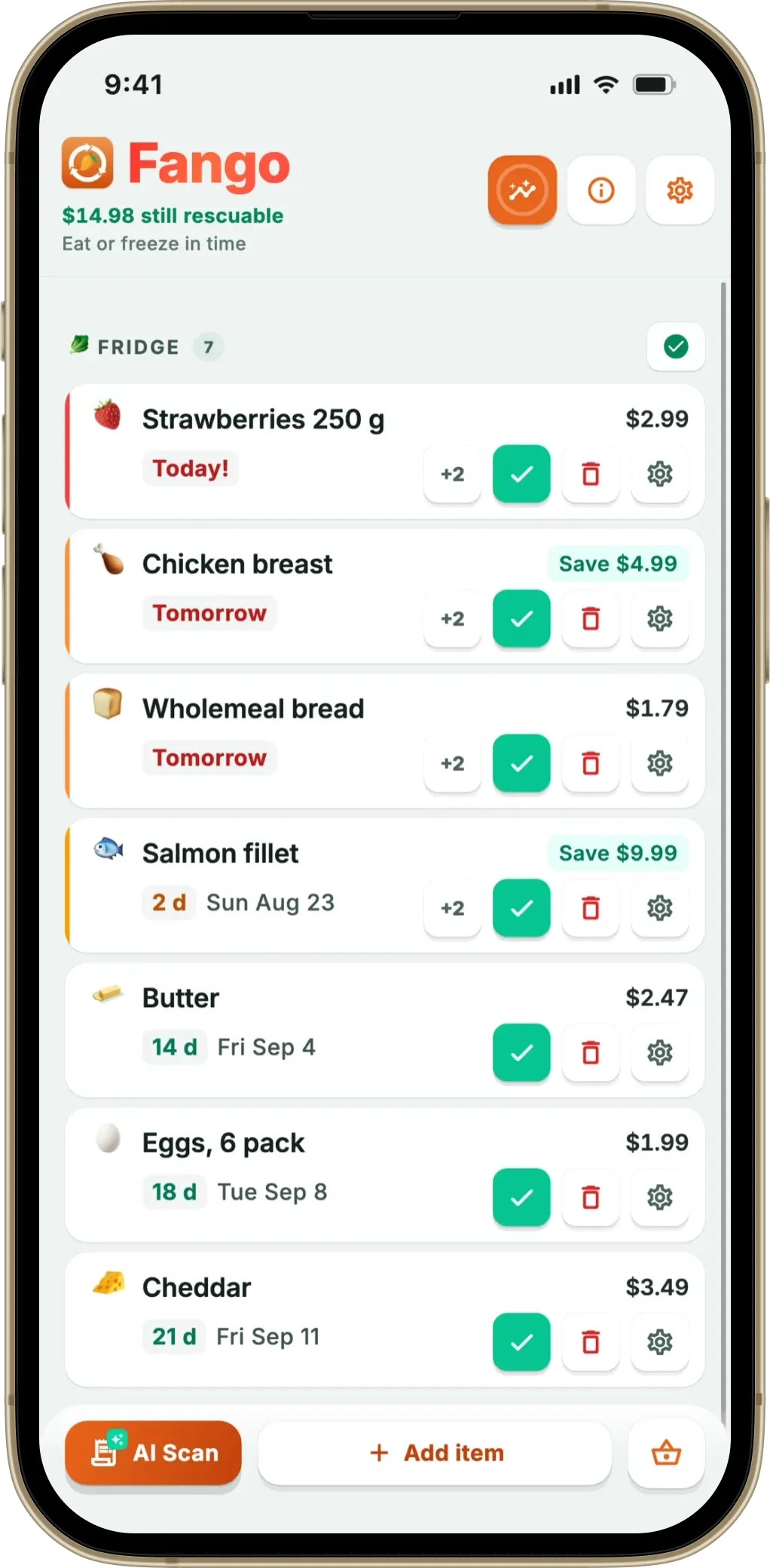
Fango is built around the big American grocery run. You photograph the receipt — paper or a PDF confirmation from an online delivery — and AI reads every line, identifies each product, and assigns an estimated expiration date. One Costco or Kroger receipt can add 25-plus items in seconds, loose produce included, with no typing. It runs on iPhone and Android, shows prices in dollars, and reminds you in time, with action buttons to mark items eaten, wasted, or push the date back a couple of days. There’s also a home-screen widget so what needs using soon is visible without opening the app.
Crucially for a personal list, there’s no account and nothing syncs to a cloud: your data stays on your phone by default, and unless you share it with your household, the only thing that ever leaves is the receipt during a scan, which is read once and discarded. It’s free to try for a month, then a monthly or yearly subscription billed through the App Store or Google Play, with the price for your country shown in the app. You can see the mechanics in the grocery receipt scanner app guide, and if the no-account angle is what matters to you, our piece on a food waste app with no registration covers it in detail.
Fango reads receipts from Walmart, Kroger, Target, Costco and the rest, adds every item with an estimated expiration date, and reminds you in time. Prices in dollars, no account, all data on your phone by default.
Download on the App Store Get it on Google PlayFree for a month · No sign-up · iOS and Android
The main US options compared
A handful of apps come up most often for American users. They differ mainly in how you add food and where your data lives — the two things that decide whether you stick with it. Here’s the comparison:
| App | Adding food | Platforms | Data |
|---|---|---|---|
| Fango | Whole receipt, AI | iOS + Android | On-device by default |
| NoWaste | Barcode / receipt / manual | iOS + Android + web | Cloud sync |
| Fridgely | Barcode | No longer in either store | — |
← scroll →
They take different routes. NoWaste mixes barcode, receipt and photo entry and syncs your inventory across devices, while the original Fridgely, once a common barcode pick, is no longer in the App Store or Google Play. Fango is the one focused on scanning your whole receipt at once and keeping everything on your device by default. For the wider field, see the best food waste tracker app roundup.
NoWaste is one of the most established apps in the category and is available in the US on both iPhone and Android. Its main strength is syncing your inventory across devices, with several lists you can set up for the fridge, freezer and pantry. It offers barcode scanning, manual entry, receipt scanning (on iPhone) and an AI assistant. The free version covers 6 lists and 500 items; NoWaste Pro is $6.99 a year or $29.99 lifetime.
- Multi-device sync, plus a web app
- Barcode scanning with product lookup
- Separate fridge, freezer and pantry lists
- Inexpensive: Pro is $6.99 a year
- Free version capped at 6 lists and 500 items
- Inventory stored in the cloud
- The Android listing mentions only barcode scanning
Fridgely was a long-running US expiration-date tracker built around barcode scanning, with family sharing. The original app is no longer in the App Store or on Google Play, so you can’t install it any more. The app now listed as “Fridgely” on Google Play is a different, newer app from another developer. If you liked the barcode approach, BEEP is still on both iPhone and Android.
- Was built around barcode scanning
- Had expiry alerts and family sharing
- No longer in the App Store or on Google Play
- The Play Store “Fridgely” is a different app
How a food waste app saves you money on groceries
The EPA’s $728 per person works out to about $14 a week, or roughly $56 a week for a family of four. A food waste app doesn’t make groceries cheaper; it cuts that loss in three ways:
- You eat what you already paid for. A reminder a day or two ahead turns the forgotten chicken into Tuesday’s dinner. In Fango, food eaten close to its date counts toward the month’s savings, so you see the dollars add up.
- You stop buying duplicates. With the fridge list on your phone in the aisle, a second jar of salsa or another carton of eggs is easy to spot, and Fango’s shopping list suggests what is actually running low. Our best shopping list app guide compares how different lists handle this.
- You freeze instead of toss. When plans change, the reminder’s freeze button moves bread, ground beef or leftovers to the freezer with a new date, instead of letting them go bad.
Catch two or three items a week and the app has paid for itself many times over. That is the idea behind “save up to $60 a month”: not a coupon, but food that no longer ends up in the trash.
Which should a US shopper pick?
Match the app to your routine. If you do a normal weekly supermarket run and want the least effort, receipt scanning wins — one photo and the whole haul is tracked. If you mostly buy a few packaged items at a time and like scanning barcodes, a barcode app suits you, as long as you don’t mind a cloud account. For most American households trying to waste less and save money, a private receipt-scanner like Fango does the most with the least effort. If you’re outside the US, we’ve written the same guide for British shoppers.
One more thing separates Fango from a pure tracker: it also carries a shopping list that reads the fridge and your receipt history, suggesting what is running low and staying quiet about what you already own. The list stays on your phone by default — it goes to other people only when you choose to share it with your household.
Frequently Asked Questions
What is the best food waste app in the USA?
It depends on how you shop, but for most American households a receipt-scanning app is the most practical. Fango lets you photograph a receipt from any US grocery store, reads every item with AI, estimates expiry dates and reminds you in time — with no account and all data kept on your phone by default. It runs on iPhone and Android and works across the US and 33 other countries.
How much money does the average American waste on food?
The EPA estimates food waste costs about $728 per person per year, roughly $2,900 for a family of four. An older, widely cited USDA figure put a household of four at around $1,500 a year. Either way it’s hundreds of dollars of groceries thrown out — most of it fresh food that was simply forgotten, which reminders are designed to prevent.
Does Fango work with US grocery store receipts?
Yes. Fango’s AI reads receipts from US grocery stores such as Walmart, Kroger, Target, Costco, Safeway, Publix, Trader Joe’s and Whole Foods, including paper receipts and PDF order confirmations from online delivery. Prices show in US dollars and your waste statistics are kept in your home currency.
Is there a free food waste app for the US?
Fango is free to try for one month — full receipt scanning and reminders included — then a monthly or yearly subscription billed through the App Store or Google Play, with the price for your country shown in the app. There’s no account, so the free month is a genuine trial of everything rather than a locked demo.
How do I track how much food my household wastes?
Start with a two-week audit: keep your receipts and write down everything you throw away and what it cost. A food waste app makes that automatic. In Fango each item is marked eaten or wasted, often straight from the reminder, and the statistics add up the money in dollars.
How can a food waste app help me save money on groceries?
In three ways: it reminds you in time to eat food you already paid for, it helps you avoid buying things you already have, and it lets you freeze food from the reminder when plans change. The EPA puts wasted food at about $728 per person a year, so even a few rescued items a week add up.
