Groceries in Canada aren’t getting any cheaper, so throwing food out stings more than it used to. The average Canadian household wastes about 140 kilograms of food a year — worth more than $1,300 — and roughly 63% of it could have been eaten, according to the National Zero Waste Council research behind Love Food Hate Waste Canada. Across the country that’s nearly 2.3 million tonnes of edible food, worth over $20 billion a year. A good tracking app won’t fix that on its own, but knowing what’s in your fridge and when it expires is the single easiest place to start.
The catch is that most food-tracking apps ask you to build the inventory by hand, or create an account before you can do anything. Below is an honest look at the best options available in Canada in 2026 — including Fango, which we make, and two of the better-known alternatives. If you want the wider picture of how these tools work, our best food waste tracker app guide goes deeper on the category.
- Fastest to fill your fridge list → Fango (scan the receipt, AI adds everything)
- No account, data stays on your phone by default → Fango
- Barcode scanning + synced inventory → NoWaste (the original Fridgely is no longer in the app stores)
- Best overall for most Canadian households → Fango (free to try for a month, no sign-up)
What to look for in a food waste app
Before comparing specific apps, it helps to know what actually makes people stick with one past the first week. The honest answer: whichever app is the least amount of work. A few things matter more than the rest:
If you are choosing between apps, our guide to picking an expiry date tracker lists the features that decide whether you are still using it a month later.
- How fast you can add food. If logging a weekly shop takes ten minutes of typing, you’ll stop doing it. Receipt scanning and barcode scanning both beat manual entry — receipt scanning is faster for big trips, barcodes for one-offs.
- Useful reminders. A tracker is only worth it if it tells you in time, not after. Look for notifications you can set a few days ahead.
- Does it fit Canadian shopping? Receipt scanning is only handy if it reads the receipts you actually get — Loblaws, Sobeys, Metro, Costco, No Frills and the rest, priced in Canadian dollars.
- Account and privacy. Some apps make you register and store your data in the cloud; others keep everything on your device. Decide how much that matters to you.
- Price. Most of these apps are freemium or subscription. It’s a few dollars a month at most — worth weighing against the food you’d otherwise bin.
The best food waste apps in Canada at a glance
| Feature | Fango | NoWaste | Fridgely |
|---|---|---|---|
| AI receipt scanning | ✓ | Receipt scan (iOS) | — |
| Reads Canadian receipts | ✓ | Not verified | — |
| Barcode scanning | ✗ | ✓ | — |
| No sign-up required | ✓ | Check listing | — |
| Data stays on device by default | ✓ | ✗ | — |
| Push reminders | ✓ | ✓ | — |
| Home-screen widget | ✓ | Not verified | — |
| Multi-device sync | ✓ in household sharing | ✓ | — |
| iOS and Android in Canada | ✓ | ✓ | ✗ removed from both stores |
| Free to try | ✓ 1-month free trial | 6 lists / 500 items | No longer available |
← scroll →
Fango — best for fast logging: one receipt, the whole shop
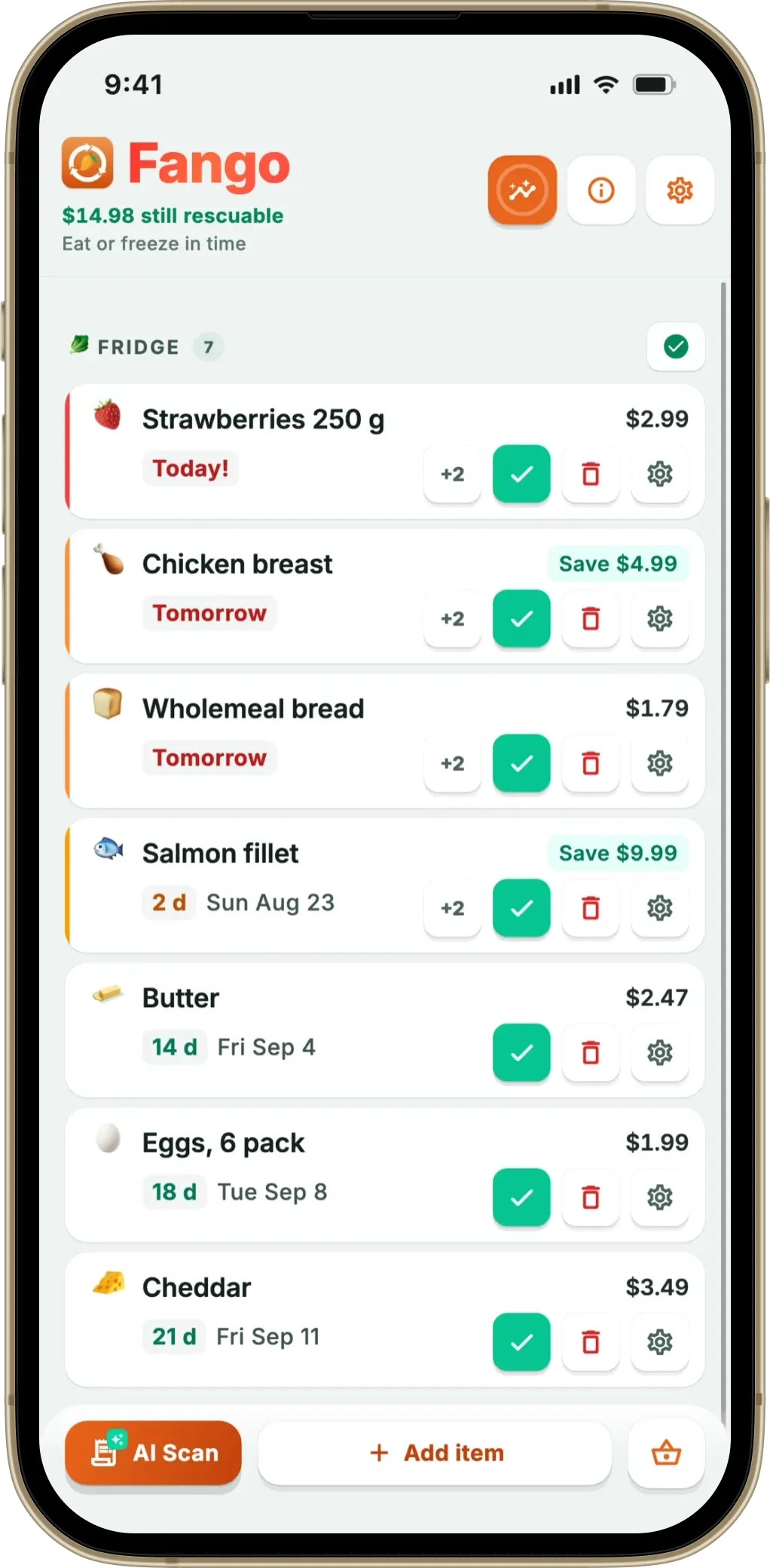
Fango is built around one idea: adding food should take seconds, not minutes. After a grocery run, you photograph the receipt and its AI reads the products automatically, estimating an expiry date for each based on the item type. For a full weekly shop you’re usually done in under a minute. The receipt scanning supports more than 60 countries including Canada, so a Loblaws, Sobeys, Metro or Costco receipt in Canadian dollars is read the same way. It also handles PDF receipts, which is handy for online grocery orders.
From there Fango sends push notifications in time — anywhere from one to fourteen days ahead, set per item — with action buttons so you can mark something used or tossed straight from the notification. There’s a home-screen widget showing what to use next, and a running tally of what you’ve wasted versus saved. There’s no account: you download it, and your fridge list stays on your device by default. Unless you share it with your household, the only network step is the optional receipt scan. It’s available on both iOS and Android in Canada, in eight languages, and supports dozens of currencies. If handing over an email address bothers you, our no-registration food waste app piece explains how that works.
- AI receipt scanning reads Canadian receipts fast
- No account — fridge data stays on your device by default
- Configurable reminders (1–14 days) with action buttons
- Home-screen widget and waste/save stats
- Free to try for a month, then billed monthly or yearly in Canadian dollars
- Household sharing: the same view for up to four people, one subscription
- No barcode scanning
- No multi-device sync by default
- No recipe suggestions or meal planning
Photograph the receipt and Fango’s AI adds everything, then reminds you in time. No account, no cloud sync by default, fridge data stays on your phone by default.
Download on the App Store Get it on Google PlayFree for a month · No sign-up · iOS and Android
NoWaste — best for shared, synced inventories
NoWaste is one of the most established apps in the category and popular with Canadian users. The thing it does best is cloud sync across your devices, with a web app alongside the phone apps. It leans on barcode scanning, manual entry and a recipe feature that suggests meals based on what’s about to expire.
On iPhone it also offers receipt, photo and AI-assistant input; the Google Play listing mentions barcode scanning. The free tier covers 6 lists and 500 items; NoWaste Pro costs $6.99 a year or $29.99 lifetime in the US App Store (Canadian prices may differ).
- Multi-device sync, plus a web app
- Barcode scanning with product lookup
- Recipe suggestions based on expiry dates
- Available on iOS and Android in Canada
- Data stored in the cloud
- Free tier capped at 6 lists and 500 items
- Receipt scanning is mentioned for iOS only
Fridgely — no longer available
Fridgely was built around barcode scanning, with expiry tracking, reminders and the option to invite family members or roommates. The original app is no longer in the App Store or on Google Play (checked September 2026), so it can’t be installed in Canada any more. The app now listed as “Fridgely” on Google Play is a different, newer app from another developer.
If you want barcode scanning, NoWaste still offers it. If you’re torn between the two approaches, our grocery receipt scanner guide lays out where each one wins.
- Was a simple barcode-based tracker
- Supported inviting family members or roommates
- No longer available on iOS or Android
- Same name now used by an unrelated Android app
Best before, packaged on, expiration: Canadian date labels and your app
Canadian food labels work a little differently from American and British ones, and it changes what a tracking app needs to do. Most prepackaged food that keeps for 90 days or less carries a best before date, which is about freshness and quality, not a safety cut-off. Food packed in the store, like meat from the butcher counter or bakery bread, often shows a packaged on date instead, which tells you when it was wrapped; how many days it keeps is printed on the label or a poster in the store, so the last good day is left for you to work out. True expiration dates appear only on a short list of products such as infant formula and meal replacements (CFIA).
Add loose fruit and vegetables, which carry no date at all, and a lot of what you buy has no clear date to act on. It is exactly the fresh food that goes off fastest. An app that only stores dates you type in leaves those items blank. Fango estimates a realistic shelf life for each product from what the food is when it reads your receipt, so ground beef from the counter and a loaf from the in-store bakery still get a reminder. You can change any date on the review screen if the label says otherwise. For more on how one list covers the fridge, freezer and pantry, see our fridge tracker app guide.
Food rescue apps and near-expiry discounts in Canada
Alongside trackers, Canadians searching for a food saving app will find discount and food rescue apps that sell near-expiry groceries or surplus meals at a reduced price. For many households, buying food close to its date is simply a way to stretch the grocery budget. It works best with a plan for what happens once the food is home: a discounted pack of chicken with a day left is only a saving if it gets cooked or frozen in time.
That is where the two kinds of app fit together. The discount app lowers the price you pay; a tracker makes sure you actually eat what you bought. Scan the receipt, set the short-dated items to today or tomorrow, and use the reminder’s freeze button if plans change.
Which app is right for you?
For most Canadian households the deciding factor is friction. If you shop weekly and want the least hassle, receipt scanning wins, and that’s where Fango is strongest — you skip the typing and the sign-up entirely. If barcode scanning, syncing across your devices or recipe ideas matter more, NoWaste earns its place. Whichever you pick, the payoff is the same: throwing out less of that $1,300. If you want to see the money side laid out, our guide on how much money food waste costs puts real numbers on it.
Fango differs from a pure tracker in one more way: it carries a shopping list built from the fridge and your receipt history, so it points at what is running out and at what you buy regularly once it is due again. That list stays on your phone by default, and it only reaches anyone else if you deliberately share it with your household.
Related reading: Best Food Waste App in Australia and Best Food Waste App in Ireland.
Frequently asked questions
What is the best food waste app in Canada?
It depends on how you shop. If you do a big weekly grocery run and want the fastest way to log everything, Fango is the strongest pick in Canada — you photograph your receipt and its AI reads the products and estimates expiry dates, with no account required. If you’d rather scan barcodes one item at a time, or sync an inventory across your devices, NoWaste is the better-known option. Both are available on iOS and Android in Canada; the original Fridgely is no longer in either app store.
Does Fango work with Canadian grocery receipts?
Yes. Fango’s AI receipt scanning supports receipts from more than 60 countries, Canada included, so receipts from Loblaws, Sobeys, Metro, Costco, No Frills, Walmart and similar chains are read automatically. It handles Canadian dollar pricing and works in English. You photograph the receipt, the app reads the line items, and you confirm — usually in under a minute end to end.
How much does Fango cost in Canada?
Fango is free to try for one month with no account. After that it’s a monthly or yearly subscription, charged by the App Store and Google Play in Canadian dollars, with the price for your country shown in the app. There are no ads and no upsells inside the app.
Is there a food waste app that works without an account in Canada?
Yes. Fango needs no sign-up — you download it and start tracking right away, and your fridge list stays on your device by default rather than in the cloud. Unless you share it with your household, the only thing that leaves your phone is the optional AI receipt scan, where the image is processed momentarily and then discarded. Many other options sync your data through the cloud; NoWaste, for example, syncs your lists across devices.
What is the difference between best before and expiration dates in Canada?
In Canada, a best before date is about freshness and quality, and it appears on most prepackaged food that keeps for 90 days or less. Expiration dates are required only on a short list of products such as infant formula and meal replacements. Food packed in the store often shows a packaged on date instead.
Is buying near-expiry food through apps worth it in Canada?
It can save real money, as long as the food gets eaten. Near-expiry groceries have a day or two left, so they are the easiest food to forget. Scanning the receipt into a tracker like Fango and setting a short date puts them at the top of your list, and you can freeze them from the reminder if plans change.
