An ordinary shopping list app does almost nothing for food waste, and the reason is structural rather than a matter of polish: it stops working at the checkout. It never learns what you brought home, what date was on the packet, or what went in the bin a fortnight later. So next Saturday’s list is built on memory — the same memory that let the spinach turn to slime. A shopping list only reduces waste when it sits inside a loop running from your fridge to the shop and back, which is what Fango’s list is built to do.
Add items straight from your fridge, shop in aisle order, then scan the receipt — everything lands back in your inventory with dates and reminders. No account, no cloud by default.
Download on the App Store Get it on Google PlayFree for a month · No sign-up · iOS and Android
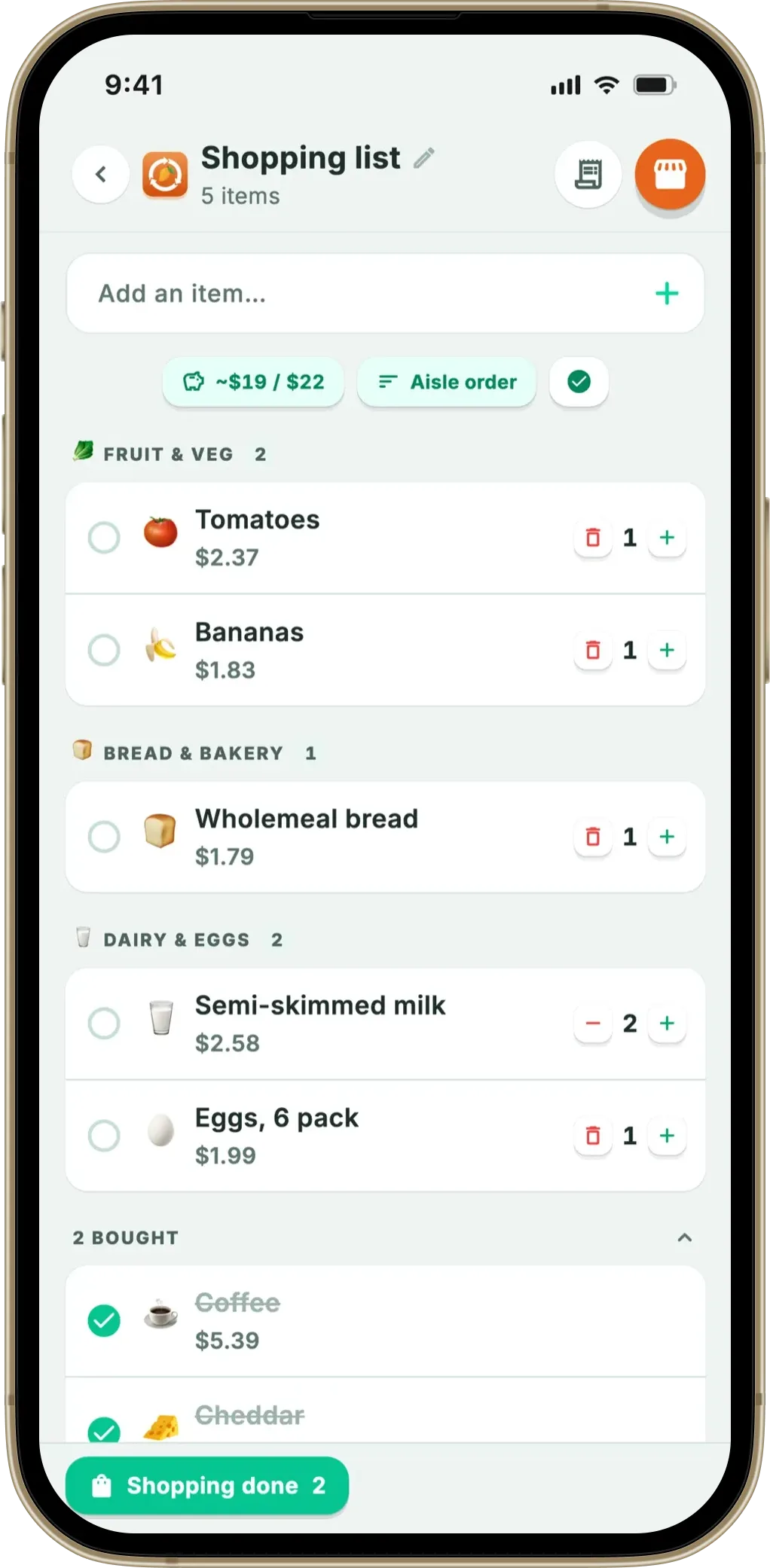
Below: the loop step by step, the three kinds of suggestion, and the one link that isn’t automatic. The aisle-ordering side has its own guide to a grocery list organised by aisle.
- Ordinary lists end at the till — no feedback from what you ate or binned
- Fango closes the loop — fridge → list → shop → receipt scan → reminders → next list
- Suggestions come from your own receipts and fridge — worked out on the phone, no AI
- The honest gap — ticking an item doesn’t add it to your fridge; the receipt scan does
Why a standalone shopping list can’t cut food waste
The numbers show where the problem lives. UNEP’s Food Waste Index Report 2024 estimates that around a fifth of all food available to consumers is thrown away, and that households — not shops or restaurants — account for roughly 60% of it. In the UK, WRAP puts the cost at roughly £1,000 a year per household. Practically none of it happens in the shop; it happens days later, in a fridge nobody has looked into properly.
If the same problem shows up on the shopping side — buying what you already have — our best shopping list app comparison covers apps that read your inventory.
A list app lives entirely on the wrong side of that line. That’s no criticism — reducing waste is a different job, needing information a list can never have:
- No record of consumption. It knows you wrote “yoghurt” nine times. Not that you binned six of them.
- No idea what’s at home. Hence the third jar of mustard while the coriander wilts unnoticed.
- “Frequent items” means list history, not shopping history. What you typed and didn’t buy still counts; what you grabbed without listing doesn’t.
- No dates. Without an expiry date there’s nothing to remind you about — and reminders are what prevent waste.
The loop: fridge → list → shop → receipt → fridge
Fango already had the second half: a fridge inventory built from scanned receipts, with expiry estimates and push reminders. The shopping list closes the circle:
-
1
Something runs out — or goes off. Mark an item in your fridge as eaten or wasted and the confirmation toast carries an “Add to shopping list” button. One tap and it’s on the list with its name, quantity and remembered price.
-
2
The list checks what’s already at home. Suggestions are filtered against your fridge contents and the list itself, so Fango won’t nudge you towards something on the middle shelf.
-
3
You shop in aisle order. A full-screen shopping mode groups everything into 13 aisles in walking order. Tick items off as they go in the trolley.
-
4
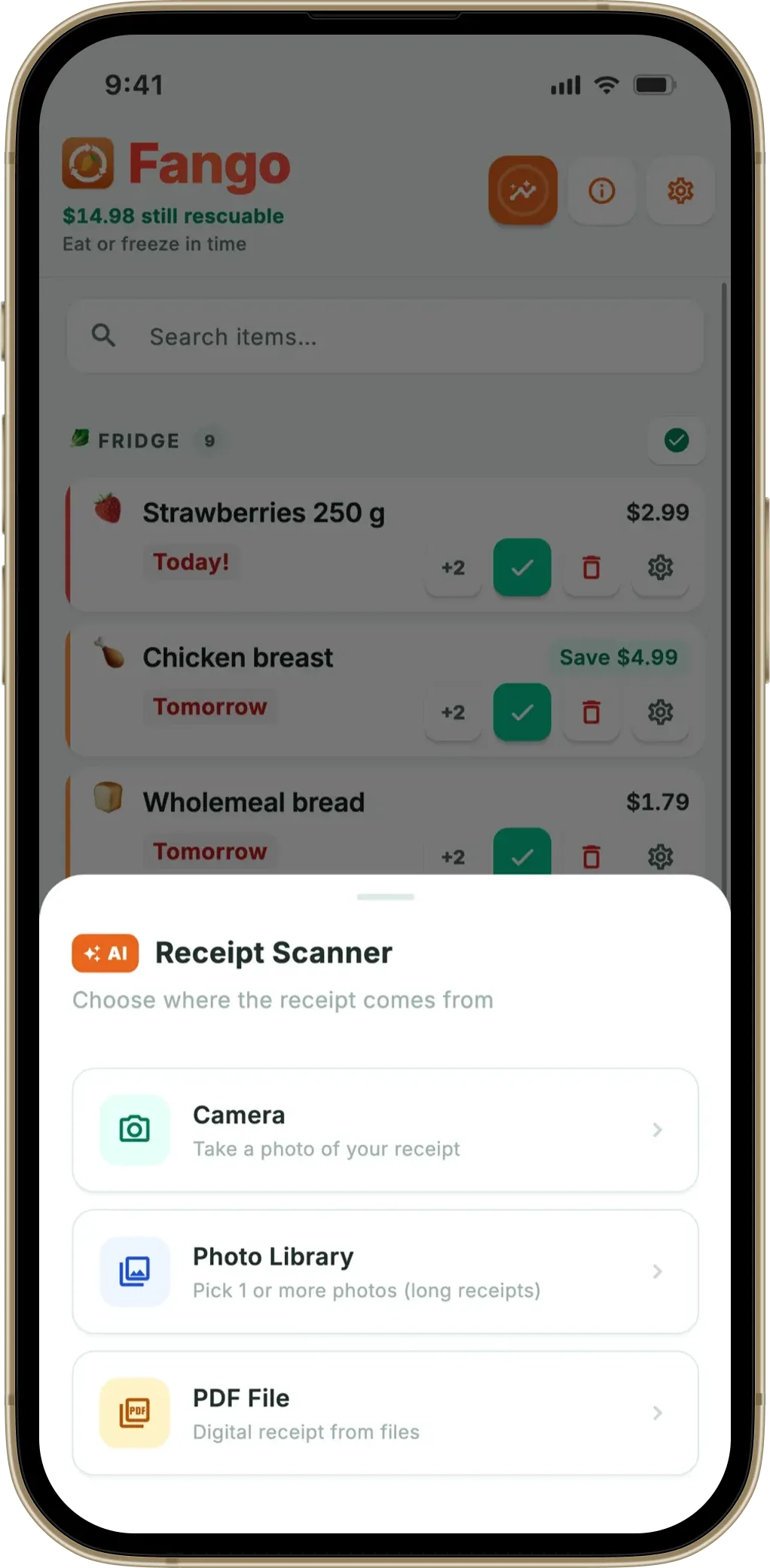
You scan the receipt at home. The AI reads each product line, estimates a date, and the items land in your fridge list — see how receipt scanning works.
-
5
You get a reminder in time. Push notifications land up to 14 days before an item’s date, so the chicken thighs get used, not discovered.
-
6
The next list knows what really happened. Because the receipts are kept, next week’s suggestions come from what you genuinely bought — not from what you once typed.
That last step is the point: each lap round the loop, the list gets better informed — fed by receipts and dates, not guesswork.
Three kinds of suggestion — and not one of them is AI
Fango suggests items as chips above the list. There are exactly three sources — worth being precise about, since “smart suggestions” usually hides a server:
- “You buy these regularly.” From your receipt history — roughly the last dozen receipts. Fango works out how consistently an item appears and how many days typically pass between purchases, then floats the ones about due.
- “Running low in your fridge.” Reads your inventory and suggests anything within about three days of its date, or already past it. No standalone list app can make this nudge; it needs expiry data first.
- Receipt-match tidy-up. After a fresh scan — within 48 hours, once per receipt — Fango spots list items that appear on that receipt and offers to strike them off in one tap.
All three are ordinary arithmetic on your phone: counting, comparing dates, matching names. No AI calls anywhere in the list, no account, nothing sent. Fango’s AI does one job — reading the receipt — and that’s the only moment anything leaves the device, as our piece on food inventory apps with no account explains.
The most common own goal: buying what you already have
Ask anyone why they throw food away and you’ll hear two answers: they forgot about it, or they bought what they already had. The second is easier to fix, and a connected list fixes it almost by accident. Because Fango knows what’s in your fridge, items already at home are filtered out of the suggestions — and with your inventory in your pocket, “do we still have parmesan?” is answerable in the aisle instead of buying a spare. A small mechanic with a big effect on the bill — and it stacks with our guide to how to stop throwing away food.
What the list is like to use in the shop
The loop only helps if the list is pleasant enough to keep using. A few things worth calling out:
- 13 aisles in walking order — fruit and veg, bread, dairy and eggs, meat and fish, frozen, dry goods, snacks, drinks, household, health and beauty, baby, pets, other. The aisle comes from the item’s emoji and multilingual keywords, not an AI, and covers non-food things like loo roll, shampoo and dog food.
- Shopping mode — a full-screen view with large rows, aisle headings, a progress bar and a light haptic tap as you tick things off. “Shopping done” clears the ticks but keeps the rows, so the weekly list can be reused.
- A budget target — set a figure in your own currency and a pill tracks the estimate against it, green under and red over. It counts only unticked items, so it falls as the trolley fills.
- Several lists — create, rename, archive as a template or delete, with per-row notes and undo after a swipe-delete.
- Four ways to add — by hand with autocomplete from your own item memory, from the fridge’s eaten/wasted toast, from a past receipt under “Previous purchases”, or from the suggestion chips. Adding something twice bumps the quantity instead of duplicating it.
The honest gap: a tick doesn’t fill your fridge
Here’s the part most feature lists would quietly skip. Ticking an item off in the shop does not add it to your fridge inventory. Scanning the receipt is what does that — or adding the item by hand. A tick on its own never will, and that’s a deliberate decision rather than an unfinished feature.
The reason is dates. A tick tells Fango you picked something up; it says nothing about what’s printed on the packet. If the app invented an expiry date from the word “chicken” on a list, every reminder afterwards would rest on a guess. The receipt gives the parser a real product line — brand, size, sometimes the shop’s own category — so the estimate is anchored to what you actually bought. Since the reminder is the whole value of the loop, invented dates would be worse than none. Our explainer on best before vs use by covers why dates matter this much.
Other things it deliberately doesn’t do: no personal sync between your own devices (household sharing is the only shared view), no recipes or meal planning, no barcode scanning, no list widget, no location-based reminders.
Add items straight from your fridge, shop in aisle order, then scan the receipt — everything lands back in your inventory with dates and reminders. No account, no cloud by default.
Download on the App Store Get it on Google PlayFree for a month · No sign-up · iOS and Android
So does closing the loop actually reduce waste?
Being straight: we can’t hand you a controlled study of Fango users, only the mechanism. Household waste comes overwhelmingly from two leaks — food bought and then forgotten, and food bought twice over. The loop puts something in the way of each: expiry reminders and an eat-me-first habit for the first, an inventory-aware list for the second. The list is where they meet, being the screen you look at just before spending money.
The list, aisles, budget and suggestions all sit on your device — no account, no sync. Free to try for one month, then from $2.99/month or $22.99/year. A shopping list and expiry tracker in one app covers both halves together, the full-screen shopping mode is what the list turns into in the aisle, and saving money on groceries sets it against the wider bill.
Frequently asked questions
Can a shopping list app actually reduce food waste?
Only if it knows what happened after the checkout. A plain list has no record of what you brought home, what expired or what you binned, so it can’t warn you about the two big leaks: buying what you already have, and forgetting what you already bought. A list connected to a fridge inventory and to your receipts can do both.
Do items I tick off in the shopping list go into my fridge list automatically?
No, and that’s deliberate. In Fango, items enter your fridge list when you scan the receipt, or when you add them by hand. A tick in the shop says you picked something up, but nothing about the date printed on the packet. The receipt gives the AI a real product line, so the expiry estimate is anchored to what you actually bought rather than to a guess.
How does Fango decide what to suggest for my next shop?
Three ways, all worked out on your phone. It reads your recent receipts to spot items you buy regularly and how many days usually pass between purchases, so the ones about due rise to the top. It reads your fridge and suggests anything within about three days of its date. And after a fresh scan it offers to clear off whatever appears on that receipt. No AI is involved — Fango’s AI only reads receipts.
Does the shopping list work without an account or an internet connection?
Yes. There’s no sign-up and, by default, no cloud: the list, the aisles, the budget and the suggestions all live on your device, exactly like the fridge inventory. The only moment anything touches the network is the optional receipt scan. By default the list stays on your own phone; household sharing is opt-in and puts it on up to four phones. There is no personal sync between your own devices.
