Adding a price to a shopping list item sounds like the most basic feature a list app could have. It isn’t. One of the best-known list apps puts it behind a subscription: AnyList’s help pages state plainly that AnyList Complete is required to add prices to items. Another popular free app has no price field at all. Fango takes a different route again — it fills the price in from your receipts instead of asking you to type it.
This article is about the mechanics: which apps have a price field, what a running total actually adds up, and where the number in it comes from. That last part matters more than the feature checkbox, because a price you have to re-type every week is a feature you will use twice.
- Three sources — a price gets onto a list because you typed it, because the app looked it up, or because you paid it last time
- Not standard — AnyList charges for item prices, OurGroceries has none, Listonic includes a total cost calculator for free
- Typed prices decay — the field is empty again next week unless you refill it; remembered prices don’t have that problem
- Every total is an estimate — no consumer list app knows what your store charges today
What “with prices” actually means
Three different things hide behind the same search. Knowing which one you want saves you from installing the wrong app.
If the same problem shows up on the shopping side — buying what you already have — our best shopping list app comparison covers apps that read your inventory.
-
1
A price field per item. You can attach a number to “milk”. This is the minimum, and even it isn’t universal.
-
2
A running total. The app adds the rows up and shows the sum, so you know before you leave the house whether this is a £40 shop or a £90 one.
-
3
A price that arrives on its own. The number is already there when the item lands on the list, because the app remembers what that product cost you.
Most apps that advertise “prices” mean the first two. The third is rare, and it’s the one that decides whether you are still using the feature a month later.
Which apps let you add prices
Checked against each company’s own pages in August 2026.
| App | Price per item | Running total | Where the price comes from | Cost |
|---|---|---|---|---|
| Fango | ✓ | ✓ vs a budget target | Scanned receipts, remembered per product; editable by hand | Free for a month, then subscription (price in app) |
| AnyList | ✓ | ✓ at the bottom of the list | You type it, per store if you want | Requires AnyList Complete, $9.99/year individual or $14.99/year household |
| Listonic | ✓ | ✓ total cost calculator | You type it | Free, with ads; premium adds themes and removes ads |
| OurGroceries | ✗ | ✗ | — | Free with banner ads; paid upgrade removes them |
| Cozi | ✗ not listed | ✗ not listed | — | Free plan $0; Shopping Mode is a Gold feature, $39/year |
| Notes / Google Keep | ✗ | ✗ | — | Free |
← scroll →
Two entries are worth reading twice. OurGroceries’ FAQ is refreshingly direct about the gap: “We’ve had many requests for price tracking, and it’s on our list of features to add in a future update.” And Cozi’s plan comparison puts Shopping Mode — checked items dropping to the bottom while you shop — in the $39/year Gold tier, without listing item prices or a list total at any tier.
Listonic is the generous one here. Its own site advertises adding prices and a total cost calculator so you can see your estimated spending before you go shopping, in the free app. What you pay for instead is the absence of ads. If that trade doesn’t appeal, we’ve written about the alternatives to Listonic separately.
Where the price comes from matters more than the feature
Here is the part the feature tables never capture. A price field is only useful if it is populated, and populating it is work. AnyList’s approach is thorough — you can enter store-specific prices to compare where a product is cheaper, and AnyList Complete bundles that with recipe imports and meal planning for $9.99 a year — but every one of those numbers is a number you typed. Do that for a 30-item shop and you have spent longer on data entry than on the shop.
What happens in practice is that people fill in prices for a week, enjoy the total, and then stop. The list survives; the prices don’t. Six weeks later the total says £12 because that’s the sum of the four rows anyone bothered to fill in.
The alternative is to take the number from something you already have: the receipt. You paid £1.35 for that pack of butter nine days ago, and the shop printed it out for you. An app that reads receipts can carry that figure forward without asking you anything. That’s the mechanism behind Fango’s estimates, and it’s the same mechanism that lets a grocery list app build itself from a receipt in the first place.
How Fango’s price estimate works
Fango is a food waste app with a shopping list attached, so the receipt is already in the system: you scan it, AI reads the products, and they go into your fridge list with shelf-life estimates. The prices ride along with them.
- Per-product memory. When you add a product you’ve bought before, the remembered price estimate comes with it. Type “butter”, get the emoji and the number.
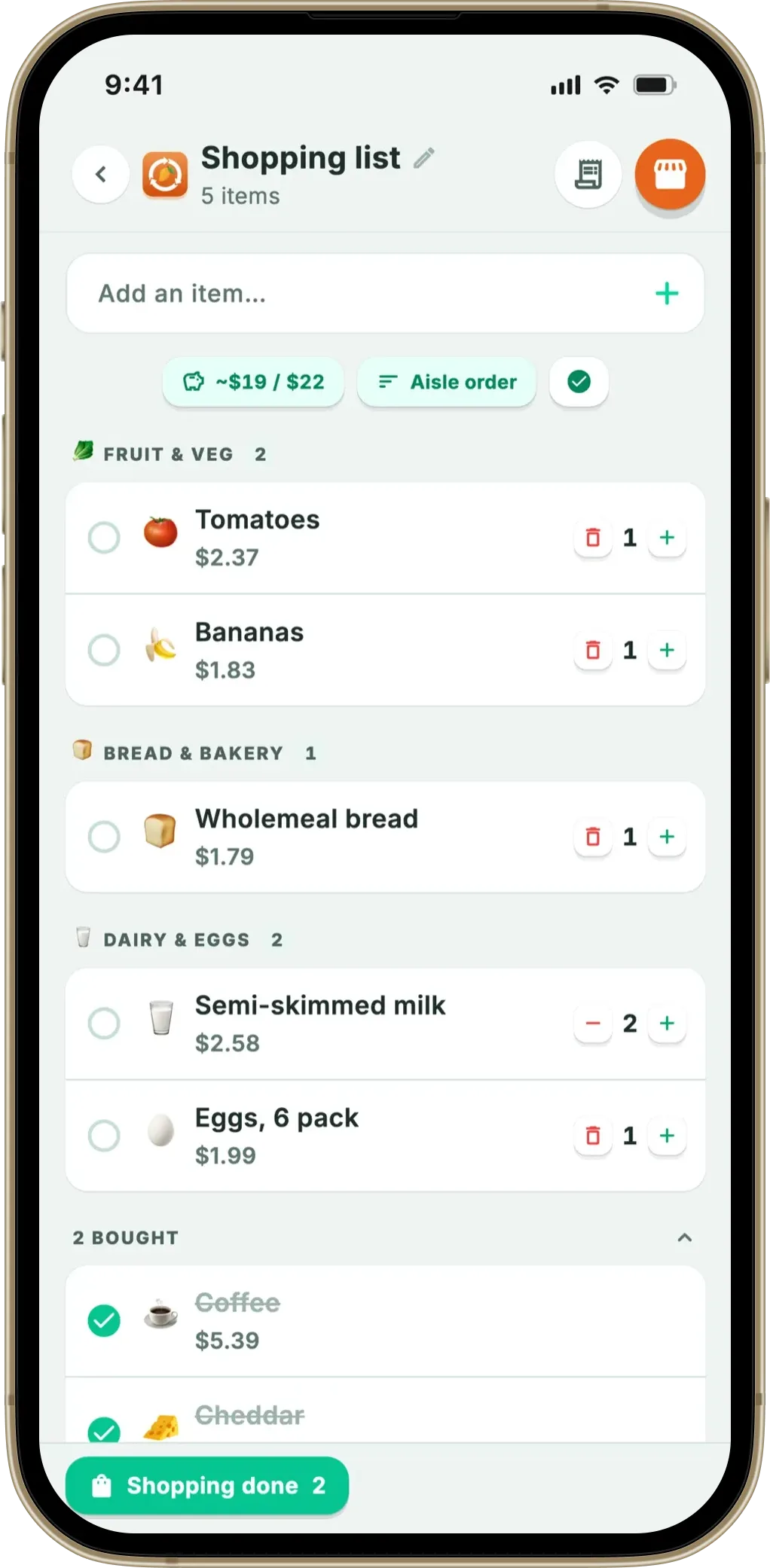
- A budget target per list. You set what this shop should cost. A pill shows estimate against target — green under, red over.
- The estimate falls as you shop. Only items you haven’t ticked off count towards the sum, so the number in front of you is what’s still to come, not what the whole list was worth when you wrote it.
- Whole numbers only. The total is rounded, and it keeps the tilde: “~19 / 20”. Showing pennies would claim a precision a remembered price doesn’t have.
- Rows with no price are simply left out of the sum rather than counted as zero — which is the honest reason the tilde stays.
Two limits, stated plainly. Fango has no barcode scanner and no live price feed, so it cannot tell you today’s shelf price or find the cheapest branch. And the first shop after installing is the weak one: with no receipt history yet, most rows have no estimate. It takes a couple of scanned receipts before the total means much.
Scan your grocery receipt — AI reads the products, adds them to your fridge with expiry reminders, and remembers what each one cost. Next time you write a list, the estimate is already there. No account, no sign-up.
Download on the App Store Get it on Google PlayTry free for a month.
Using a grocery list app as a cost estimator
A lot of people searching for prices really want one answer: how much will this list cost before I go? A grocery list cost estimator does that job in one of two ways. A supermarket’s own website or online basket prices the list at that store’s current prices, which is accurate for that one shop and useless for comparing it with anywhere else. A list app with prices estimates the trip from what you typed or what you paid last time, which works across stores but is only as good as the numbers behind it.
For the second kind, three habits make the estimate worth trusting. Put a price on the items that make up most of the bill (meat, fish, cheese, coffee, nappies) and don’t bother with the 60p onions. Set a target for the shop so the number means something, and check it before you leave rather than at the till. And let the prices refresh themselves: in Fango, each scanned receipt updates what a product cost you, so the estimate follows your actual prices instead of the ones you typed in spring. How the receipt side works is covered in our grocery receipt scanner app guide.
Then there is the cost no estimate captures. If part of what you buy each week ends up in the bin, the cheapest way to lower the bill is to buy less of it, which is the gap Fango was built for: it knows what is already in the fridge and reminds you in time.
What no app can promise you
Every total in every one of these apps is an estimate, and it’s worth being clear about why. None of them has a live feed of what your specific branch charges this morning. Prices move with promotions, pack sizes change, and the same product costs different amounts two miles apart.
Comparing across products is harder still. The UK’s Competition and Markets Authority reviewed unit pricing in the groceries sector and found inconsistencies that make like-for-like comparison difficult even standing in the aisle — similar products unit-priced in different measurements, and some retailers not showing unit prices on promotional items at all. If the shelf edge itself is inconsistent, no list app is going to hand you a precise number.
So use the total for what it’s good at: keeping a shop inside a rough envelope, and showing you the trend across weeks. If you want the deeper version of that argument, we looked at which grocery budget apps show a shop total and what they charge for it, and at the seven-step method for writing a list that saves money whether or not there’s an app involved.
Which should you pick?
One thing worth weighing before you choose on price features alone: the biggest number in a grocery budget usually isn’t the one on the receipt. WRAP puts UK household food waste at around £1,000 a year for the average household of four. A list app that shaves a few pounds off the shop is doing less for you than one that stops a bag of spinach turning to liquid in the drawer. That’s the argument for picking a list that sits inside a food waste app rather than beside one — the same reason we built the list that suggests what’s about to run out.
Frequently asked questions
Which grocery list apps let you add prices?
Listonic has a price field and a total cost calculator in its free app. AnyList has item prices and a running total, but its help pages state that AnyList Complete is required to add prices to items. Fango attaches a remembered price estimate to products you have bought before and shows the running estimate against a budget target for the list. OurGroceries has no price tracking at all — its FAQ says the feature is on the list to add in a future update — and Cozi’s plan comparison lists Shopping Mode under the paid Gold plan without mentioning item prices or a list total.
Can a shopping list app show a running total?
Yes, but only a handful do. AnyList shows the total cost for each item to the right of the item and adds it to the running total at the bottom of the list. Listonic advertises a total cost calculator so you can see your estimated spending before you go shopping. Fango counts only the items you have not ticked off yet, so the number falls as the trolley fills. A notes app cannot do any of this, because there is no price field to add up.
Do I have to type every price by hand?
In most apps, yes — the price field is empty until you fill it, and it stays empty next week unless you fill it again. The exception is an app that remembers what you paid. Fango reads prices from scanned receipts and stores them per product, so a product you have bought before arrives on the list with an estimate already attached. You can still edit any row by hand.
Are the prices in a shopping list app accurate?
They are estimates, not shelf prices. No consumer shopping list app has a live feed of what your specific store charges today, so every number is either what you typed or what you paid last time. Promotions, pack size changes and store-to-store differences all move the real figure. Treat the total as a rough guide that keeps you inside a budget, not as a prediction of the receipt.
Is there an app that estimates what my grocery list will cost?
Yes, if you give it prices to work with. Listonic has a free total cost calculator, AnyList shows a running total in its paid Complete tier, and Fango estimates the list from prices it remembers from your scanned receipts, shown against a budget target. A supermarket’s own website can price a basket at that store’s current prices, but only for that store.
- AnyList Help: How do I enter prices for items and view a running total for my list?
- AnyList: AnyList Complete pricing and features
- Listonic: Smart shopping list app — features and pricing
- OurGroceries: Frequently asked questions
- Cozi: Compare plans
- Competition and Markets Authority: Unit pricing in the groceries sector
- WRAP: Household Food and Drink Waste in the UK 2022
