Google Keep is a genuinely good list. It’s free, it’s already on the phone, it does real checkboxes rather than a wall of text, and you can hand it to whoever else does the shopping. If you’re searching for an alternative, it’s almost never because Keep is bad — it’s because Keep is a note, and a shopping list has a job that a note structurally cannot do: put itself in the order of the building you’re walking through.
Below: what Keep does well, the four specific places it breaks in a supermarket, and four alternatives compared on the things that actually differ — aisle order, sharing, price and whether the app cares what happens to the food after you’ve bought it.
- Keep can’t group by aisle. Its documented list features are checkboxes, dragging and moving ticked items to the bottom — all manual order
- Closest swaps: Bring! and OurGroceries — shared, free with ads, and both sort items into shop sections on their own
- For a budget: AnyList adds prices and a running total, but its own help pages say that needs the paid tier
- If food keeps going off: Fango is the only one here that also tracks what you bought and warns you in time
What Google Keep gets right
Start with the honest case for staying. Keep is not a compromise for a short weekly shop, and a fair comparison has to say so before it sells you anything.
- Real checklists. Google’s own list guide covers checkboxes, tap-and-hold dragging to reorder, and indented sub-items — this is a proper list, not a scratchpad.
- Tidy-up settings. The Keep settings page lets you move ticked items to the bottom automatically and choose whether new items land at the top or the bottom.
- Sharing that just works. Keep lets you add a collaborator by name, email or Google Group, and they can edit the list immediately. No invite codes, no second app.
- Reminders on the note. Keep supports time-based reminders, so “shop on Saturday morning” is a solved problem.
- Free, permanently. No trial clock and no premium tier gating the basics — a real advantage over most of this category.
If your shop is ten lines, once a week, and nothing goes in the bin at home, none of the apps below will improve your life. Close the tab.
The four places Keep breaks in a supermarket
These aren’t features Google forgot. Keep is a note with checkboxes, and it can’t do any of this without becoming a different product.
- It can’t walk the shop with you. The list stays in the order it fell out of your head: milk, bananas, toilet roll, yoghurt. That’s three return laps past the end-caps, and every lap is another chance for something unplanned to land in the trolley. Our guide to a grocery list organised by aisle walks through all 13 sections.
- It has no memory. You retype milk, bread and coffee every single week. Keep can’t offer them back to you, because it has no idea last week’s note was a shopping list — see a grocery list that learns what you buy regularly.
- It doesn’t know what’s already at home. The expensive gap. A note can’t tell you there are already two tubs of yoghurt going off on Thursday, so you buy a third. UNEP’s Food Waste Index Report 2024 estimates around a fifth of the food available to consumers is thrown away, and WRAP puts the bill at £1,000 a year for the average UK household of four. Almost none of that is decided at the till.
- The note never ends. There’s no “shop finished” step, so the list silts up with crossed-out lines and last month’s barbecue until you wipe it and lose the history.
The four alternatives, compared
Four apps that fix different parts of the problem. Everything below comes from each company’s own documentation or store listing.
Bring! — the closest swap for a shared list
A shared list with a design-led interface and automatic category grouping. Bring!’s help centre documents a Group by Categories setting under List View in profile settings, so the list arranges itself into shop sections rather than typing order. Free with advertising; a Premium tier removes ads and adds extras such as a dark theme. Like Keep, it needs an account for the list to be shared.
OurGroceries — plainer, and it does barcodes
The least fashionable and one of the most practical. Its App Store listing describes automatic category suggestions for new items, barcode scanning, adding an item by photographing it, recipes that dump their ingredients onto the list in one tap, Apple Watch and a web version. Google Play labels it Contains ads and In-app purchases; the company’s own FAQ confirms the app is free with banner ads and sells an upgrade to remove them, and that sharing requires an OurGroceries account with the same email on every device.
AnyList — the one with the budget, at a price
The most polished list in the category, and the only one here with a proper running total. AnyList’s own feature comparison prices AnyList Complete at $9.99 a year for an individual or $14.99 for a household, and its help pages state plainly that AnyList Complete is required to add prices to items — the running total is a paid feature. Free tier still gives you lists, sharing, meal planning and a handful of recipe imports.
Fango — the list that knows what’s in your fridge
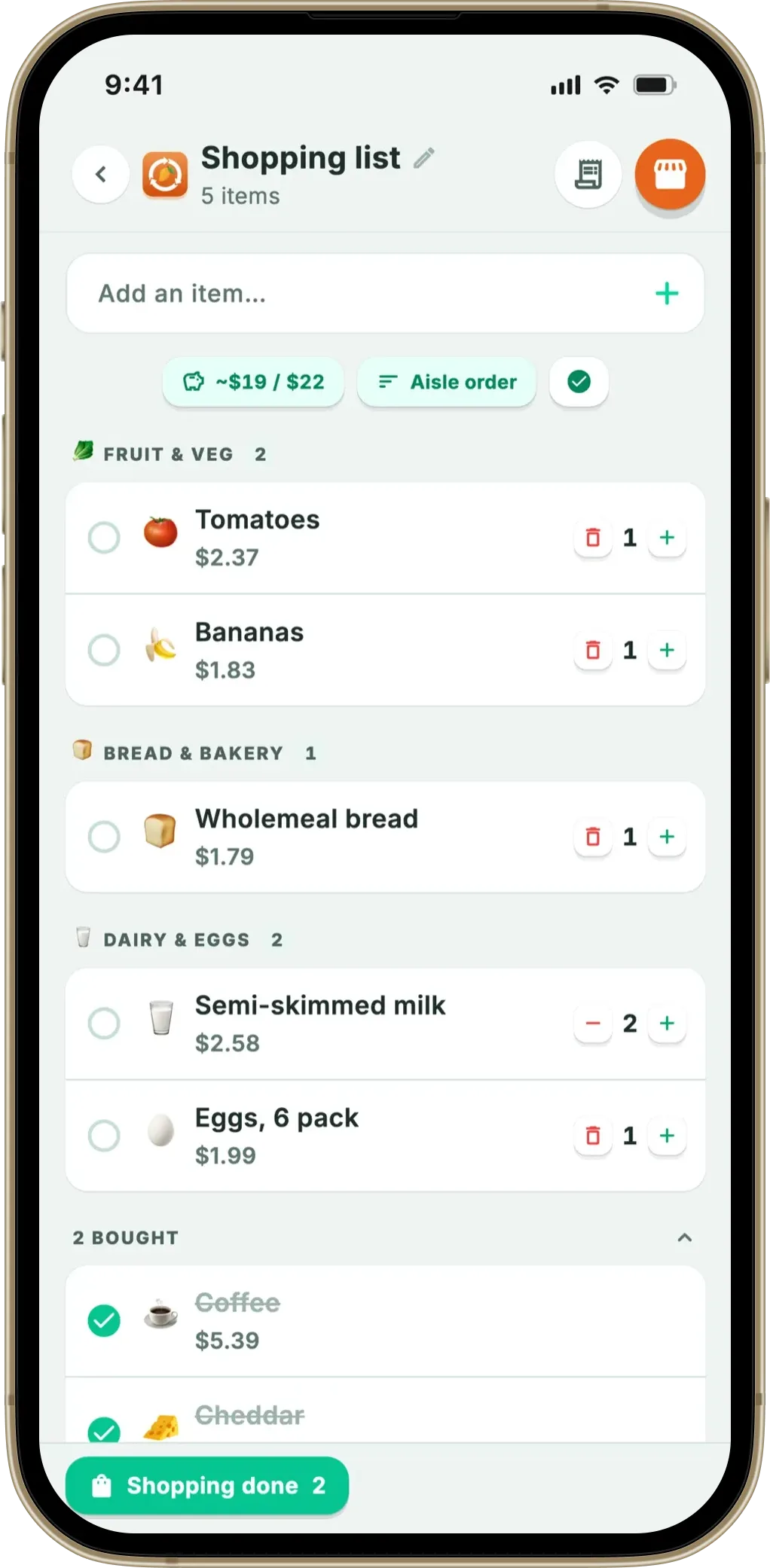
A food waste app that grew a shopping list, which is why it’s the odd one out. The list itself does the normal things: type an item and autocomplete offers names you’ve used before with an emoji and a remembered price estimate; anything can go on by hand, including bin bags, shampoo and dog food; it sorts into 13 aisles in walking order, on the phone, with no connection required. What the others can’t do is the second half — scan the receipt afterwards and the products land in a fridge list with a shelf-life estimate and a reminder in time.
Google Keep vs the alternatives, side by side
| What you want | Google Keep | Bring! | OurGroceries | AnyList | Fango |
|---|---|---|---|---|---|
| Groups items by shop section | ✗ | ✓ | ✓ | ✓ | ✓ 13 aisles |
| Shared list | ✓ | ✓ | ✓ | ✓ | ✓ up to 4 people |
| Works with no account | ✗ Google account | ✗ | ✗ | ✗ | ✓ |
| Advertising in the app | ✓ none | ✗ free tier has ads | ✗ free tier has ads | ✓ none | ✓ none |
| Running total / budget | ✗ | ✗ | ✗ | Paid tier only | ✓ |
| Suggests what you buy regularly | ✗ | Recent items | Past items | Past items | ✓ from your receipts |
| Knows what’s in your fridge | ✗ | ✗ | ✗ | ✗ | ✓ |
| What it costs | Free | Free with ads; paid Premium | Free with ads; paid upgrade | Free; Complete $9.99–$14.99/yr | Free for a month, then from $2.99/mo |
← scroll →
What Fango adds — and what it gives up
What it adds. Scan a receipt and the AI reads the products, estimates how long each one keeps, and puts them in a fridge, freezer or cupboard list with reminders you can set for the expiry day itself and 1, 2, 3, 5, 7 and 14 days before it. That history is what powers the suggestions: things you buy on a regular cadence come back as one-tap chips, and anything about to go off is flagged before you buy a duplicate — the idea behind shopping your fridge first and a list that knows what you’re about to run out of. There’s a full-screen shopping mode and a budget target that counts down as you tick items off, and without family sharing it all stays on the device, with no account at all. Turn family sharing on and the shared fridge, plus the lists you choose to share, travel through a server between the household’s phones — that is the only way sharing can work, and the choice is asked per list, never assumed.
What it gives up. Sharing capped at four people in one household, where Keep has no limit at all — the single biggest reason to stay on Keep. No recipes or meal planning, no barcode scanning, no web version and no shopping list widget. Ticking an item off doesn’t move it into fridge tracking either; things get there by scanning a receipt or adding them by hand. It’s free for a month, then from $2.99 a month or $22.99 a year.
Sorted into 13 supermarket sections, with suggestions from what you actually buy and what’s about to go off at home. No account, no ads, and nothing leaves the phone unless you share a list with your household.
Download on the App Store Get it on Google PlayFree for a month · No sign-up · iOS and Android
Which one should you move to?
One shop is enough to decide. Do you re-read the list from the top more than twice? Do you retype the same six items every week? Did anything you bought last week end up in the bin? One yes and any of the aisle-sorted apps pays for itself in attention alone; three yeses and the fridge side is the part worth solving. To see the whole field first, our roundup of the best shopping list apps covers the shared-list and recipe-led options, and grocery list app vs notes app makes the case for staying put.
Frequently asked questions
What is the best Google Keep alternative for a grocery list?
It depends on which part of Keep is failing you. If it is sharing and speed, Bring! and OurGroceries are the closest swaps and both sort items into shop sections automatically. If you want a running total and a budget, AnyList does it but charges for it. If the real problem is that the food you buy keeps going off before you eat it, a shopping list bolted onto a food waste app is the only category that touches that, and Fango is the one we build. There is no single winner, because Keep fails different people in different ways.
Can Google Keep sort a shopping list by supermarket aisle?
No. Keep documents checkboxes, tap-and-hold dragging to reorder, indented sub-items, and a setting that moves ticked items to the bottom of the list. All of that is manual ordering: nothing in Keep knows that milk and yoghurt belong to the same chiller, so the list stays in the order you typed it. Every app in this comparison groups items into shop sections on its own, which is the single clearest reason people leave Keep.
Is there a grocery list app that works without a Google account?
Yes, but fewer than you would think. Keep, Bring! and OurGroceries all sync through an account, because a shared list has to live on a server for two phones to see the same thing. Fango has no account and, by default, no server copy of your list: nothing to sign into. Sharing is opt-in — an invite code puts the list on up to four phones. If real-time sharing matters more to you than the account, stay with a synced app.
Do I lose my Keep lists if I switch apps?
No, but nothing imports them either. None of these apps read Google Keep, so the switch is a one-off retype of your regular shop. That is less painful than it sounds, because the apps worth switching to remember what you type: after two or three shops the items you buy every week come back as suggestions. Keep the old note until the new list feels complete, then archive it rather than deleting it.
- Google Keep Help: Make a list
- Google Keep Help: Change list, reminder and sharing settings
- Google Keep Help: Share notes, lists and drawings
- Google Keep Help: Set up reminders for your notes
- OurGroceries: Frequently asked questions
- AnyList: Compare features and pricing
- AnyList Help: Item prices
- UNEP: Food Waste Index Report 2024
- WRAP: Household Food and Drink Waste in the UK 2022
