Almost nobody leaves AnyList because it’s bad. It is one of the most mature shopping list apps you can install, and the two reasons people go looking are both about fit. The first is the paywall: adding prices to items, the meal planning calendar, recipe import and the Mac and browser versions all sit inside AnyList Complete, priced on AnyList’s own site at $9.99 a year for an individual or $14.99 a year for a household. Cheap — but still a subscription in front of things people assume a shopping list simply does, like telling you what the trolley will cost. The second reason is the opposite complaint: AnyList is a kitchen-planning system, and some households want a list.
The answer depends on which of those you are. Want everything AnyList does but free? OurGroceries. A shared list with more polish and shopping inspiration? Bring! Nothing new installed on an iPhone? Apple Reminders now sorts a grocery list by itself. And if what you want is a list that keeps working after the shop — budget included, plus expiry dates for what you brought home — that’s Fango, a different kind of app. UNEP’s Food Waste Index Report 2024 puts roughly 60% of consumer-level food waste in households, precisely the part no shopping list can see.
- Everything AnyList does, free — including sharing → OurGroceries
- A budget, no account, and a list tied to expiry dates → Fango
- Polished shared list with recipes and local offers → Bring!
- Nothing new to install on an iPhone → Apple Reminders
- Recipe box + meal planner as the centre of your kitchen → stay with AnyList
What AnyList does well
Credit where it’s due. AnyList’s site describes shared lists that keep a household in step — “Any changes made to a shared list will show up instantly to everyone sharing the list” — plus autocomplete that “suggests common items as you type, and automatically groups items by category”. The recipe box organises your own recipes and pulls them in from email and websites, and the planner lets you “Plan your meals for the coming weeks on a calendar, then easily add ingredients for upcoming recipes to your shopping list”.
If the same problem shows up on the shopping side — buying what you already have — our best shopping list app comparison covers apps that read your inventory.
That loop — recipe to meal plan to list — is why AnyList sticks. Its UK App Store listing (developer Purple Cover, Inc.) shows 4.8 stars from 3.4K ratings, and barcode scanning appears in its listing text. If recipes and meal planning are how your kitchen runs, nothing here replaces it, Fango least of all.
Where the AnyList paywall falls
The friction is in the split, not the price. The AnyList Complete page lists what the subscription unlocks: web and Mac access (“AnyList for the Web gives you full access to AnyList on any Mac or PC”), recipe importing from “popular websites and blogs”, meal planning with calendar and list views, Apple Watch support, item and recipe photos, recipe scaling, price tracking, assigning items to stores, folders, location reminders and passcode protection. On the UK App Store the same subscriptions appear as “12 Month AnyList Complete Individual Subscription £9.99” and “1 Year Household Subscription £14.99”.
Three of those land awkwardly for ordinary shoppers:
- Prices and budgeting. Adding prices to items, with running totals, is a Complete feature — and stopping the surprise at the till is exactly why many people install a list app in the first place. Our comparison of which grocery apps actually show a shop total goes through who charges for the arithmetic.
- The meal planner. The calendar is one of AnyList’s headline ideas and sits on the paid side, so the free app is a very good list rather than a planning system.
- Access outside the phone. Web and Mac versions are in Complete, which makes the free tier a phone app.
There’s also the account. AnyList’s getting-started guide says “After downloading AnyList, you’ll be prompted to create an account. It’s free and only takes a few moments”, and that the account is what shares lists, syncs devices and backs up your data. A fair trade for sync — but if you’d rather no server held your shopping at all, it’s a reason to look elsewhere, as our guide to a food inventory app with no account explains.
How much does AnyList cost in 2026?
AnyList has two price points, and the official figures are short enough to list in full. Everything below comes from AnyList’s own Complete page and its UK App Store listing:
- AnyList (free): shared lists with instant sync, autocomplete and automatic categories, on the phone.
- AnyList Complete, individual: $9.99 a year in the US, £9.99 a year in the UK.
- AnyList Complete, household: $14.99 a year in the US, £14.99 a year in the UK.
So the subscription is not expensive, and the real question is whether you use what it unlocks. If the meal planning calendar, recipe import and the web version are part of your week, it is good value. If you only wanted prices on the list, you are paying for a planning system to get a calculator. It is also worth keeping the figure in proportion: WRAP puts wasted food at around £1,000 a year for a UK household, so the bigger cost sits in the fridge after the shop, which is the part an expiry date tracker is built for and a list app never sees.
AnyList for the web: which alternatives have a browser version?
A lot of people searching for AnyList on the web want the same thing: build the list on a laptop, shop from the phone. In AnyList that is a Complete feature, described on its pricing page as “AnyList for the Web gives you full access to AnyList on any Mac or PC”, so the free app stays on the phone.
Among the alternatives here, OurGroceries is the one that puts the web in its free tier: its site lists a web browser alongside iPhone, Android, Apple Watch and Echo, with ads until you upgrade. Bring! does not mention a browser version on the feature page we checked, Apple Reminders is built around Apple devices and iCloud, and Fango has no web version at all. If typing the list on a keyboard is the reason you are looking, OurGroceries is the swap; if it is the paywall on prices, read on.
The alternatives at a glance
| Feature | Fango | AnyList | Bring! | OurGroceries | Apple Reminders |
|---|---|---|---|---|---|
| Shared list, real-time sync | ✓ up to 4 people | ✓ | ✓ | ✓ free | ✓ via iCloud |
| Works with no account | ✓ none at all | ✗ prompted at setup | Not stated on its feature page | Account needed to share | ✗ iCloud required |
| Data stays on your device by default | ✓ | ✗ cloud sync | ✗ cloud sync | ✗ cloud sync | ✗ iCloud sync |
| Prices on items / budget | ✓ included | Complete only | Not stated | Not stated | Not stated |
| Aisle / category ordering | ✓ 13 aisles | ✓ | ✓ | ✓ | ✓ automatic |
| Recipes / meal planning | ✗ | ✓ planner in Complete | ✓ recipes | ✓ recipes | ✗ |
| Receipt scanning into a food inventory | ✓ | ✗ | ✗ | ✗ | ✗ |
| Expiry dates + reminders | ✓ up to 14 days | ✗ | ✗ | ✗ | ✗ |
| Price | Free for a month, then subscription (price in app) | Free; Complete £9.99/yr, £14.99/yr household (UK) | Free; Premium £1.79/mo or £8.99/yr (UK) | Free; optional upgrade ~$1/mo, $6/yr, $20 lifetime | Free with iOS |
← scroll →
Fango — best for a budget included and a list that outlives the shop
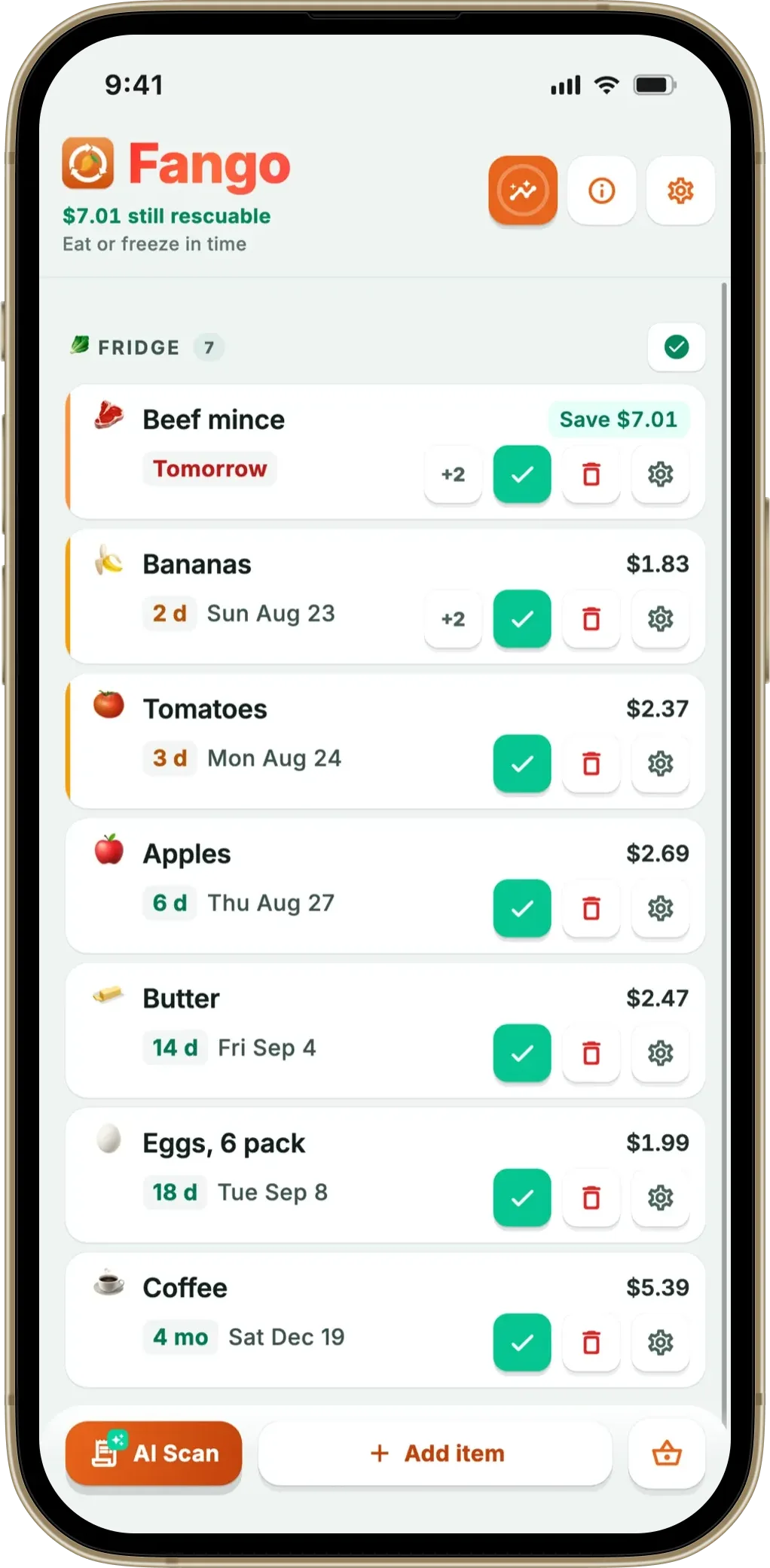
Fango comes at the category from the other end: a food waste app that grew a shopping list, not a list app that grew a kitchen. There is no sign-up of any kind, no email and no password, and the list, your prices and your fridge contents stay on the phone unless you choose to share a list with your household. Anything can be typed in by hand with autocomplete, food or not: nappies, shampoo, batteries and dog food all land in the right aisle, no receipt required.
The list itself is thorough. Thirteen aisles in walking order, a full-screen shopping mode with a progress bar, quantities, free-text notes such as “lactose-free”, several named lists, and a budget target per list with per-item price estimates — the estimate counts only what you haven’t ticked yet, so it falls as the trolley fills. That budget is the piece AnyList puts behind Complete. Our guide to a grocery list organised by aisle goes deeper on the ordering.
The second half of the loop is what makes it a different animal. Photograph the receipt, and AI reads the products, estimates how long each keeps and adds them to your fridge list — what you actually bought, not what you typed. That history feeds back: suggestions for what you buy regularly, a nudge for what’s about to run out of the fridge, and reminders up to 14 days ahead. It works the other way too: shopping your fridge first is how you stop buying the third jar of pesto.
The gaps are real. No recipes, no meal planner, no barcode scanning, no Mac or web version — AnyList beats Fango on every one. Ticking an item off doesn’t move it to the fridge either; a receipt scan or a manual entry does. Free for a month, then a monthly or yearly subscription (price for your country shown in the app), on iOS and Android in 15 languages.
- Budget target and item prices included, not an upgrade
- No account, no ads, data stays on the device by default
- 13 aisles, shopping mode, multiple lists, notes and quantities
- Receipt scanning with shelf-life estimates and reminders
- Suggestions drawn from your own receipts and fridge
- Household sharing: the same view for up to four people, one subscription
- No Mac or web version
- No recipe box, meal planner or barcode scanning
- Ticked items don’t move to the fridge — a receipt scan or manual entry does
- Paid after the free month
Aisle-ordered list, budget target, and suggestions from your own receipts — plus a reminder in time. No account, no ads.
Download on the App Store Get it on Google PlayFree for a month · No sign-up · iOS and Android
OurGroceries — best if the paywall is the problem
If your objection to AnyList is that useful things cost money, OurGroceries is the straight swap. Its site advertises sharing “lists with your whole household”, use “on iPhone, Android, Apple Watch, web browser, Echo, and more”, “Automatic grouping into grocery store aisles”, recipes that “add ingredients to a shopping list”, and photos, notes, quantities and barcodes on items — then invites you to “start making and sharing lists for free”. The upgrade buys silence rather than features: the user guide puts it at “about US$1 per month”, “US$6 per year” or “US$20 for a lifetime (one-time) upgrade” with a 7-day trial, removes ads “for everyone you are sharing your lists with”, and states outright that “upgrading is not required in order to use OurGroceries, including all features and list sharing”.
Two caveats. The free tier is ad-supported — that’s the trade. And sharing needs an account: the guide advises choosing “a single email address for the household”, and warns that without one your lists are stored anonymously and can’t be recovered if you reinstall or change phone.
- All features and list sharing free, ads aside
- Web, watch and Alexa access at no cost
- Cheap optional upgrade, including a lifetime option
- Ads in the free version
- Plain, utilitarian interface next to AnyList
- No receipt scanning or expiry tracking
Bring! — best polished shared list
Bring! is the design-led option and the easiest sell to a household that found AnyList a bit spreadsheet-ish. Its feature page describes creating digital lists and sharing them, with “Changes are shared in real time with the other list members”, sorting “based on the aisles in your supermarket”, urgency labels, light or dark tile and list views, “New seasonal recipe ideas every week”, and saving recipes from the internet to add their ingredients straight to the list. It also leans on retail: local brochures, offers you can add to the list, and loyalty cards.
That retail layer is the thing to weigh. Its UK App Store listing (Bring! Labs AG) shows 4.8 stars from 6.6K ratings, is marked “Contains Advertising”, and prices Bring! Premium at £1.79 a month or £8.99 a year. If offers read as inspiration, that’s a feature; if they read as noise, our note on a food app without recipes covers the quieter preference, and our Bring! alternatives roundup compares it head-on.
- Excellent real-time shared lists and interface
- Aisle sorting, urgency labels, weekly recipe ideas
- Cheaper yearly subscription than AnyList Complete
- Store offers and advertising are part of the experience
- No meal planning calendar described on its feature page
- No receipt scanning or expiry tracking
Apple Reminders — best for installing nothing at all
The alternative people forget is already on the phone. Apple’s iPhone user guide explains that “In the Reminders app, you can create a grocery list to make shopping easier. Items are automatically sorted into categories such as Produce and Seafood”, that “You can change how items are grouped, and the list remembers your preferences”, and that you set it up by choosing Groceries as the List Type. Lists can be shared, and items take notes, photos and location-based alerts.
The catch is on the same page: “All Reminders features described in this guide are available when you use updated reminders in iCloud. Some features aren’t available when using other accounts.” So it’s the Apple-ecosystem answer — free, invisible, no extra app, and no help with recipes, budgets or what’s already in your fridge. For a household split between iPhone and Android, a non-starter.
- Free, already installed, nothing to learn
- Automatic grocery categories that remember corrections
- List sharing and location-based reminders built in
- iCloud required, and Apple devices only
- No recipe, meal plan or budget features
- No receipt scanning or expiry tracking
Which app is right for you?
Four of the five apps here compete for the same job, and AnyList does it as well as anyone — if you’re switching purely to save £9.99 a year, be honest about what you’re giving up. Fango is playing a different game: the list is the front half of a loop running through the receipt, the shelf life and the reminder, which is why a budget and an expiry date can sit in the same app. Our guides to a shopping list and expiry tracker in one and a shopping list that reduces food waste go deeper, and the Listonic alternatives roundup covers the same field from the ad-free angle. WRAP puts UK household food waste at roughly £1,000 a year per household — a fair argument that the money question doesn’t end at the till.
Frequently asked questions
Is AnyList free, and what does AnyList Complete add?
AnyList is free to download, and the free app covers shared lists, instant sync, autocomplete and automatic categories. AnyList Complete is the paid layer: its pricing page lists web and Mac access, recipe importing, the meal planning calendar, Apple Watch support, item photos, recipe scaling, price tracking, folders and location reminders, at 9.99 US dollars a year for an individual or 14.99 for a household. The UK App Store lists the same two subscriptions at 9.99 and 14.99 pounds. Prices vary by country, so check your own store.
Which AnyList alternative includes a budget without paying extra?
Fango does: a per-list budget target and per-item price estimates are part of the app rather than an upgrade, and the running estimate counts only what you have not ticked off yet, so it falls as you shop. In AnyList, adding prices to items is listed on the AnyList Complete page as part of the paid subscription. Bring!, OurGroceries and Apple Reminders do not describe a budget feature on the pages we checked, so treat them as list apps with no money side.
Can I use a shopping list app without creating an account?
Fango has no accounts at all: no email, no password, and by default no cloud copy — the list, prices and fridge contents stay on the phone unless you share a household. AnyList prompts you to create a free account after download, and that account is what syncs and shares your lists. OurGroceries asks for a single household email address to share lists, and warns that without an account your lists cannot be recovered if you reinstall or change phone. Apple Reminders needs iCloud switched on for Reminders. The trade-off is usually the same: no account means no backup — though Fango shares a household on an invite code instead.
Do any of these apps track expiry dates too?
Only Fango among the apps here. AnyList, Bring!, OurGroceries and Apple Reminders all stop at the checkout. Fango scans the receipt afterwards, the AI reads the products and estimates how long each one keeps, and reminders arrive up to 14 days ahead. Because that history exists, the list can also suggest what you buy regularly and what is about to run out of the fridge. Ticking an item off the list does not add it to the fridge, though: a receipt scan or a manual entry does that.
Is there a free AnyList alternative with a web version?
OurGroceries is the closest match. Its site lists a web browser among its platforms alongside iPhone, Android, Apple Watch and Echo, and its user guide says upgrading is not required to use any feature, list sharing included; the free tier shows ads instead. In AnyList, web and Mac access are part of AnyList Complete. Fango has no web version.
AnyList vs Bring!: which is better?
They are good at different things. AnyList is built around a recipe box and a meal planning calendar, with the planner, recipe import and web access in the paid Complete tier. Bring! is built around a polished shared list with aisle sorting and weekly recipe ideas, plus local offers and loyalty cards as part of the experience. If your list starts from a meal plan, AnyList fits better; if the list is the main thing and several people add to it every day, Bring! does. Neither tracks expiry dates or reads receipts.
- AnyList: official site (shared lists, categories, recipes, meal planning)
- AnyList Complete: features and pricing
- AnyList Help: Getting Started (account, sync, sharing)
- AnyList: Grocery Shopping List on the UK App Store (ratings, in-app purchases)
- Bring!: Features
- Bring! Shopping List on the UK App Store (ratings, Premium pricing)
- OurGroceries: official site
- OurGroceries: User Guide (upgrading, ads, accounts)
- Apple: Make a grocery list in Reminders on iPhone
- UNEP: Food Waste Index Report 2024
- WRAP: Household Food and Drink Waste in the UK
