The short answer: Fango has no account at all, Listonic lets you start without signing up but wants an account for syncing, and That Shopping List asks for no log-in either. Bring!, AnyList and OurGroceries are built around an account. The rest of this article is why that matters — and what a no-account list genuinely cannot do.
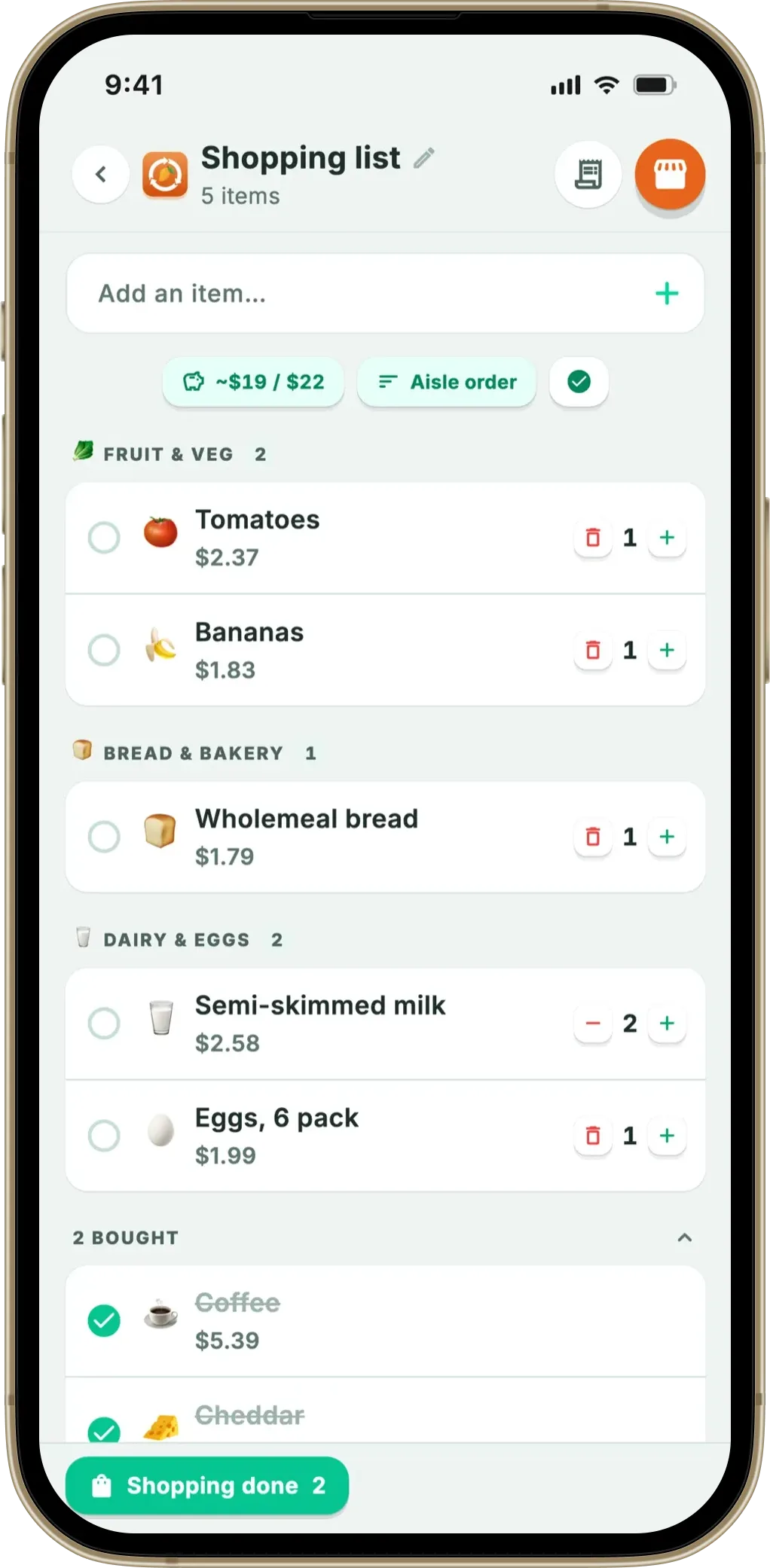
Type anything onto the list by hand, sorted into 13 aisles, with a budget target and a full-screen shopping mode. No email, no password, no ads — the list stays on your phone by default.
Download on the App Store Get it on Google PlayFree for a month · No sign-up · iOS and Android
The reason people search for this is rarely paranoia. Usually it is the second time it has happened: an app they organised their kitchen around switched off its servers, or a sync error wiped a list mid-shop. And groceries are worth the fuss: UNEP’s Food Waste Index Report 2024 puts roughly 60% of consumer-level food waste in households, and WRAP estimates UK households throw away around £1,000 of food a year. For which list app suits which household, see our roundup of the best shopping list app; this one stays on the account question.
- No account at all → Fango — nothing to sign up for, nothing on a server
- No sign-up, account optional → Listonic, if you may want sync later
- What you give up → shared lists, sync and cloud backup: all three, not one
- Account-based is fine → for a shared household list, Bring! and OurGroceries do it better
What an account actually costs you
An account is not a fee, so it feels free. The cost shows up in four ways, only the first of them dramatic.
1. The shutdown risk. When your list lives on a company’s servers, that company’s survival is part of your kitchen setup — and this category has proved the point. CozZo, one of the most feature-complete food inventory apps there was, closed its cloud service and users could not export what they had built: see what happened when CozZo shut down. Kitche went another way; Remy’s acquisition announcement of 17 February 2025 states plainly that “Kitche’s independent journey is ending, its legacy will thrive as part of Remy”. Neither is a scandal — it is what happens to servers, and our round-up of apps that shut down has the longer list.
2. Sync that fails at the worst moment. Sync is a feature until it is a bug: a flaky connection at the back of the supermarket, a session that logged itself out, and the list you are reading is not the one your partner edited. A local list has no such failure mode — there is no second copy to disagree with. The trade-off, as the next section says, is that there is no second copy at all.
3. What the account is worth to the app. Free apps with servers to pay for usually monetise attention. Apple’s privacy summary on Listonic’s UK App Store listing shows location, user content, identifiers and usage data under “Data Used to Track You”, with third-party advertising among the stated purposes. Normal and openly declared — but it helps to know what the label means. Apple defines tracking as “linking data collected from your app about a particular end-user or device… with Third-Party Data for targeted advertising”, and exempts data linked “solely on the end-user’s device” and never sent off it.
4. Groceries are unusually revealing. A weekly list says how many people live in a house, what they cannot eat, what medication or baby products they buy. Keeping it on the phone is the only version that cannot be breached or sold — the reasoning behind a privacy-first food app generally.
What you give up without an account — honestly
Any article that only lists upsides is selling you something. Removing the account removes three real features.
- No shared list by default. Nobody else can add to it or watch items disappear as you tick them off. Where two people shop, that is usually decisive — Fango is the exception here, since a household of up to four can switch sharing on with an invite code.
- No sync between devices by default. The list exists on one phone — not a tablet, a work laptop or a watch. If you plan the week on a computer, this is the wrong tool.
- No cloud backup by default. The counterweight to the shutdown risk: a server can be switched off, but a phone can be dropped in a canal. Nothing to restore from.
So the question is not privacy versus convenience. It is whose failure would hurt more: a company you do not control, or a device you do. The same trade-off for fridge tracking is set out in a food app with no cloud sync by default.
Which shopping list apps really work without registration
“No account required” is claimed more often than it is true, and the interesting cases sit in the middle: apps that let you in without signing up, then steer you to an account for anything beyond one device.
| App | Usable without signing up? | What the account buys | Ads |
|---|---|---|---|
| Fango | ✓ No account exists | Nothing — none exists | None on any tier |
| Listonic | ✓ “Right away without signing up” | Syncing and backup (optional) | Yes — Premium removes them |
| That Shopping List | ✓ “No log-in or registration required” | Only to synchronise lists | Not stated on its site |
| Bring! | ✗ Log in to start | Real-time sharing, multiple devices | Retailer brochures and offers built in |
| AnyList | ✗ Prompted to create one | Sync, sharing, recipes, meal planner | Not stated on its listing |
| OurGroceries | ✗ Sign in with an email | Sharing, finding lists on a new phone | Yes — upgrade removes them |
← scroll →
Listonic is the most honest middle case. Its own site says “You can use Listonic right away without signing up. For extra features like syncing across devices or backing up your lists, creating a free account is recommended, but it’s entirely optional.” A genuinely usable no-account mode — with the caveat that the free version is the ad-supported one, as our Listonic alternatives comparison covers.
That Shopping List is the small, plain option: its developer page states “No log-in or registration required” and “No personal data, no registration, no shady app permissions”, adding that “a data connection is only required if you want to synchronize lists”. Expect a basic list and nothing else — which for many people is the point.
Bring!, AnyList and OurGroceries are account-first by design, because sharing is the core feature. Bring!’s help centre tells you to “log in over one of the four options (Facebook, Google, Apple Sign-in or email)”; AnyList’s guide says “After downloading AnyList, you’ll be prompted to create an account”; OurGroceries’ user guide asks for “the email address you wish to use for your new OurGroceries account”, which is what lets you “find your lists again” later. All three earn it — Bring!’s feature page describes changes “shared in real time with the other list members”. If that is what you need, buy the account, not the argument.
How Fango does it — and what it does after the shop
Fango never asks for an email or a password, because there is no account system to belong to. The list, the fridge inventory, your prices and your statistics live in the phone’s own storage, and nothing is fetched from a server — which is why it still works in a supermarket basement with no signal.
The list itself is a proper list, not a privacy demo. You can type anything onto it by hand, with autocomplete from things you have added before, and that explicitly includes non-food items — toilet roll, shampoo, batteries, dog food. Items sort into 13 aisles in walking order, which you can switch off. There is a full-screen shopping mode with a progress bar, quantities and notes, several named lists, and a budget target that counts down as you shop. No receipt is needed for any of it; the aisle-ordering guide covers the layout.
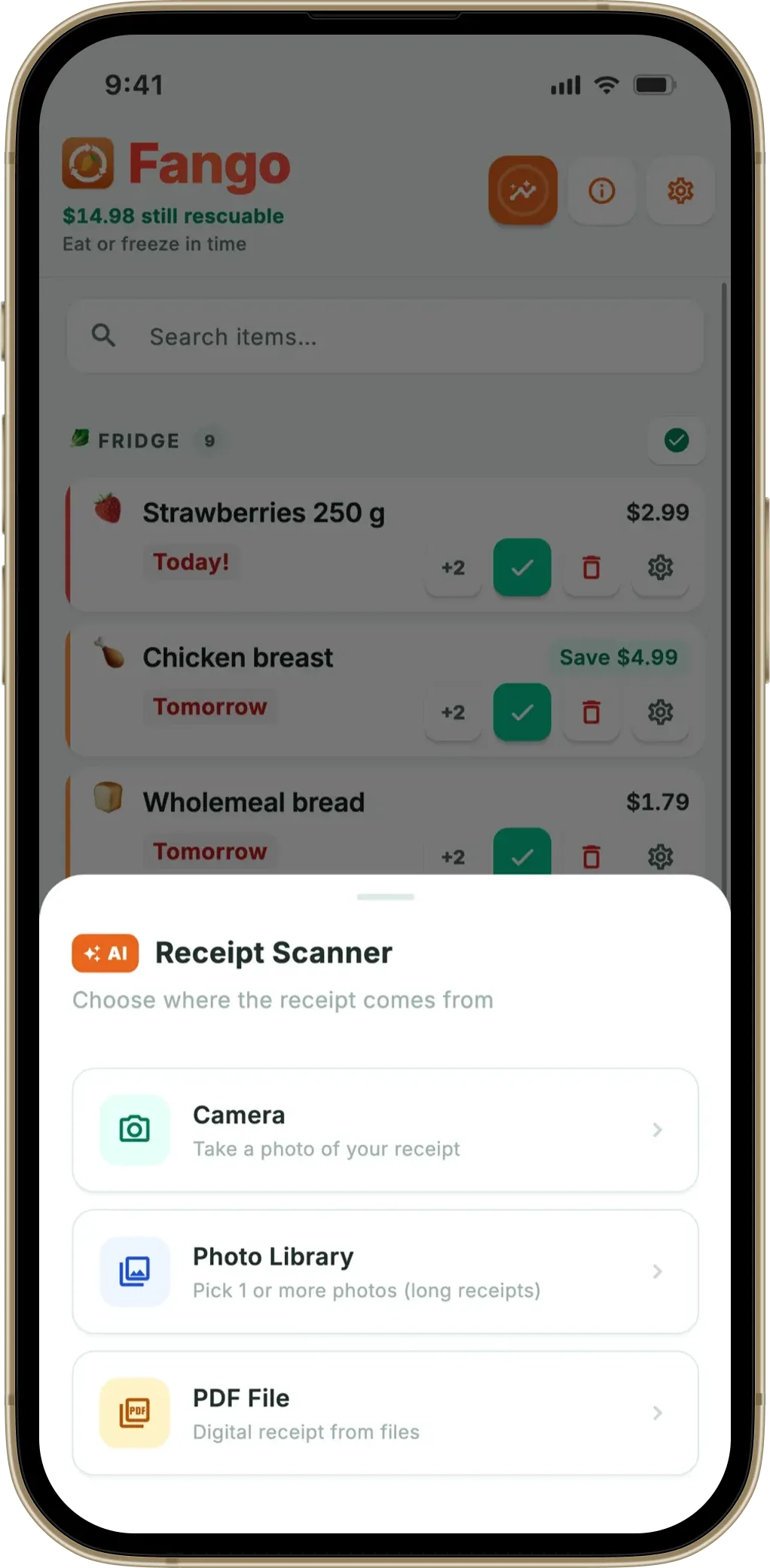
What separates it from a plain local list is what happens after the shop. Photograph the receipt and the AI reads the products, estimates how long each keeps and adds them to your fridge list, so reminders arrive in time — up to 14 days ahead. Because that history stays on the phone, the list can suggest what you buy regularly and flag what is about to run out of the fridge — from a local file, not a profile on a server. One point of accuracy: ticking an item off does not put it in your fridge tracking; a receipt scan or a manual entry does.
The only moment anything leaves the device is a receipt scan you choose to run: the image or PDF goes off for AI parsing and comes back as a product list, with no identity attached because there is no account. No products, prices or personal details are sent at any other point — is it safe to scan receipts with an app covers that in full.
The gaps above apply, with one exception: sharing can be switched on for a household of up to four. No sync between your own devices, no cloud backup by default, no web version, no recipes, no barcode scanning. Free for a month, then from $2.99 a month or $22.99 a year, on iOS and Android in eight languages.
Food-waste numbers of the kind quoted at the top only move if you keep using an app for years — precisely the timescale over which servers get switched off and companies get acquired. That is the practical case for local data, more than the privacy one.
Type anything onto the list by hand, sorted into 13 aisles, with a budget target and a full-screen shopping mode. No email, no password, no ads — the list stays on your phone by default.
Download on the App Store Get it on Google PlayFree for a month · No sign-up · iOS and Android
Which one should you pick?
And if the real question is whether to use an app at all, the notes app on your phone is the original no-account list: grocery list app vs notes app settles that, and the Google Keep alternatives for a grocery list cover what you gain and lose by moving off it. For the full loop, see a shopping list and expiry tracker in one.
Frequently asked questions
Which shopping list apps work without an account?
Fango has no account at all — no sign-up screen, and by default no server holding your list. Listonic states on its own site that you can use it right away without signing up, though it recommends a free account for syncing and backup, and That Shopping List says on its developer page that no log-in or registration is required. The others are account-first: Bring! asks you to log in with Facebook, Google, Apple Sign-in or email, AnyList prompts you to create an account, and OurGroceries asks for an email address.
What happens to my shopping list if the app shuts down?
If the list lives on company servers, it goes when the servers go. Not hypothetical here: CozZo closed its cloud service, and Kitche was acquired by Remy, whose announcement said Kitche’s independent journey is ending. An app that keeps everything on your phone fails differently: if the developer disappears, the installed copy keeps working. Our guide to a food inventory app with no account covers the same question for fridge tracking.
Can I use the Fango shopping list without scanning receipts?
Yes. You can type anything onto the list by hand, with autocomplete from what you have added before, including non-food items such as toilet roll, shampoo and batteries. Receipt scanning, the fridge view and the regular-purchase suggestions are extra routes in, not requirements — it works as a plain shopping list from the first minute, offline.
What do I lose by using a shopping list app with no account?
Three things, the same three for every no-account app — with one Fango exception. By default no shared list, so nobody else can tick items off; in Fango a household of up to four can switch sharing on with an invite code. By default no sync, so the list lives on your own device. And no cloud backup by default, so if the phone is lost or wiped, the list goes with it. If any of those matter more to you than privacy does, an account-based app such as Bring! or OurGroceries is the right answer.
- Listonic: official site (using the app without signing up)
- Shopping List – Listonic on the UK App Store (App Privacy summary)
- Apple: App privacy details on the App Store (definition of tracking)
- That Shopping List: developer page (no log-in or registration)
- Bring! Help Centre: Profile and settings (log-in options)
- Bring!: Features (real-time sharing, brochures and offers)
- AnyList Help: Getting Started (account creation)
- OurGroceries: User Guide (accounts, sharing, upgrading)
- Remy: Remy acquires Kitche (announcement, 17 February 2025)
- UNEP: Food Waste Index Report 2024
- WRAP: Household Food and Drink Waste in the UK
